









Background
I recently gave a talk at DEF CON 34 titled, “Dylib Hijacking on macOS: Dead or Alive?”. The first half of the talk highlighted the fact that even on macOS 26, “dylib hijacking” is still possible (albeit in a much more limited capacity). However, in the second half, I took a step back, focusing more broadly on other classes of dylib-based attacks, and how security tools may (now) be able to generically detect such attacks.
This broader focus is increasingly relevant, as advanced adversaries are increasingly deploying their payloads as dylibs rather than standalone programs. Doing so can provide a higher degree of stealth, while also allowing the malicious code to inherit the trust and privileges of the process into which it is loaded. At the same time, traditional macOS security tools have largely ignored, or been blind to, dynamic libraries!
In this blog post, we’ll first highlight examples of attackers abusing dylibs for persistence, payloads, and even exploits. Then, we’ll show how we can programmatically enumerate dylibs statically on disk, at runtime in a remote process, and as they are being loaded. Better yet, using Apple’s Endpoint Security framework, we’ll show how we can register for memory-mapping events associated with dylib loads, granting us the ability to examine and even block, if needed, libraries before they fully load in the first place.
Abusing Dylibs
It’s an overlooked fact that attackers have long been abusing dylibs in a variety of ways. Let’s look at a few examples from my slides, starting with dylib-based malware.
Wait, what is a dylib? First, let’s define a library: compiled, reusable code that provides shared functionality to other programs. On macOS, dynamically loaded libraries are commonly referred to as dynamic libraries, or dylibs.
Dylibs are normally loaded in one of several ways: they may be linked as a dependency of a Mach-O binary, causing dyld to load them when the program starts; loaded explicitly at runtime via APIs such as dlopen; or injected into a process via mechanisms such as DYLD_INSERT_LIBRARIES.
Malware: Flashback:
First up we have Flashback. After exploiting an unpatched bug to infect OS X users who simply visited a subverted website, it then subverted Safari with a malicious payload.
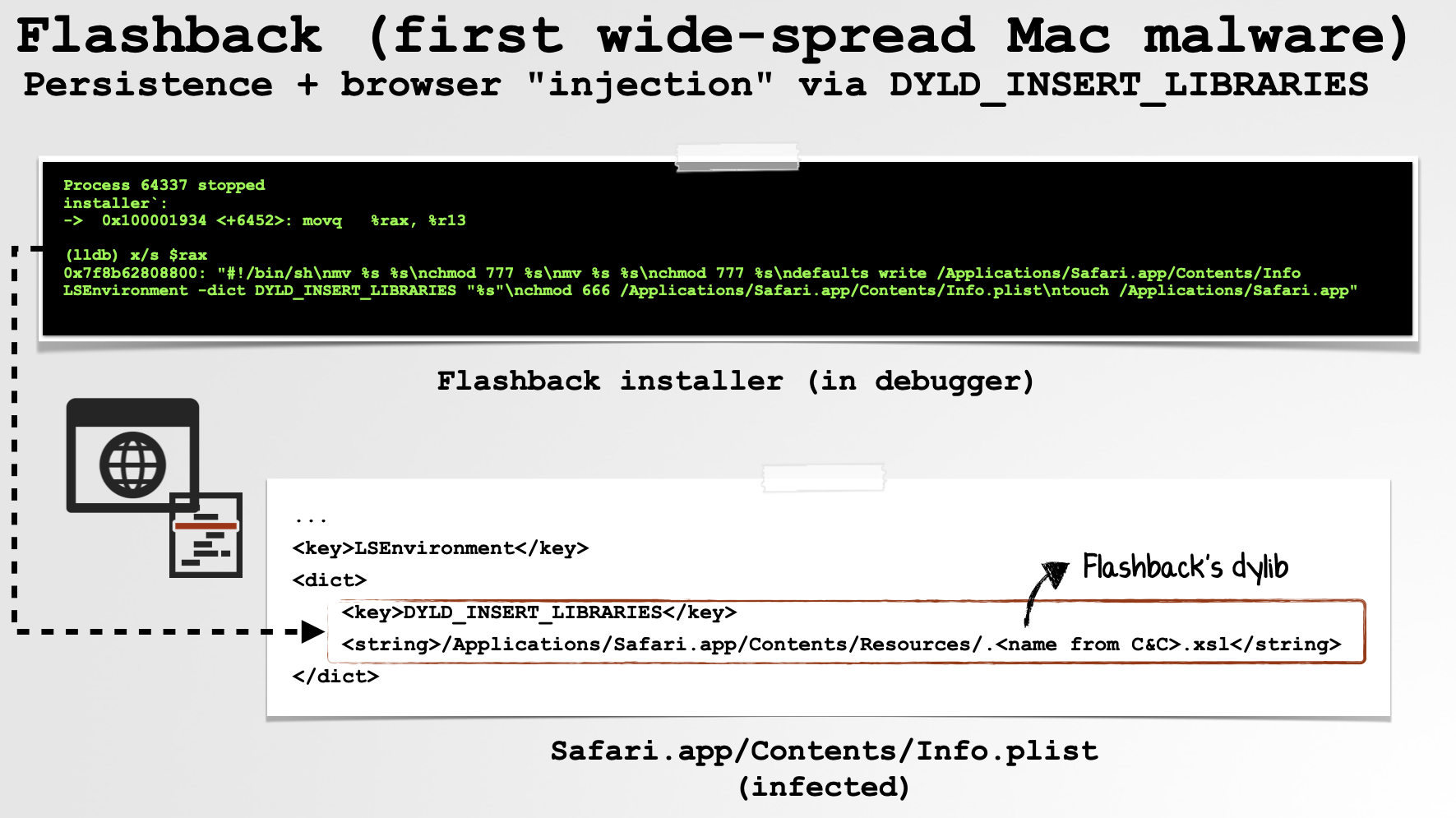
Specifically, it modified Safari’s Info.plist file, adding a DYLD_INSERT_LIBRARIES entry that referenced its malicious payload. Now, every time the user launched Safari, the malicious dylib would also be loaded into the browser’s process. Here, it interposed network-related APIs to subvert the user’s browser traffic and perform adware-like actions (e.g. ad fraud).
Malware: Equation Group’s OS X Implant:
Nation-state attackers also (ab)use dylibs for their malware. Here we have the Equation Group’s OS X implant. Though we only have a standalone (i.e. non-dylib) version of the implant, its handling of DYLD_INSERT_LIBRARIES strongly suggests that a dylib-based variant existed as well.
As shown in the image below, when the implant receives an “execute” command from its command-and-control server, it ensures that DYLD_INSERT_LIBRARIES is removed from the environment passed to the child process it is about to spawn:
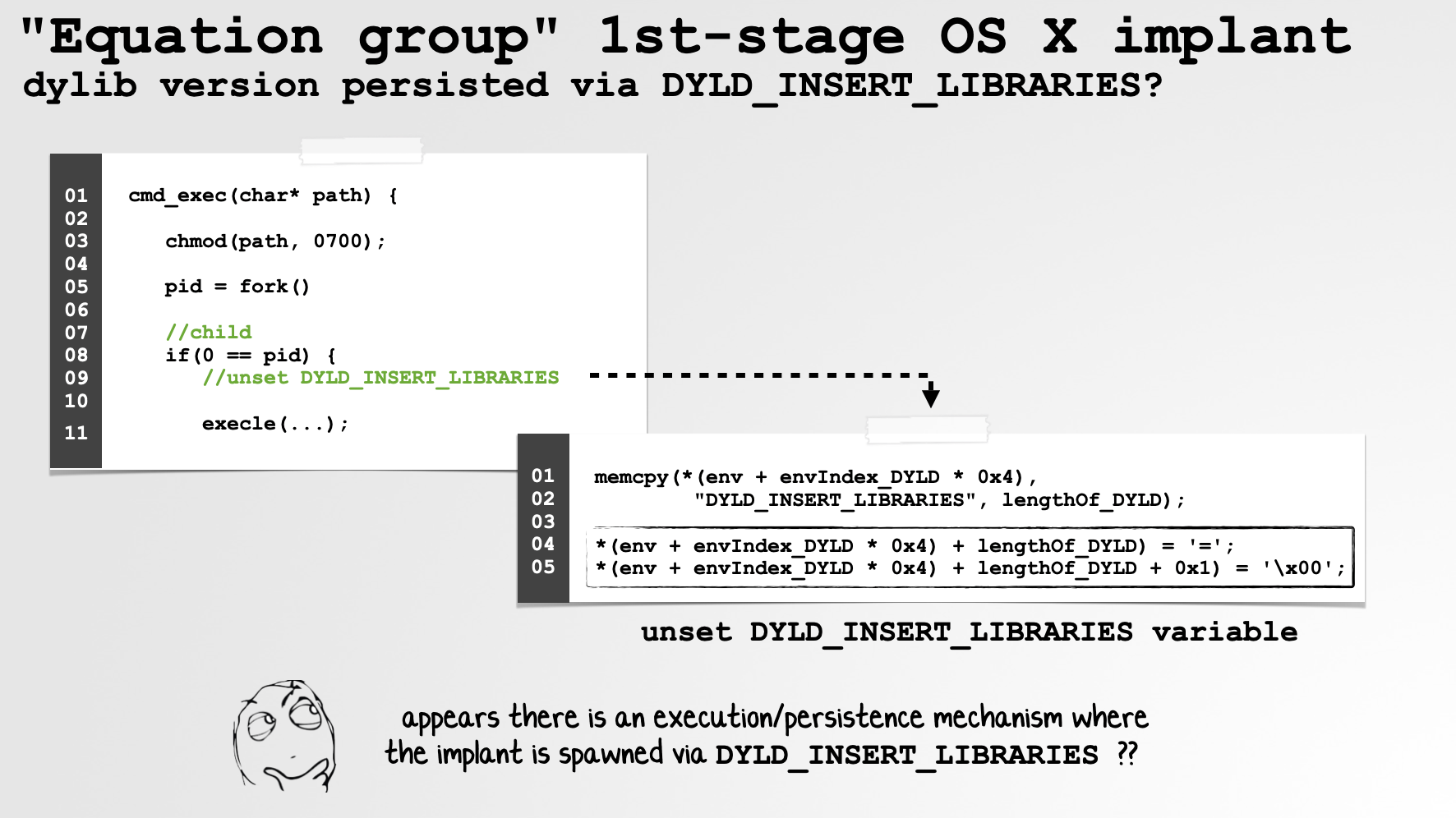
Why? Environment variables are normally inherited by child processes. Thus, if the implant itself had been injected via DYLD_INSERT_LIBRARIES, any process it subsequently spawned could inherit that same variable and attempt to load the malicious dylib as well.
For example, when executing an attacker-specified shell command, the implant forks and then invokes execle. Before doing so, it explicitly removes DYLD_INSERT_LIBRARIES from the child’s environment. This prevents its dylib from being unintentionally injected into the newly spawned process.
Taken together, this behavior suggests that the Equation Group likely had a variant of the implant that, much like Flashback, was loaded via DYLD_INSERT_LIBRARIES. Though we don’t have that dylib variant itself, the standalone implant appears to contain the cleanup logic required to safely operate when launched in such a configuration.
You can read more about this implant in a presentation from #OBTS:
Malware: 3CX Supply Chain Attack
More recently, the attackers behind the now-infamous 3CX supply chain attack surreptitiously trojanized a dylib within the 3CX application, ultimately infecting users around the world:
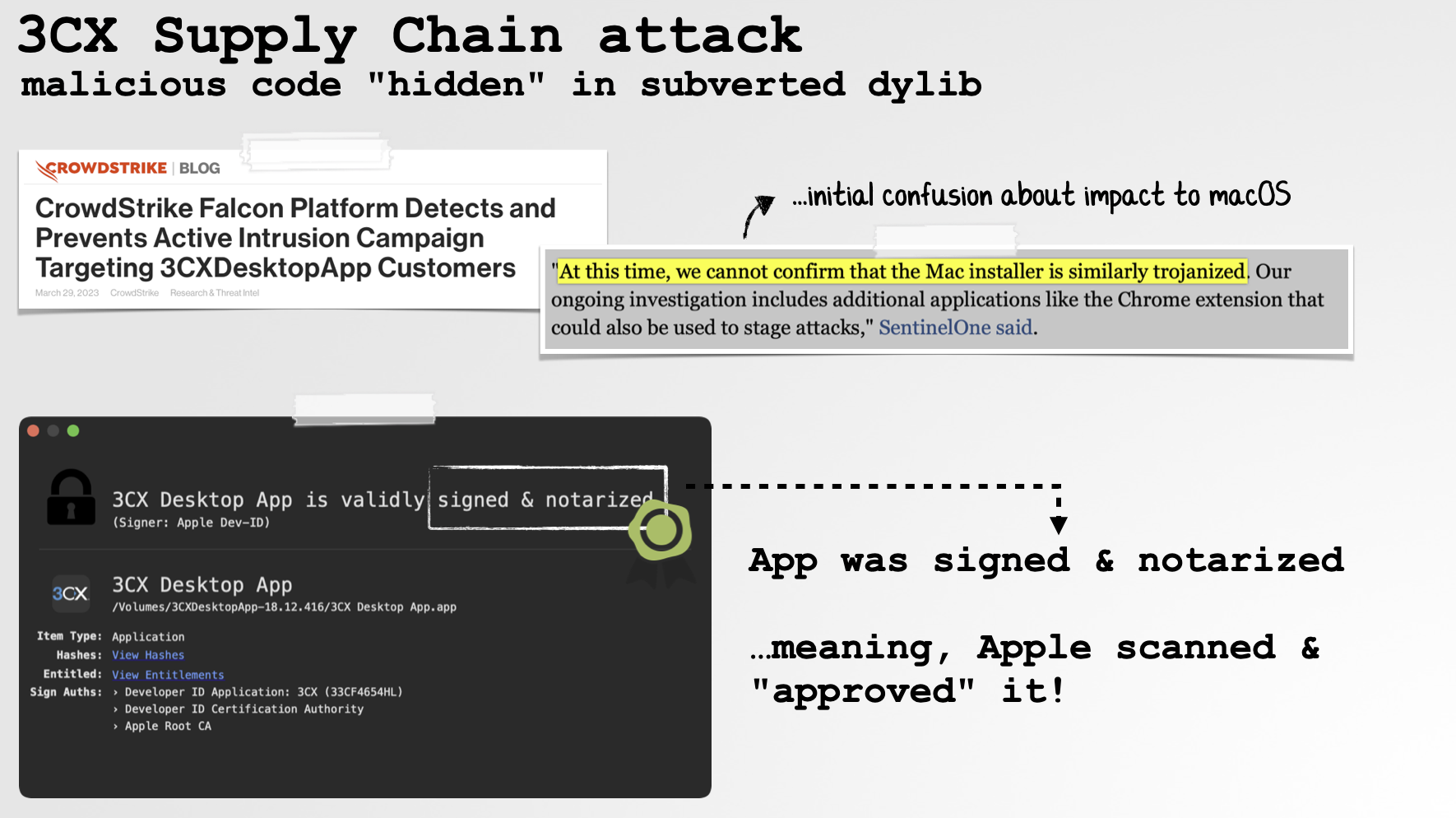
Due in part to this, both Apple and commercial security products initially missed the fact that the application had been subverted! Apple even went so far as to notarize it …yikes! When I dug more deeply into the application during my analysis, I uncovered the maliciously modified dylib, libffmpeg.dylib:
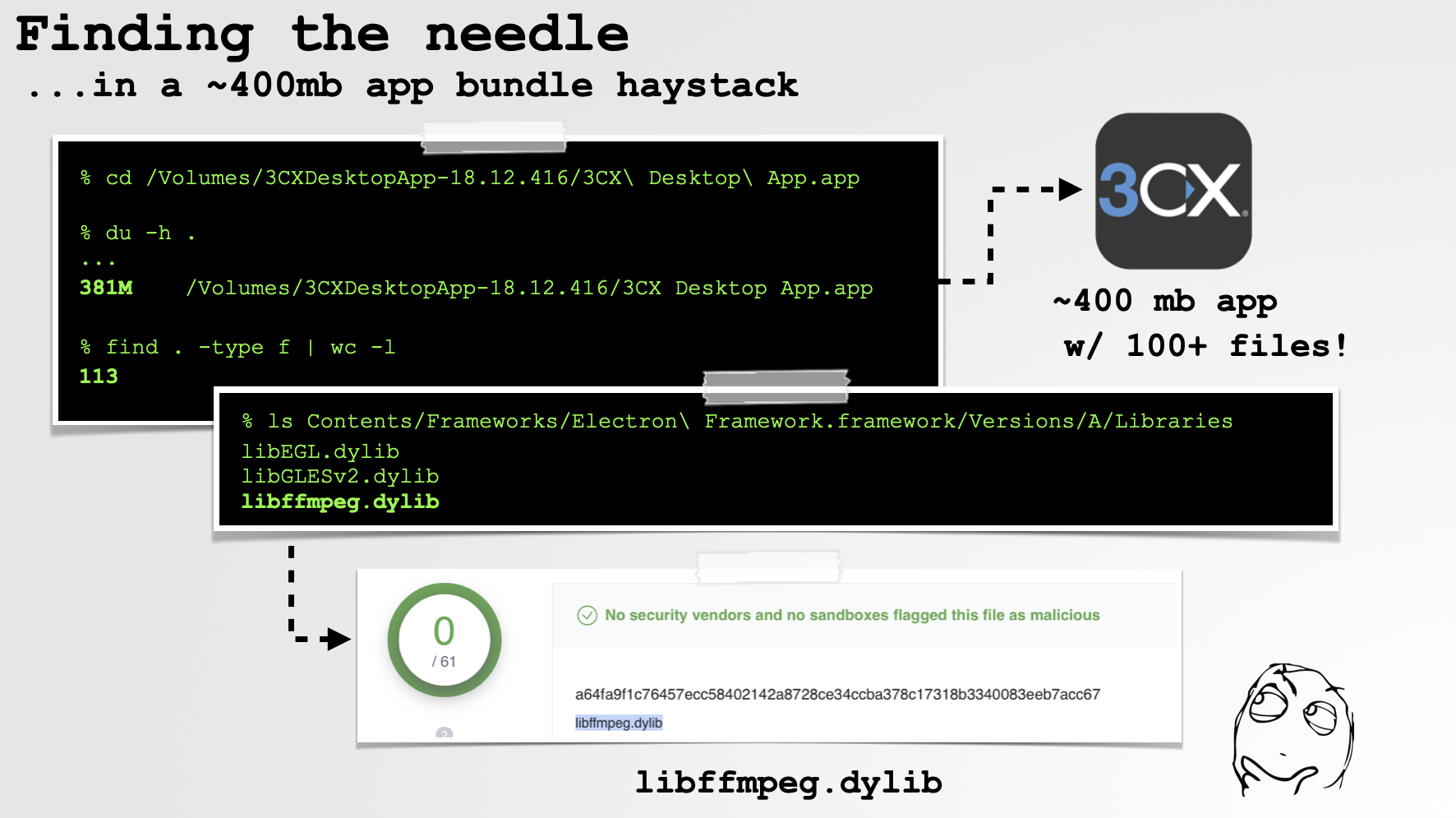
As we can see, in the Intel slice of the dylib, we find a constructor containing malicious code that would automatically execute whenever the library was loaded. This code spawned a background thread that ultimately downloaded and executed a second-stage payload from the attackers’ command-and-control infrastructure:
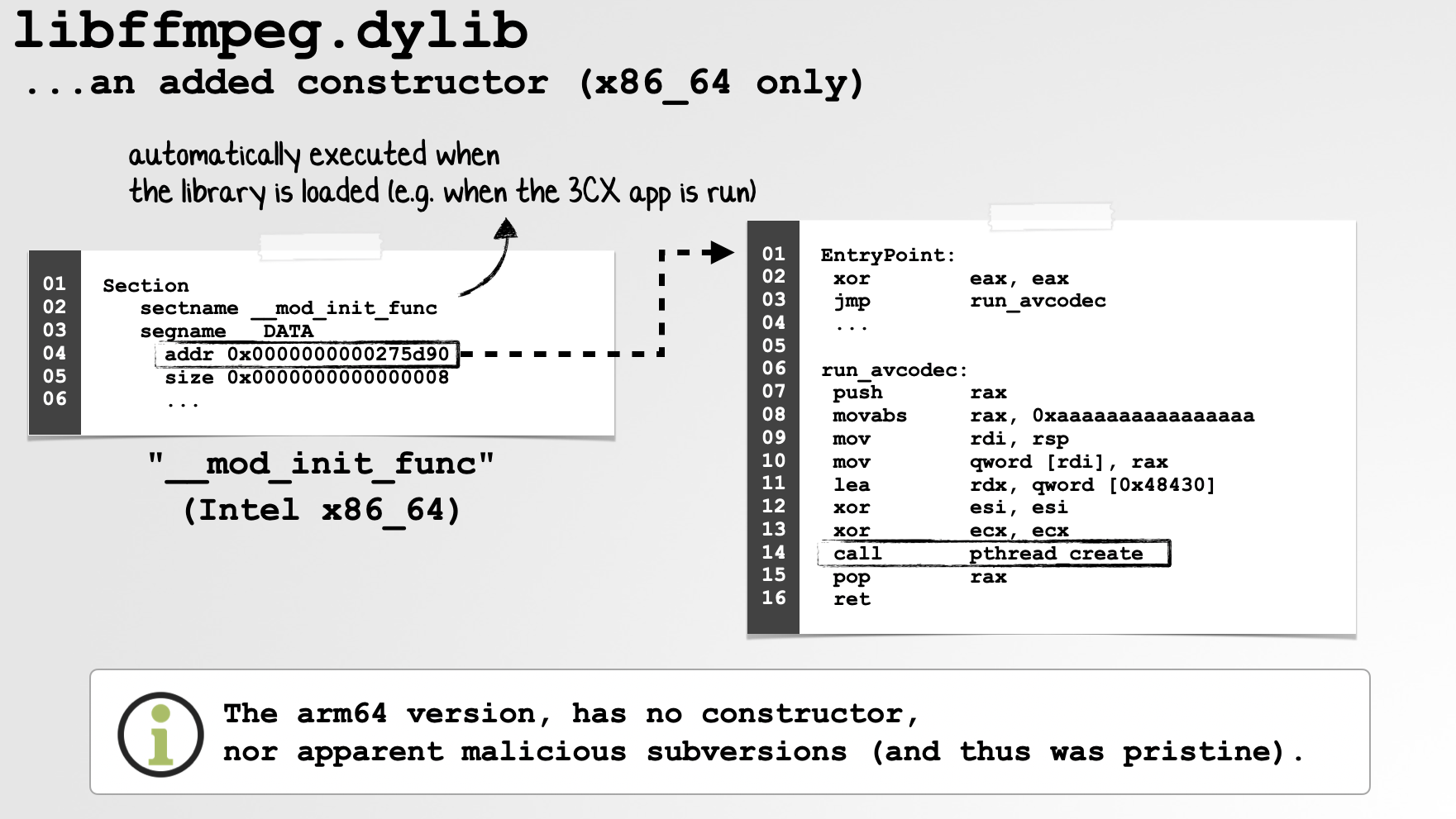
Interested in reading more about this attack? Check out my two-part blog post series:
Ironing out (the macOS) details of a Smooth Operator (Part I)
Ironing out (the macOS) details of a Smooth Operator (Part II)
Exploit: SIP Bypass
In a blog post titled, “Bypassing SIP via Sandboxing”, security researcher CodeColorist wrote about a neat macOS vulnerability he uncovered that abused a dylib to bypass macOS’s System Integrity Protection (SIP):
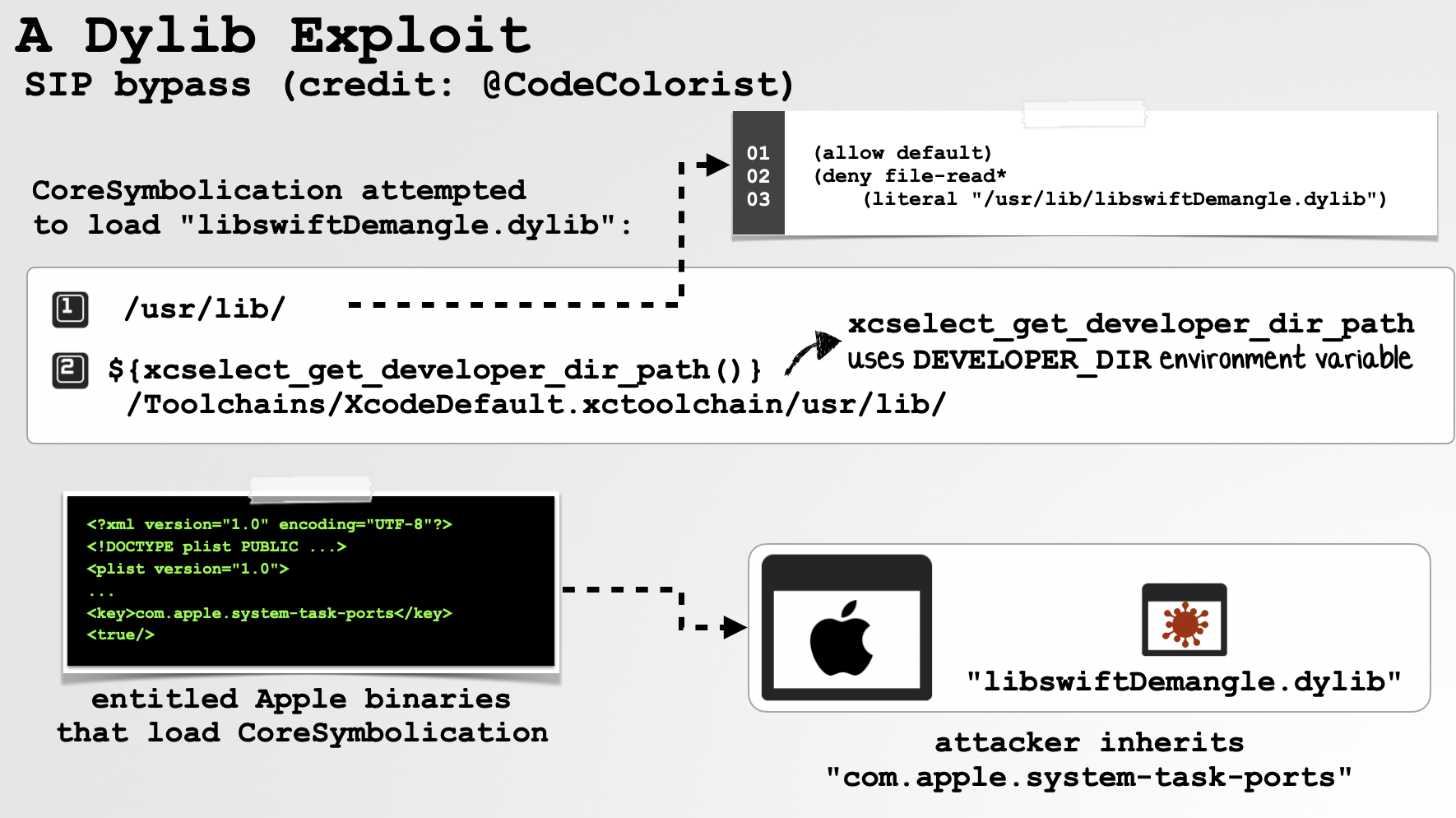
As we can see in the screenshot from the slides, he was able to coerce one of Apple’s trusted Sampling Tools, which possessed the powerful com.apple.system-task-ports entitlement, into loading an attacker-controlled libswiftDemangle.dylib.
Normally, CoreSymbolication would first load a legitimate copy of libswiftDemangle.dylib from a protected system location. However, the vulnerable lookup logic also included a path derived from the attacker-controllable DEVELOPER_DIR environment variable. By applying a sandbox profile that denied access to the legitimate copies of the library, the attacker could force CoreSymbolication to continue searching until it reached this attacker-controlled path.
The end result was a dylib hijack inside an Apple process possessing com.apple.system-task-ports. As this entitlement allowed the process to obtain task ports for SIP-protected processes, executing attacker-controlled code in its context provided a path to, amongst other things, bypass SIP protections.
Exploit: Dylib Hijacking
Finally, we’ve got dylib hijacking, which in a nutshell involves planting a dylib such that dyld resolves a vulnerable dependency to the attacker-controlled library. Beyond providing a form of user-assisted persistence (i.e. each time the vulnerable application is launched, the hijacker dylib is loaded and executed as well), the loaded code also inherits the trust, permissions, and capabilities of the host application:
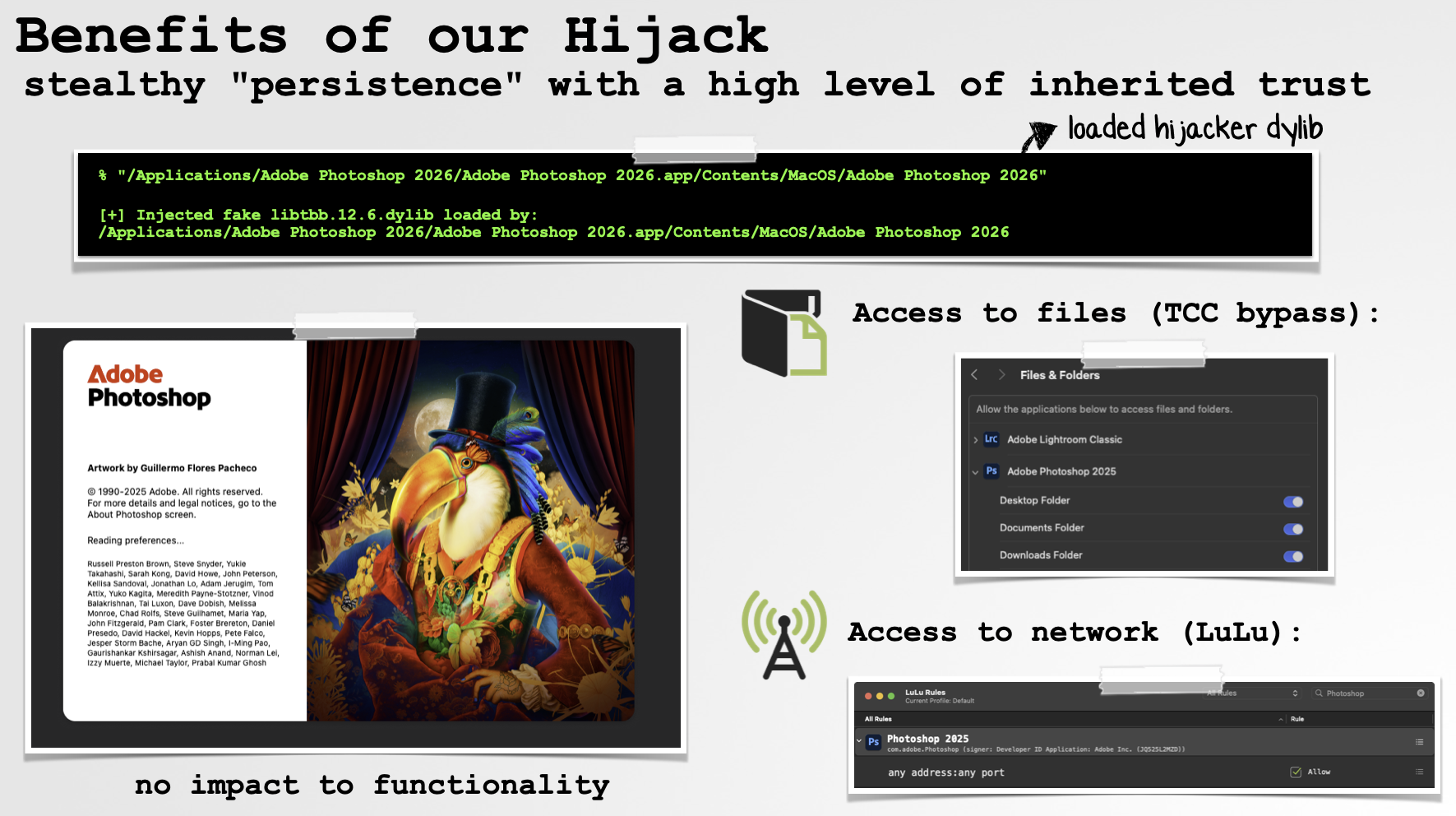
For example, on my system I can hijack Adobe Photoshop, which is almost always running, providing a handy form of persistence. Better yet (for the attacker), since the malicious dylib executes within Photoshop’s process context, it can also access resources already granted to Photoshop. This includes many otherwise TCC-protected locations, as well as the ability to perform actions such as accessing the network under Photoshop’s identity, potentially bypassing application-based firewall rules that already trust Photoshop.
Stealth and Trust
The two main reasons that attackers abuse dylibs, especially when talking about malware, are stealth and trust.
Stealth
On macOS, it’s easy to get a list of running processes. Either open Activity Monitor or, from a terminal, run something like ps aux:
% ps aux
USER               PID  %CPU COMMAND
root                 1   0.0 /sbin/launchd
_coreaudiod         606  10.6 /usr/sbin/coreaudiod
patrick           46423   8.1 /Applications/Xcode.app/Contents/MacOS/Xcode
patrick           58361   1.6 /Applications/WhatsApp.app/Contents/MacOS/WhatsApp
patrick           53340   0.7 /Applications/Spotify.app/Contents/MacOS/Spotify
...
And programmatically, this is trivial too, via APIs such as proc_listallpids.
But what if you wanted a list of the libraries loaded into each process (for example, to check for malware)? That’s a little more tricky! Sure, Activity Monitor can show a process’s “Open Files and Ports” (which, amusingly, it does by simply invoking lsof), and from the terminal lsof kinda works too. But it shows all open files for a given process, not just dylibs, and moreover isn’t a comprehensive view of loaded libraries. For example, libraries mapped from the dyld shared cache generally won’t appear as individually opened dylib files.
Another option is Apple’s vmmap, which shows a process’s virtual-memory mappings, including those corresponding to dylibs. It can do this across processes using privileged process-inspection access that isn’t generally available to ordinary third-party applications. However, this isn’t particularly helpful for security tools that need to do the same thing programmatically. Sure, they could execute vmmap and parse its output …but that’s hardly ideal.
On older versions of macOS, a program could directly enumerate dylibs loaded into a remote process by reading that process’s memory. This could be accomplished via the following steps:
-
Invoke
task_for_pidto retrieve a task port for the remote process. -
Invoke
task_infowithTASK_DYLD_INFOto retrieve the address of the target’sdyld_all_image_infosstructure. -
Invoke
mach_vm_read(or a related Mach VM API) to read the remotedyld_all_image_infosstructure. -
Read the array of
dyld_image_infostructures referenced bydyld_all_image_infos. -
Iterate over each
dyld_image_infostructure and read the remote memory containing the path of each loaded image.
On modern macOS, however, obtaining a task port for arbitrary processes is heavily restricted, which makes this approach generally unavailable to ordinary third-party security software.
Ok, so the point stands: compared to processes, it’s much harder to “see” what libraries are loaded into a given process. This is great for malware, which loves to run unseen! And this lack of visibility is one reason dylib-based payloads can be so attractive to attackers.
For users and security tools, however, this lack of visibility is very much less than ideal!
Trust
The other reason attackers abuse dylibs, at least in the context of malware, is trust. Broadly speaking, many important security decisions on macOS are made at the process level, and that trust extends to code loaded into the process. Examples include entitlements, access to TCC-protected resources, and the attribution of many Endpoint Security events. None of these mechanisms generally tell you, “this specific dylib inside the process performed the action.”
So, back to the example of hijacking Photoshop on my box. Once the hijacker dylib is loaded into Photoshop’s address space, its code executes as part of the Photoshop process. As such, it can take advantage of the process’s entitlements and TCC grants, while actions it performs will generally be attributed by security tooling to Photoshop itself.
This is great for malware, but again, bad for users and security tools.
Let’s look at a few examples, specifically at how this impacts security tools! As we’ll see, though, this isn’t really the fault, or even a shortcoming, of the tools themselves. Rather, the system APIs they depend on generally provide attribution at the process level, without identifying which loaded library actually initiated an action.
First up, LuLu, a free open-source firewall written by yours truly. It integrates with macOS’s Network Extension framework, through which the OS routes network flows for inspection. Along with each flow, LuLu receives information identifying the application/process responsible for the network activity, allowing it to make a decision to allow or block the connection. However, that attribution doesn’t extend down to the individual dylib responsible for initiating it.
So, back to our hijacked Photoshop example: if the hijacker dylib attempts a network connection, LuLu will see the network activity, but it will be attributed to Photoshop, not to the malicious library.
And yes, you might be thinking that the firewall could simply block connections to untrusted network endpoints (e.g. an untrusted domain). Fair! And LuLu has this capability. But the hijacker could instead host its C&C infrastructure on a trusted cloud service that Photoshop already communicates with, much like the CreativeUpdate malware did.
Next up, Endpoint Security. Via macOS’s built-in eslogger, we can stream events:
# eslogger open
{
   "event": {
      "open": {
         "file": {
            "path": "\/Users\/patrick\/Documents\/secret.txt"
         }
      }
   },
   "process": {
      "executable": {
         "path": "\/Applications\/Adobe Photoshop 2026\/Adobe Photoshop 2026.app\/Contents\/MacOS\/Adobe Photoshop 2026",
         "team_id": "JQ525L2MZD",
         "signing_id": "com.adobe.Photoshop",
         ...
      },
      ...
   }
}
Thus, when our hijacker dylib attempts to access a file, including one in a location to which Photoshop has previously been granted TCC access, the file event itself is visible. For example, above we can see an open event for secret.txt. However, once again, the action is attributed to Photoshop. Endpoint Security doesn’t tell us that some particular dylib loaded inside Photoshop was actually responsible.
Static, Runtime, and Load-Time Enumeration of Dynamic Libraries\
Hopefully I’ve clearly shown that attackers are rather fond of using dylibs to host their malicious code (and/or facilitate exploits), and because many security decisions and events are handled at the process level, the OS and third-party security tools can be largely blind to malicious code executing from within a dylib.
The good news is, this lack of visibility can be largely mitigated through static, runtime, and load-time enumeration of dylibs. Though events (Endpoint Security, network, etc.) may still be attributed only to the process, security tools can gain important additional context by determining which libraries a program depends on, which are already loaded into a process, and better yet, which libraries are being loaded into a process.
Armed with this information, they can take additional actions such as analyzing or scanning the dylib itself. And in some cases, such as a dylib hijack, simply detecting a code-signing mismatch between a dylib and its host process may be reason enough to flag the library for further inspection.
Let’s start with static enumeration of dynamic libraries. This is a well-known approach, but for completeness we’ll reiterate it here.
In order to programmatically enumerate the libraries a program depends on (aka its “dependencies”), you first need to know about Mach-O load commands:
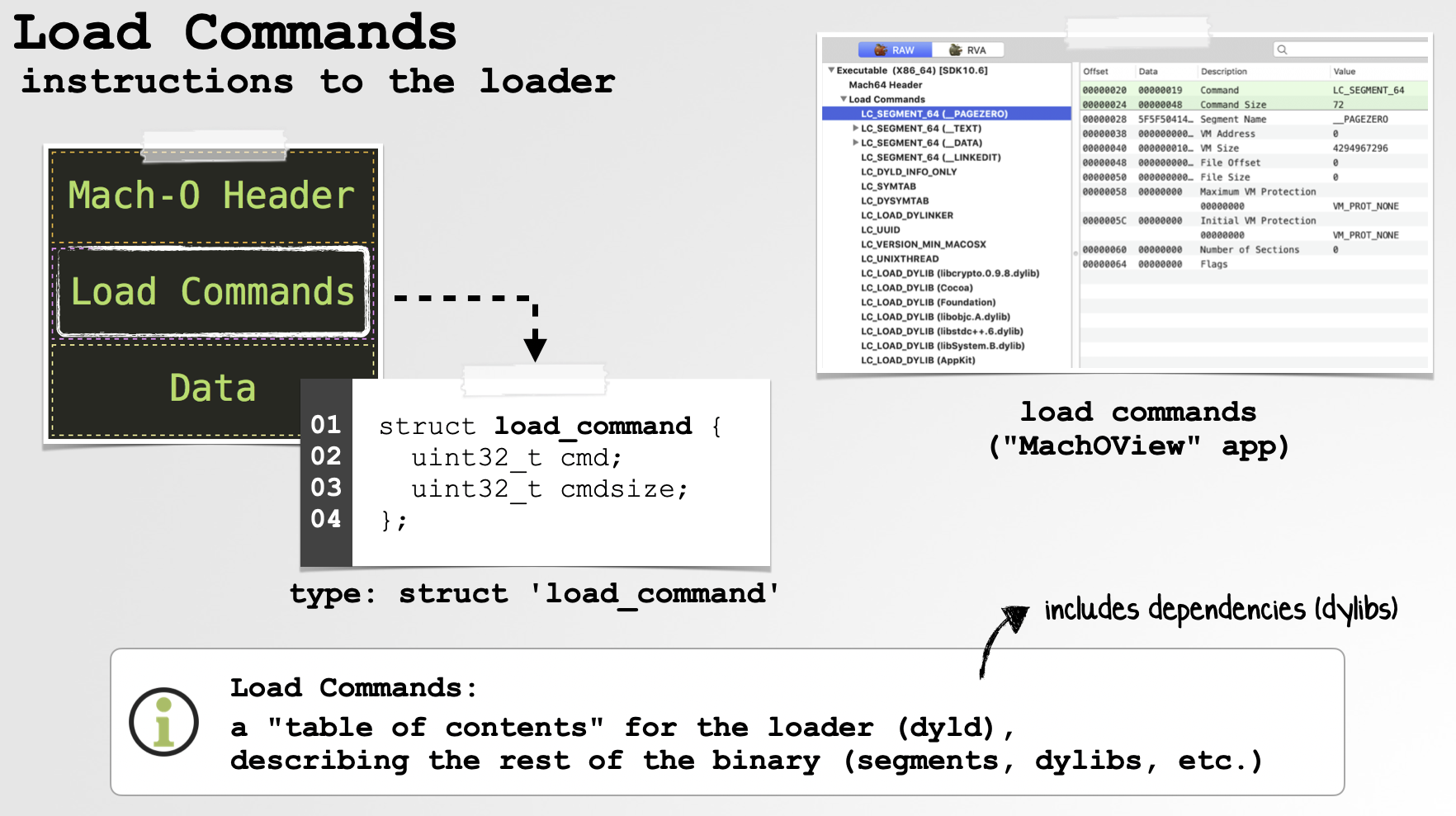
These, as their name implies, contain instructions and metadata used by the loader (dyld). Most relevant here are dylib-related load commands such as LC_LOAD_DYLIB, which identify libraries that the program depends on. In the simplest case, a program contains an LC_LOAD_DYLIB command for each required dependency, specifying the library’s install name. This may be an absolute path or contain special tokens such as @rpath, @loader_path, or @executable_path.
At load time, dyld processes these commands, resolves each dependency according to its install name and run-path semantics, and maps the corresponding library into the process. This happens recursively, as those dependent libraries can of course contain dependencies of their own.
Our code can mimic the enumeration portion of this process (well, minus actually loading anything):
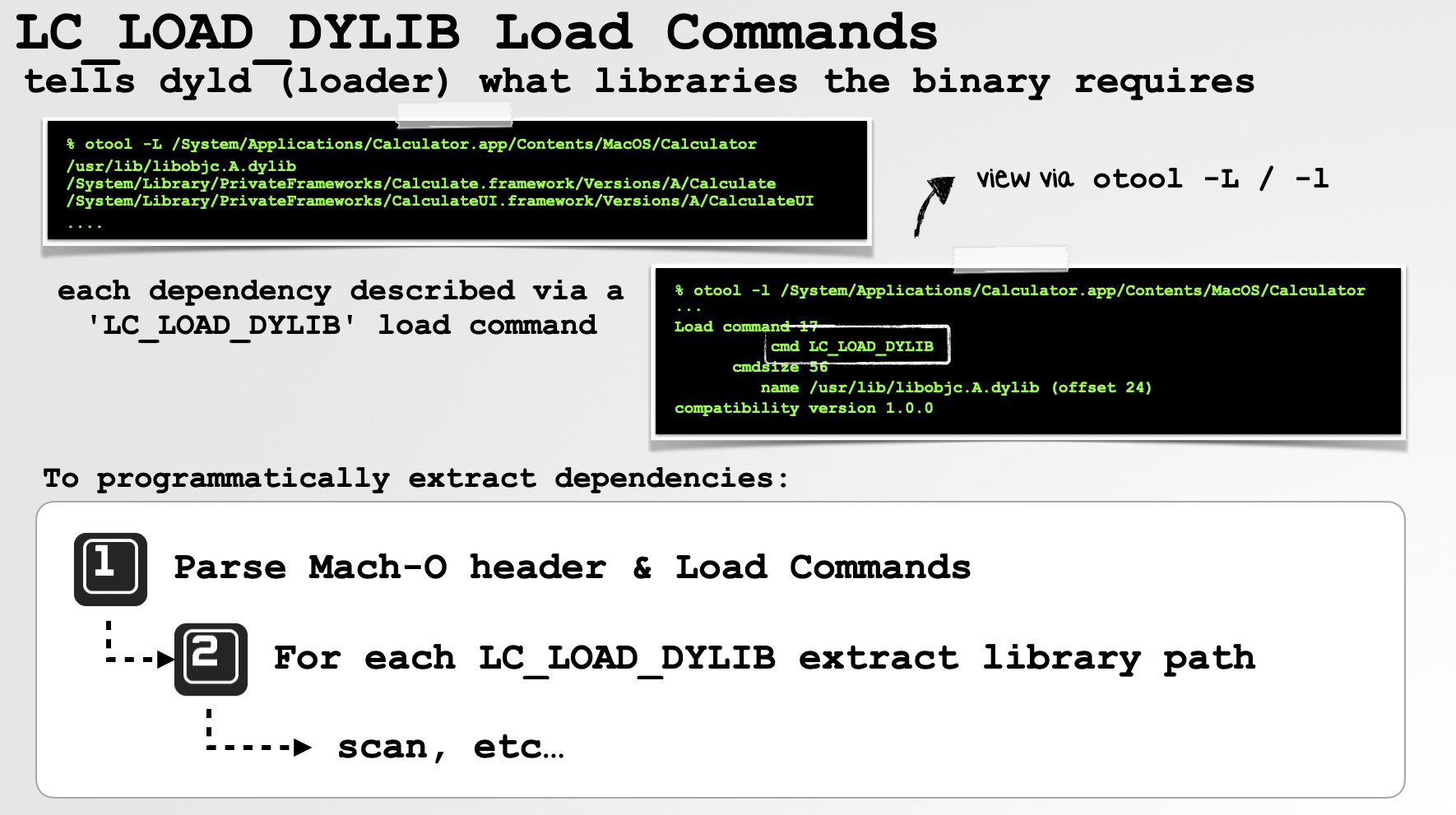
In short, we can parse the Mach-O’s load commands and, for each dylib dependency, resolve its path and examine (read: scan) the library’s on-disk file, as well as recursively inspect its dependencies.
In the specific case of detecting a persistent dylib hijacker, it can often be sufficient to identify multiple candidates that satisfy the same @rpath-based dependency, especially if one of those libraries has code-signing information that doesn’t match the host application or its expected components.
This is exactly the approach taken by the open-source “Dylib Hijack Scanner” I wrote:
 1//iterate over all dependencies
 2for(NSString* dependency in binary.parserInstance.binaryInfo[KEY_LC_LOAD_DYLIBS]) {
 3   int dylibCount = 0;
 4
 5   //skip non-rpath'd dependencies
 6   if(![dependency hasPrefix:@"@rpath"]) {
 7      continue;
 8   }
 9
10   //check all run-path directories
11   for(NSString* runPath in binary.parserInstance.binaryInfo[KEY_LC_RPATHS]) {
12
13      //build full path
14      path = [runPath stringByAppendingPathComponent:
15              [dependency substringFromIndex:@"@rpath".length]];
16
17      //does it exist?
18      if([NSFileManager.defaultManager fileExistsAtPath:path]) {
19         dylibCount++;
20      }
21
22      //more than one dylib with the same name?
23      if(dylibCount == 2) {
24         //potential hijack!
25      }
26   }
27   ...
Running this on a system with a hijacked application quickly reveals the hijacker:

Runtime enumeration, that is, determining which libraries a remote process has already loaded, eluded me for a long time! As noted earlier, processes generally cannot directly read the address space of another process, so simply walking the target’s dyld_image_info structures is off the table. And sure, we could execute a properly entitled Apple utility such as vmmap and ingest and parse its output, but that’s rather messy.
Enter the venerable proc_pidinfo API, or more specifically its PROC_PIDREGIONPATHINFO option:
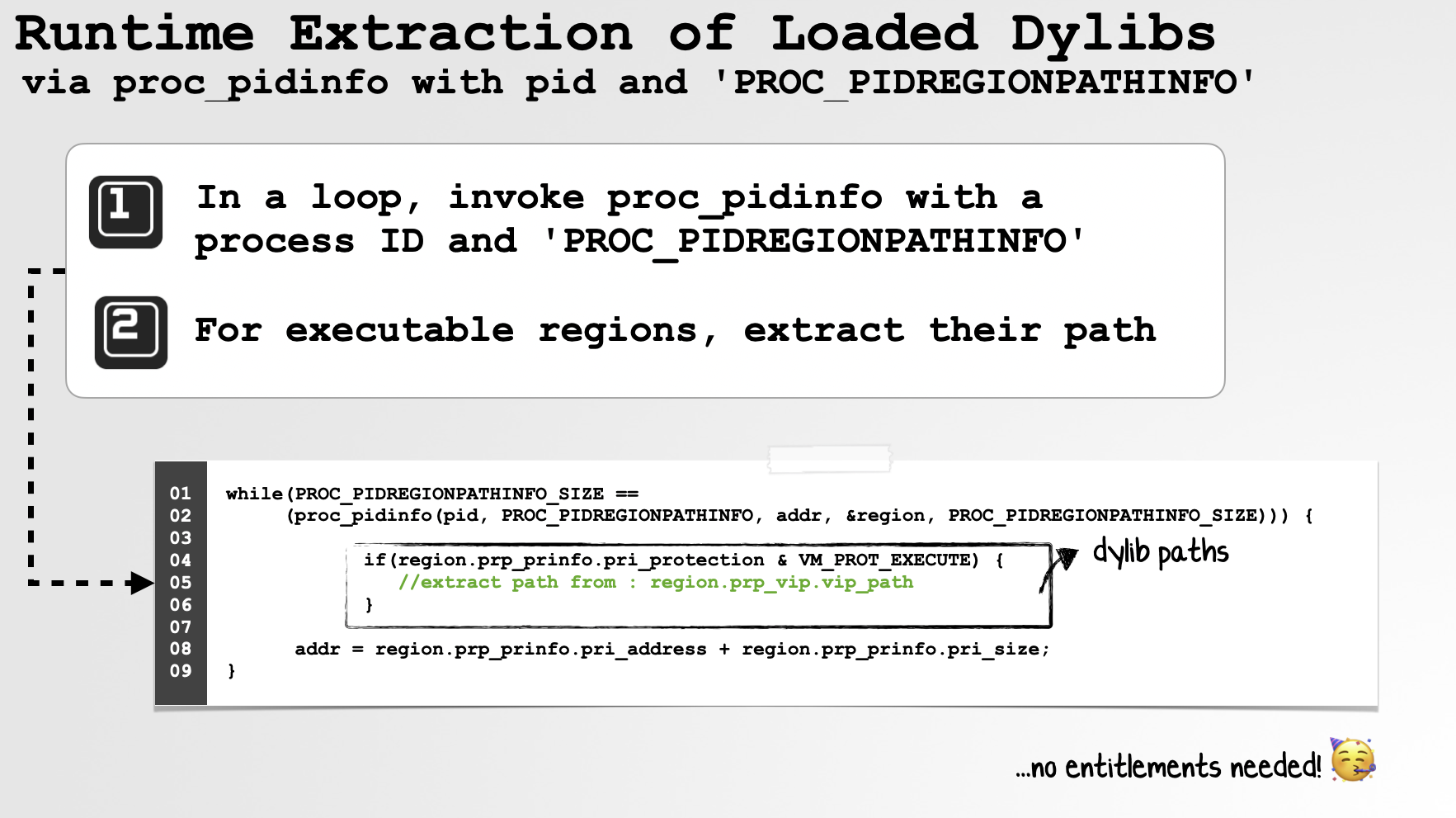
Via this API and the PROC_PIDREGIONPATHINFO option, we can enumerate the mapped regions of another process and, importantly, retrieve paths for file-backed mappings. This gives us a way to identify loaded third-party dylibs without directly reading the target process’s memory. Better yet, for processes we’re permitted to inspect, this doesn’t require any special Apple-only entitlement!
Try it for yourself by compiling the following code (e.g. clang -fobjc-arc -framework Foundation main.m -o enumDylibs) and running it with the PID of the process whose loaded dylibs you’d like to enumerate:
1#import <libproc.h>
2#import <Foundation/Foundation.h>
3#import <mach/mach_time.h>
4
5NSArray* getLibraries(pid_t pid);
6
7int main(int argc, const char * argv[]) {
8 @autoreleasepool {
9
10 if(2 != argc) {
11 return printf("ERROR: Requires PID\n");
12 }
13
14 pid_t pid = atoi(argv[1]);
15 NSLog(@"dylibs for %d: %@", pid, getLibraries(pid));
16 }
17 return EXIT_SUCCESS;
18}
19
20NSArray* getLibraries(pid_t pid) {
21
22 NSMutableSet *dylibs = [NSMutableSet set];
23 struct proc_regionwithpathinfo region;
24 uint64_t addr = 0;
25 int ret;
26
27 while ((ret = proc_pidinfo(pid, PROC_PIDREGIONPATHINFO, addr,
28 ®ion, PROC_PIDREGIONPATHINFO_SIZE))
29 == PROC_PIDREGIONPATHINFO_SIZE) {
30
31 if(region.prp_prinfo.pri_protection & VM_PROT_EXECUTE) {
32
33 if(region.prp_vip.vip_path[0] != 0) {
34
35 NSString *path = [NSString stringWithUTF8String:region.prp_vip.vip_path];
36 if(0 != path.length) {
37 [dylibs addObject:path];
38 }
39 }
40 else {
41
42 //maybe JIT region?
43 printf("found 'VM_PROT_EXECUTE' mapping at 0x%llx, but has no path\n",
44 region.prp_prinfo.pri_address);
45 }
46 }
47
48 addr = region.prp_prinfo.pri_address + region.prp_prinfo.pri_size;
49 }
50
51 return [dylibs allObjects];
52}As you can see in the code above, we invoke proc_pidinfo with the target PID and PROC_PIDREGIONPATHINFO, asking the kernel for information about each mapped region. We then walk those regions, looking specifically for mappings with executable protections. If an executable mapping is backed by a file, proc_pidinfo may also give us its path. Executable mappings without a backing file, on the other hand, could represent things such as JIT-generated code.
Of course, an executable file-backed mapping isn’t necessarily a dylib; it could also be the process’s main executable. But once we have the path, it’s trivial to inspect the backing file and determine exactly what it is. Hooray!
Sticking with our hijacked Photoshop example, we now have the ability to detect dylib hijackers at runtime! And once we have a list of loaded libraries in a remote process, we’re of course free to apply whatever scanning approaches or heuristics we’d like:
% ./enumDylibs $(pgrep Photoshop)

Process:         Adobe Photoshop 2026 [14792]
Path:            /Applications/Adobe Photoshop 2026/Adobe Photoshop 2026.app/Contents/MacOS/Adobe Photoshop 2026
Code Type:       ARM64
Dylibs:
/Applications/Adobe Photoshop 2026/Adobe Photoshop 2026.app/Contents/Frameworks/AID.dylib
...
/Applications/Adobe Photoshop 2026/Adobe Photoshop 2026.app/Contents/MacOS/libtbb.12.6.dylib
/Applications/Adobe Photoshop 2026/Adobe Photoshop 2026.app/Contents/Frameworks/libtbb.12.6.dylib
In the output, note the two instances of libtbb.12.6.dylib. Since we now have their paths, we can examine their code-signing information, which quickly reveals that the first is our hijacker, while the second is legitimately signed by Adobe.
Now, I always strive to acknowledge limitations, as nothing is ever a panacea. First, and arguably somewhat moot in the context of detecting malware, this approach does not provide a nice enumeration of the individual system libraries mapped from the dyld shared cache. So, yah, don’t expect this technique alone to give you a complete list of every platform dylib loaded into the process.
Second, and more problematic, we’re ultimately trusting that the on-disk file found at a returned path still corresponds to the executable pages mapped into the process. That’s not necessarily guaranteed. For example, a file could be mapped and subsequently replaced or removed, meaning that scanning the current file at that path may not tell us what is actually executing in memory. As far as I know, this sort of trickery hasn’t been widely observed in macOS malware in the wild, but if I were a malware author, it’s certainly something I’d consider taking advantage of 😅.
Let’s wrap up this section by discussing load-time notification (and authorization!) of dylibs via Endpoint Security.
Endpoint Security (ES) provides a pair of events relevant to our goals today: ES_EVENT_TYPE_NOTIFY_MMAP and ES_EVENT_TYPE_AUTH_MMAP. In short, these provide a means to either be notified of, or consulted for authorization before, file-backed memory mappings occur. This of course includes the executable mappings created as part of loading a dylib.
Here, let’s focus on the more powerful ES_EVENT_TYPE_AUTH_MMAP event. First, we create a new ES client and subscribe to this event. In our callback, we’ll then begin receiving mmap authorization events, described by an es_event_mmap_t structure:
1typedef struct {
2    int32_t protection;
3    int32_t max_protection;
4    int32_t flags;
5    uint64_t file_pos;
6    es_file_t *_Nonnull source;
7    uint8_t reserved[64];
8} es_event_mmap_t;
Just like with our runtime-enumeration approach, we’re primarily interested in executable mappings backed by a file. As such, our code looks something like this:
1const es_event_mmap_t *mmap = &message->event.mmap;
2
3if(mmap->protection & VM_PROT_EXECUTE) {
4    //extract path from mmap->source->path
5    //inspect/scan the mapped file
6}
And here’s the best part: because this is an AUTH event, macOS waits for our response before allowing the mapping to proceed. This gives our security tool an opportunity to inspect the file and explicitly allow or deny the operation.
So, say we detect that Photoshop is attempting to map our malicious hijacker dylib. We can simply deny the mapping. The executable pages from that dylib will never be mapped into the process, preventing its malicious code from executing in the first place.
In other words, we now have a generic mechanism that can be leveraged not only to detect dylib hijackers, but to prevent them …and potentially other dylib-based malware and exploits as well. 🔥
Of course, nothing is ever a panacea. This approach is particularly well suited to normal, file-backed dylib loads. More exotic techniques, such as manually moving code into anonymous memory or subsequently changing the protections of mapped pages, may require additional visibility. Endpoint Security’s ES_EVENT_TYPE_AUTH_MPROTECT and ES_EVENT_TYPE_NOTIFY_MPROTECT events can help with the latter, but MMAP events alone shouldn’t be viewed as universal coverage for every possible in-memory loading technique.
# ./dylibMonitor $(pgrep Photoshop)

Process:         Adobe Photoshop 2026 [14792]
Path:            /Applications/Adobe Photoshop 2026/Adobe Photoshop 2026.app/Contents/MacOS/Adobe Photoshop 2026
Code Type:       ARM64

New ES event: ES_EVENT_TYPE_AUTH_MMAP (Permission: VM_PROT_EXECUTE)
Mapping Path: /Applications/Adobe Photoshop 2026/Adobe Photoshop 2026.app/Contents/MacOS/libtbb.12.6.dylib

Team ID mismatch, will deny!!
Two practical notes specific to Endpoint Security and ES_EVENT_TYPE_AUTH_MMAP.
First, AUTH events come with a deadline. When macOS delivers an authorization event, it expects a response (via es_respond_auth_result) before the time specified by the message’s deadline field. If you miss this deadline, Endpoint Security may terminate your client process (or restart it, if it’s a system extension). So make sure a response is always delivered before the deadline!
Worth noting, macOS 27 introduces new Endpoint Security APIs that give clients more control over how deadline misses are handled, including the ability to fail open or fail closed rather than simply terminating the ES client.
Second, denying a mapping can cause the target process to fail to start if the dylib is a required dependency. If the library is instead being loaded dynamically at runtime, say via dlopen, the load will fail, and depending on how (un)gracefully the host application handles that failure, it may misbehave or crash.
For blocking malware or dylib hijackers, this is still preferable to allowing the malicious library to load and leaving the application running in a compromised state. But it does mean that a security tool leveraging this approach should deny judiciously, as false positives here don’t merely generate an alert …they may take down the (legitimate) application!
Takeaways
In this blog post, we started by highlighting how dylib-based malware and exploits remain a real and present threat. We also saw why dylibs are attractive to attackers: they provide stealth, while allowing malicious code to execute within the trust and security context of a legitimate host process.
Unfortunately, many of the macOS APIs that security tools rely on provide visibility and attribution largely at the process level. As a result, malicious code executing from within a dylib can often remain largely invisible, or at least indistinguishable from the legitimate process hosting it.
However, as we’ve shown, this blind spot can be mitigated. By statically enumerating a program’s dependencies, inspecting the executable mappings of running processes, and, better yet, monitoring and authorizing executable mappings via Endpoint Security, we can build security tools that are truly “dylib aware.”
And considering attackers’ increasing fondness for dylib-based payloads, I’d argue it’s about time! 🔥
If you’re into macOS security research like this, I’d love to invite you to “Objective by the Sea”, our Apple security conference. The talks have been announced and tickets are now on sale! Best of all, it’s in Hawaii! 🌴
💕 Support