









Background
Recently, I presented “Practical Ransomware Detection on macOS (via Maths, Not AI)” at both MacSysAdmins and Virus Bulletin.
The talk’s abstract describes the presentation well:
Ransomware remains a serious threat to macOS users, especially as Apple devices continue to gain traction in the enterprise. Despite its many variants, most ransomware shares a fundamental behaviour: rapidly transforming user files into encrypted data.
This talk presents a practical, maths-driven approach to generically detecting and stopping ransomware on macOS. While this approach builds on established ideas, it is now far more practical with Apple’s Endpoint Security framework. By leveraging Endpoint Security and entropy-based analysis, we can distinguish benign file activity from encryption and further differentiate encrypted data from compressed data using simple mathematical heuristics. This approach avoids signatures and machine learning, instead relying on observable behaviour and measurable properties of data.
We will walk through the implementation in a free, open-source tool, including real-world testing, and demonstrate the approach against macOS ransomware samples. We will also acknowledge limitations and possible avenues for evasion.
The result is a lightweight, explainable, and practical method for detecting ransomware on macOS using maths, not AI.
The talk revisited my earlier research, “Towards Generic Ransomware Detection,” which led to the original release of RansomWhere?, a free, open-source tool designed to protect macOS users from, well, ransomware!
The central idea remains just as relevant today: by monitoring for the rapid creation or modification of encrypted files by untrusted processes, we can generically detect most—perhaps even all—macOS ransomware:
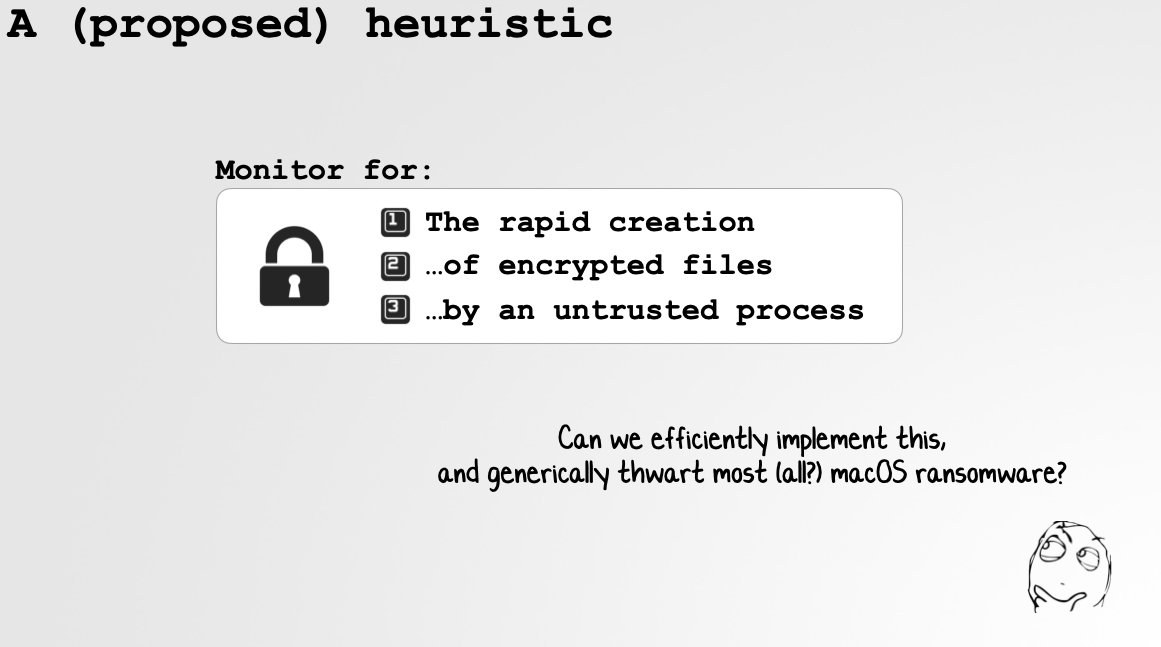
Though it is not exactly the most sophisticated heuristic, it has held up remarkably well over the years! Best of all, it gave me an excuse to incorporate maths into the presentation:
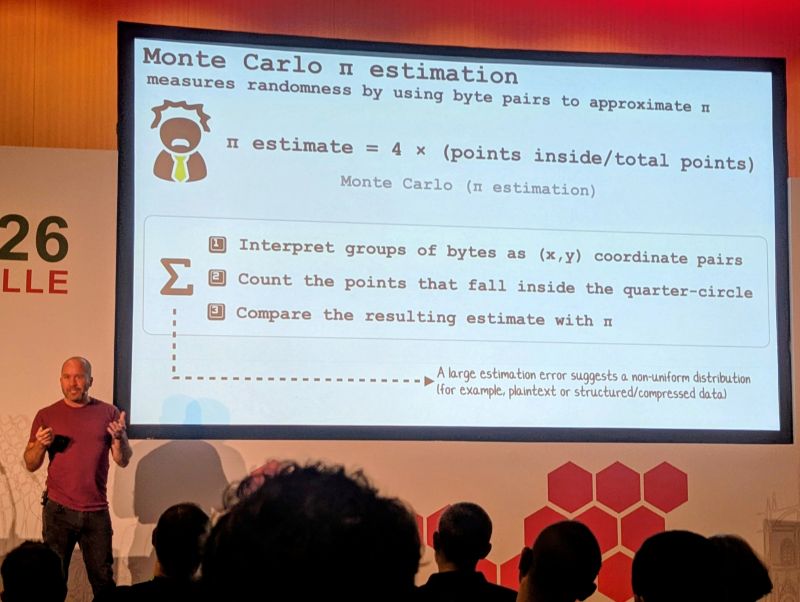
So what was new in my talk? First, thanks to Apple’s Endpoint Security framework, I showed how RansomWhere? can now implement this heuristic far more efficiently and comprehensively. Even cooler, IMHO, was a discussion of Heartbreaker: a previously unknown and undetected ransomware sample targeting macOS that attempts to metamorphically rebuild itself.
In this blog post, we’ll analyze Heartbreaker, recover files encrypted by it, explore its unusual self-rebuilding machinery, and finally pit it against our generic ransomware-detection heuristic.
Analyzing Heartbreaker
Heartbreaker (password: infect3d).
Heartbreaker was originally uploaded to VirusTotal in May 2025. As of this writing, it remains undetected by all of the antivirus engines on the site:
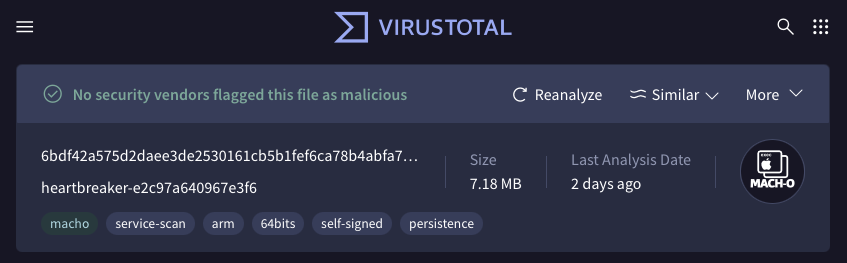
It was discovered there by Megan Carney, who will present her hunting approach in “Lessons from Threat Hunting for Malware Triage” at the upcoming Objective by the Sea v9 conference!
Initial triage reveals an ad hoc-signed ARM64 (Apple silicon) Mach-O binary named heartbreaker:
% file heartbreaker
heartbreaker: Mach-O 64-bit executable arm64

% codesign -dvv heartbreaker
Identifier=heartbreaker-e2c97a640967e3f6
Format=Mach-O thin (arm64)
CodeDirectory v=20400 size=58520 flags=0x20002(adhoc,linker-signed) hashes=1825+0
Signature=adhoc
Next, if we extract strings embedded in the heartbreaker binary, we encounter the following:
% strings heartbreaker

Encrypting file:
HEARTBREAKER WARNING!
Your system has been encrypted!
Please send 0.003 BTC ...

[dependencies]
aes-gcm = "0.10.3"
mimicore = { git = "https://github.com/saaaarwar/mimicore" }

Writing source to: modified_source.rs
Writing Cargo.toml to:
Writing build.rs to:
Running cargo build
Saving new executable

Transforming source code
METAMORPHIC_MARKER_START
METAMORPHIC_MARKER_END
Interesting! From the strings alone, the binary certainly smells like ransomware. The Rust dependencies also reveal its implementation language, while the mimicore dependency and METAMORPHIC_MARKER_* strings immediately piqued my interest.
Of course, one should never base an analysis solely on embedded strings. Instead, think of them as signposts that guide further investigation. With that in mind, let’s move into an isolated virtual machine and observe the binary at runtime.
Running FileMonitor alongside the sample lets us observe its filesystem activity:
# FileMonitor.app/Contents/MacOS/FileMonitor -filter heartbreaker

"event" : "ES_EVENT_TYPE_NOTIFY_OPEN",
"file" : {
    "destination" : "/Users/user/Downloads/file.txt",
    ...

"event" : "ES_EVENT_TYPE_NOTIFY_WRITE",
"file" : {
    "destination" : "/Users/user/Downloads/file.txt",
    ...

"event" : "ES_EVENT_TYPE_NOTIFY_RENAME",
"file" : {
    "source" : "/Users/user/Downloads/file.txt",
    "destination" : "/Users/user/Downloads/file.txt.heartbreaker",
    ...
Specifically, Heartbreaker recursively processes existing files in the user’s Downloads directory. For each file, it truncates and overwrites the original contents before renaming the file with a .heartbreaker extension.
It also writes a ransom note named README.txt to the user’s Desktop and displays a suitably scary warning confirming that the files have been encrypted and demanding payment:
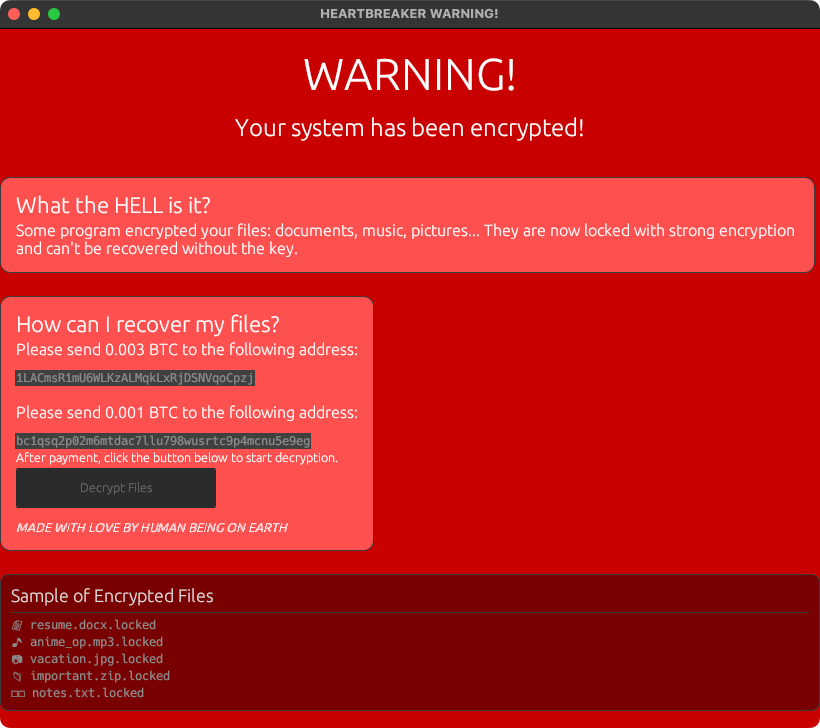
Back to static analysis. In the malware’s source code—wait, how did we obtain that? We’ll answer that shortly—we find its core encryption logic:
 1let key_str =
 2String::from("g_w`:D2Xq6Yxez-5{#3mfd=VcB.Qhsub");
 3
 4let key = aes_gcm::Key::<Aes256Gcm>::from_slice(...);
 5let cipher = Aes256Gcm::new(key);
 6
 7fn encrypt_file(path: &PathBuf, cipher: &Aes256Gcm) -> io::Result<()> {
 8    let mut file = File::open(path)?;
 9    let mut contents = Vec::new();
10    file.read_to_end(&mut contents)?;
11
12    let mut nonce = [0u8; 12];
13    OsRng.fill_bytes(&mut nonce);
14
15    let ciphertext = cipher.encrypt(...)?;
16
17    let mut file =
18        OpenOptions::new().write(true).truncate(true).open(path)?;
19
20    file.write_all(&nonce)?;
21    file.write_all(&ciphertext)?;
22
23    rename(path, new_name)?;
24}
For each file, Heartbreaker:
- Reads the entire file into memory.
- Generates a fresh 12-byte nonce.
- Encrypts the file’s contents using AES-256-GCM and a hard-coded 32-byte key.
- Truncates the original file.
- Writes the nonce followed by the ciphertext and 16-byte GCM authentication tag.
- Renames the file with a
.heartbreakerextension.
In other words, each encrypted file has the following layout:
12-byte nonce || ciphertext || 16-byte GCM authentication tag
There’s nothing wrong with its choice of AES-GCM. The problem is that Heartbreaker uses the same hard-coded key for every file—and presumably every victim. As we’ll show, this makes it possible to create a decryptor and recover the files without paying the ransom!
Persistence
Interestingly, Heartbreaker also attempts to persist. This is somewhat unusual for ransomware, as most ransomware simply encrypts the victim’s files, displays its ransom demand, and calls it a day.
Heartbreaker, however, begins its main ransomware routine with a call to mimicore::add_to_startup():
1fn entry() -> Result<(), eframe::Error> {
2    mimicore::add_to_startup();
3
4    let key_str =
5        String::from("g_w`:D2Xq6Yxez-5{#3mfd=VcB.Qhsub");
6
7    ...
8}
Though the original mimicore source is no longer publicly available (more on this shortly!), strings recovered from the compiled component reveal the persistence mechanism. Specifically, it creates a LaunchAgent at:
~/Library/LaunchAgents/com.network.startup.plist
The embedded property-list template contains the following:
<?xml version="1.0" encoding="UTF-8"?>
<!DOCTYPE plist PUBLIC
  "-//Apple//DTD PLIST 1.0//EN"
  "http://www.apple.com/DTDs/PropertyList-1.0.dtd">

<plist version="1.0">
<dict>
    <key>Label</key>
    <string>com.myapp.startup</string>

    <key>ProgramArguments</key>
    <array>
        <string>PATH_TO_HEARTBREAKER</string>
    </array>

    <key>RunAtLoad</key>
    <true/>
</dict>
</plist>
At runtime, the ProgramArguments is populated with the path of the currently executing Heartbreaker binary. As the Launch Agent specifies RunAtLoad, macOS will attempt to execute that binary when the agent is loaded, such as during a subsequent user login.
And why would ransomware want to run again? Existing .heartbreaker files are skipped, but persistence would give the malware another opportunity to encrypt any new, restored, or previously inaccessible files added to ~/Downloads.
One implementation detail is worth noting: Heartbreaker ignores the return value from mimicore::add_to_startup(). Thus, a failure to create the Launch Agent does not prevent the malware from continuing with file encryption.
Decrypting Heartbreaker
With an understanding of Heartbreaker’s encryption format, we can now write a decryptor.
As we saw in the recovered source, the ransomware uses the following static, hard-coded key:
g_w`:D2Xq6Yxez-5{#3mfd=VcB.Qhsub
Because AES-GCM is a symmetric authenticated-encryption algorithm, and because every encrypted file stores its required nonce, recovery is straightforward. The core logic of our decryptor is as follows:
 1SUFFIX = ".heartbreaker"
 2KEY = b"g_w`:D2Xq6Yxez-5{#3mfd=VcB.Qhsub"
 3
 4def decrypt_one(source: Path, apply: bool, overwrite: bool) -> str:
 5    target = output_path(source)
 6    blob = source.read_bytes()
 7
 8    nonce, ciphertext_and_tag = blob[:12], blob[12:]
 9    plaintext = AESGCM(KEY).decrypt(
10        nonce,
11        ciphertext_and_tag,
12        None
13    )
The GCM authentication tag provides another useful property: if the key is incorrect or the encrypted file has been damaged, authentication fails instead of silently producing corrupted plaintext.
Let’s run our decryptor against the file encrypted earlier, Downloads/file.txt.heartbreaker:
% python3 decrypt_heartbreaker.py file.txt.heartbreaker
DECRYPTING: file.txt.heartbreaker
RECOVERED:  file.txt.heartbreaker -> file.txt (19 bytes)

% cat file.txt
Aloha dear reader!
Neat! No ransom payment required.
Metamorphism?
Up to this point, Heartbreaker is not especially sophisticated—particularly because its victims’ files can be recovered using a key embedded in the malware. Now, however, comes an interesting twist: metamorphism.
Metamorphism: A technique in which malware rewrites its own code so that each new generation looks different while retaining substantially the same behavior.
Recall that the embedded strings included "Saving new executable", "Transforming source code", "METAMORPHIC_MARKER_START", and "METAMORPHIC_MARKER_END".
The relevant logic begins in a function named rewrite:
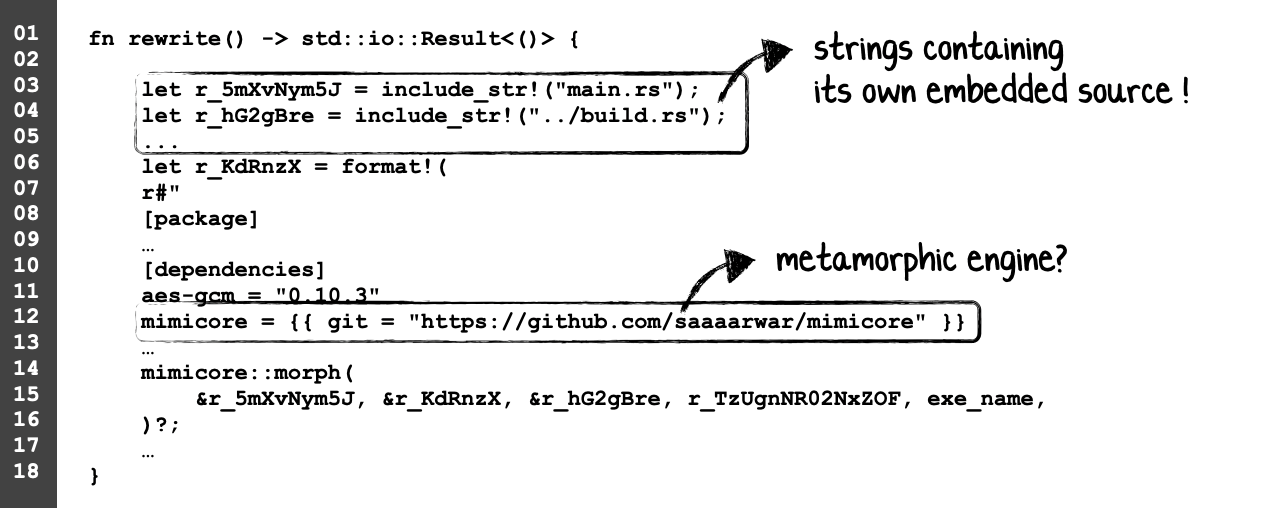
The first surprise is that the malware contains its own source code. Specifically, Rust’s include_str! macro embeds the contents of main.rs and build.rs directly into the compiled Mach-O at build time:
 1fn rewrite() -> std::io::Result<()> {
 2    let source = include_str!("main.rs");
 3    let build_script = include_str!("../build.rs");
 4
 5    ...
 6
 7    mimicore::morph(
 8        &source,
 9        &cargo_toml,
10        &build_script,
11        15,
12        exe_name,
13    )?;
14
15    Ok(())
16}
This explains how we recovered the malware’s original Rust source from the compiled binary: it was not reconstructed through decompilation, but deliberately stored inside the Mach-O as data.
The rewrite function also reconstructs a Cargo.toml containing the dependencies required to rebuild the malware, then passes it—along with the embedded main.rs and build.rs—to mimicore::morph().
Heartbreaker reaches this logic automatically during normal execution. It first attempts persistence, encrypts files, writes its ransom note, and displays the ransom window. When that window closes, control returns to main(), which checks whether Rust is installed and then invokes rewrite(). If there were no eligible files to encrypt, the GUI is skipped and the rebuilding attempt begins immediately.
If Cargo is unavailable, Heartbreaker even attempts to install Rust before continuing. Subtle it is not.
Unfortunately, the referenced mimicore repository is no longer publicly available. However, another repository belonging to the same author, metacore, remains online:
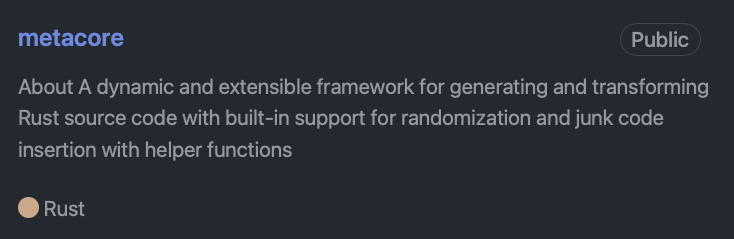
As described by its author, metacore is “a dynamic and extensible framework for generating and transforming Rust source code with built-in support for randomization and junk code insertion with helper functions.”
metacore appears to be a renamed and expanded successor—or at least a very close relative—of mimicore.
Both operate on Rust source enclosed by identical “METAMORPHIC_MARKER_START” and “METAMORPHIC_MARKER_END” delimiters, remove previously generated junk code, randomize identifiers, insert new junk functions, construct a temporary Cargo project, and compile the transformed source using: cargo build –release.
They also expose matching APIs and contain near-identical build and executable-replacement logic. Most tellingly, the ostensibly generic metacore source retains an error message suggesting that the user rerun sudo ./heartbreaker.
Still, because the original mimicore repository is no longer available, the surviving public Git history does not definitively prove a formal rename or direct lineage.
Artifacts recovered from the compiled mimicore component, together with the closely related metacore source, reveal how Heartbreaker’s metamorphic rebuilding was designed to work.
First, as we saw above, include_str! embeds main.rs and build.rs directly in the Mach-O. At runtime, Heartbreaker retrieves these strings, reconstructs its Cargo.toml, and passes all three components to mimicore::morph().
The framework then searches the embedded source for a region enclosed by two special markers:
// METAMORPHIC_MARKER_START
...
// METAMORPHIC_MARKER_END
This region contains the ransomware’s functional code as well as junk code generated during the previous build. Before applying a new transformation, the framework removes the previously generated func_* functions and other transformation artifacts. This prevents successive generations from accumulating an ever-growing amount of dead source code.
Next, the framework randomizes recognized identifiers—variables beginning with r_ in Heartbreaker’s version of mimicore—and generates 15 new junk functions. These functions contain randomized names, variables, constants, strings, and comments, but do not intentionally alter the ransomware’s behavior. The framework then reassembles the modified source, potentially changing the order of its functions in the process.
With the transformation complete, the framework creates a temporary Cargo project containing the modified main.rs, the embedded build.rs, and the reconstructed Cargo.toml. It then invokes:
cargo build --release
If compilation succeeds, the framework renames the currently running executable to a temporary path, copies the newly compiled Mach-O into its original location, restores its executable permissions, and removes the old binary and temporary build directory.
Crucially, the modified source still contains the original include_str! calls. The newly compiled Mach-O therefore embeds its own transformed source and can repeat the process during a subsequent execution:
embedded source₀
       ↓
transform and compile
       ↓
binary₁ embeds source₁
       ↓
transform and compile
       ↓
binary₂ embeds source₂
Each successful rebuild will produce a different binary hash and likely a new Mach-O UUID, along with modified embedded source, identifiers, and build layout. The Rust compiler may optimize away some unused junk functions in a release build; however, because the transformed source is itself embedded in the output, changes to that source are sufficient to alter the resulting binary even when they do not survive as executable machine code.
Heartbreaker’s essential behavior—including file encryption, persistence, ransom demands, and self-rebuilding—remains largely unchanged.
So, while this source-level mutation will change the binary’s hash—and may break simpler signatures—it doesn’t change what the malware actually does. More robust signatures may also continue to work if they target artifacts that remain consistent across builds.
There’s another problem for Heartbreaker: its generated Cargo.toml still points to the now-unavailable mimicore repository. Unless the dependency is already cached, Cargo won’t be able to build the replacement binary. Neat idea, but in its current form the whole process is rather fragile—not to mention incredibly noisy.
RansomWhere? vs. Heartbreaker
Heartbreaker is a useful test of RansomWhere? precisely because the tool’s detection logic contains no Heartbreaker-specific signatures or prior knowledge of the sample. Moreover, Heartbreaker was designed to change its static binary identity through recompilation.
RansomWhere?, however, is behavior-based. It monitors for an untrusted process rapidly creating or modifying files whose contents appear encrypted. Using Endpoint Security’s modified-file close events means the heuristic also covers ransomware such as Heartbreaker that truncates and rewrites existing files in place rather than simply creating new encrypted copies.
So, how does RansomWhere? fare?
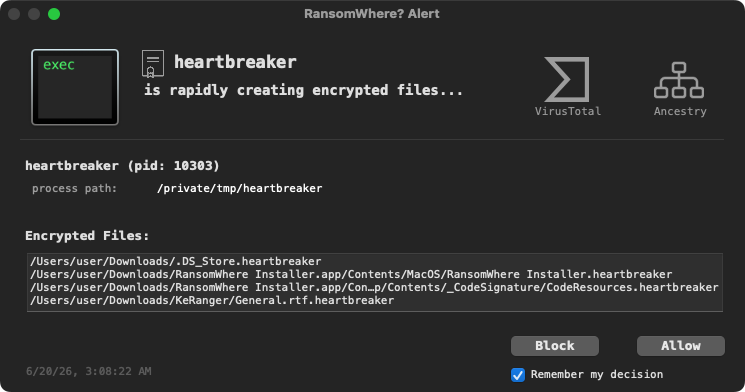
No surprises—at least not to me! RansomWhere? observes Heartbreaker rapidly transforming files into high-entropy, statistically random-looking data, suspends the process, and alerts the user.
Because the detection is based on the malware’s impact rather than its hash, the metamorphic rebuilding is largely irrelevant. Heartbreaker may change how its binary looks, but to ransom a victim it must still encrypt the victim’s files.
Before wrapping up, however, it is important to reiterate that no security tool is a panacea. In my talks—and in the original post—I sought to clearly articulate the limitations of this approach:
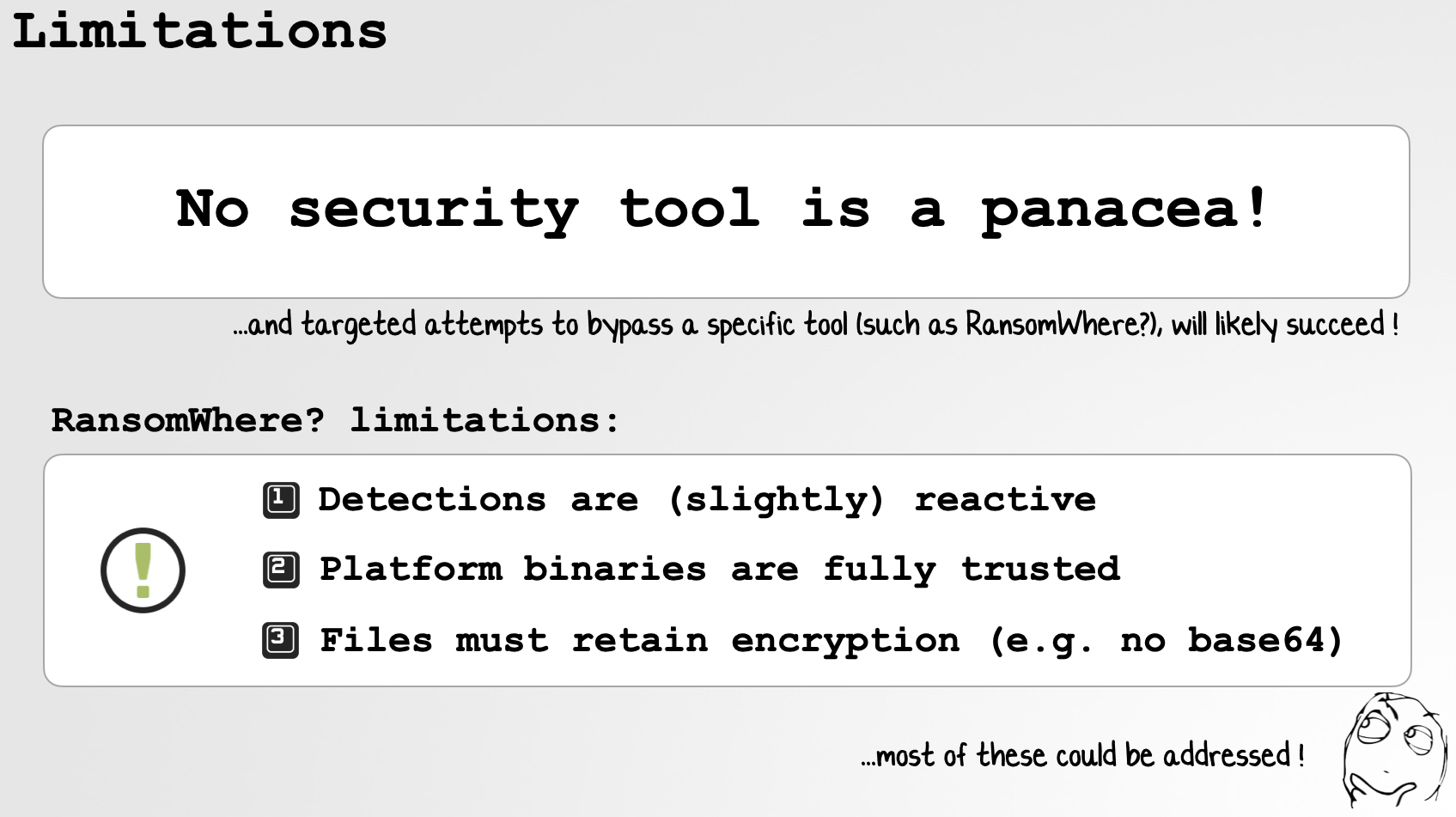
RansomWhere?’s heuristic is inherently reactive: a small number of files may be encrypted before the threshold is reached and the process is suspended. Legitimate software can also create encrypted data, so process trust and user-approved exceptions remain important for controlling false positives.
A determined attacker who specifically targets RansomWhere?’s implementation will also likely find a bypass. For example, ransomware might encrypt files slowly enough to avoid a time-based threshold, transform ciphertext before writing it, operate through a trusted child process, target files too small for reliable statistical classification, or exploit gaps in process attribution.
Such evasions generally impose costs of their own: slower encryption, additional code and complexity, larger output, or new process and filesystem activity. Those side effects may create other opportunities for detection, but they do not eliminate the need for layered defenses, least privilege, and reliable offline backups.
Takeaways
Heartbreaker is unlikely to pose a major real-world threat in its current form. It only targets files under ~/Downloads, lacks awareness of macOS privacy protections, embeds a universal recovery key, depends on a now-unavailable build framework, and performs an exceptionally noisy Rust installation and compilation workflow. Its disabled “Decrypt Files” button does not actually recover anything, either.
As a research specimen, however, it is pretty interesting (wellll, at least to me!).
First, Heartbreaker demonstrates an unusual approach to metamorphism on macOS. Rather than decrypting or rewriting its machine code in memory, it carries its own Rust source, transforms that source, invokes the native build toolchain, and attempts to replace itself with the result. Because each generation embeds its newly transformed source, the design can—in principle—continue across executions.
Second, it illustrates the limitations of relying on hashes and overly brittle static signatures. A successful rebuild changes the bytes of the Mach-O, and therefore its cryptographic hash, without meaningfully changing what the program does. Detection strategies that depend solely on one known sample will always struggle with this kind of mutation.
Third, it also illustrates the limits of metamorphism. Heartbreaker can rename variables, generate junk functions, shuffle source, and produce a different binary, but none of that changes the behavior required to achieve its objective. It must still open user files, overwrite them with encrypted data, rename them, establish persistence, and display its ransom demand. Those actions remain visible to Endpoint Security and other behavioral monitoring systems.
Finally, Heartbreaker validates the central premise behind RansomWhere?: ransomware families, implementations, and binary identities may change, but the fundamental impact behavior remains remarkably stable. By focusing on the rapid creation or modification of encrypted files by an untrusted process, defenders can detect previously unknown ransomware without first requiring a sample-specific signature.
Of course, this doesn’t mean signatures are useless, nor that a single heuristic can stop every attack. As always, the best defense is a layered one.
Still, Heartbreaker can rewrite its source, rebuild its binary, and change its hash—but to ransom a Mac, it ultimately has to encrypt the user’s files. And that’s where we catch it.
If you’re into macOS security research like this, I’d love to invite you to “Objective by the Sea,” our Apple security conference. The talks have been announced and tickets are now on sale! Best of all, it’s in Hawaii! 🌴
💕 Support